Page 1 of 1
[TWEAKED] can we look at my save game it is laggy and nothing is happening
Posted: Sat Dec 07, 2024 6:54 pm
by Nicholasarm87
idk if its because there are orions stuck at the airport at Kastelli FAB or what it is but there isn't any messages or anything and the game barely is passing a second
and I'd like to know if it is doing this on your machines so I know to move on restart or reinstall I have to have some plan my other games are not having any problems
I have lowered my monitor resolution from 5120x1440 to 1920x900 but it didn't have any effect on the performance I recently post
what I have done I have deleted command.ini restarted
ran 4kfix
set nvidia control panel and app settings to always run dedicated graphics card
in-game options /Gamespeed unchecked all the recommendations for better performance
update also I have 1 p-3b orion in air but it says I have several empty slots for it what does that mean empty slot? and should I have seven? any lua command can do to fix this or do I need restart for the lag might because this idk?
Re: can we look at my save game it is laggy and nothing is happening
Posted: Sat Dec 07, 2024 8:19 pm
by Nikel
Try this.
Load the save with the editor, switch to Turkey side and remove the unit north of Dardanelles strait, the Rapier SAM.
Do you notice any difference?
Re: can we look at my save game it is laggy and nothing is happening
Posted: Sat Dec 07, 2024 8:37 pm
by Nicholasarm87
yes I did notice an improvement
Re: can we look at my save game it is laggy and nothing is happening
Posted: Sat Dec 07, 2024 9:13 pm
by Nicholasarm87
Nikel wrote: Sat Dec 07, 2024 8:19 pm
Try this.
Load the save with the editor, switch to Turkey side and remove the unit north of Dardanelles strait, the Rapier SAM.
Do you notice any difference?
only on 1x do I notice a improvement if I go to 2x it plays and freezes for 10 seconds then plays I have deleted all the sams on turkey side even
Re: can we look at my save game it is laggy and nothing is happening
Posted: Sat Dec 07, 2024 9:24 pm
by Nikel
A lot of calculations going on, it seems, that slow down the system.
With so many units is very difficult to track which one(s).
Re: can we look at my save game it is laggy and nothing is happening
Posted: Sun Dec 08, 2024 3:35 am
by Nicholasarm87
Nikel wrote: Sat Dec 07, 2024 9:24 pm
A lot of calculations going on, it seems, that slow down the system.
With so many units is very difficult to track which one(s).
I uninstalled nvidia experience because I seen I was getting a app crash every minute in event viewer by the nvcontainer.exe and it has helped I also just beat my first Live Aegean In Flames with a whopping High score bro so rewarding umm yeah I guess the Nvidia had a overlay that kept crashing I thought it was turned off but when I noticed I couldn't even start the nvidia experience app i knew something was wrong and just uninstalled also I allow norton to allow the app

- Aegean In flames WON 4247 Score.png (2.78 MiB) Viewed 700 times
Re: can we look at my save game it is laggy and nothing is happening
Posted: Sun Dec 08, 2024 9:48 am
by Nikel
Good to know you solved your issues and that they are not related with the game.
I still see spikes in the pulse time that slow down the simulation.
Not sure whether there is a problem or just a lot of calculations are going on.
If it happens again you may enable the option "Log debug information to file"
After restarting the game, the exception log could indicate the cause.
Re: can we look at my save game it is laggy and nothing is happening
Posted: Mon Dec 09, 2024 10:57 pm
by Nicholasarm87
Nikel wrote: Sun Dec 08, 2024 9:48 am
Good to know you solved your issues and that they are not related with the game.
I still see spikes in the pulse time that slow down the simulation.
Not sure whether there is a problem or just a lot of calculations are going on.
If it happens again you may enable the option "Log debug information to file"
After restarting the game, the exception log could indicate the cause.
I made a video just click the
(https://youtu.be/OWQgL-irknw)
it shows everything is normal on my PC nothing in the danger zone and the fps is low and lag is high and shows exception list no errors i did restart it also and same no errors
Re: can we look at my save game it is laggy and nothing is happening
Posted: Mon Dec 09, 2024 11:33 pm
by Nicholasarm87
also here I found a exception log with errors for that save game zip that was lagging we were troubleshooting Update:
09/12/2024 17:59:31 -- B1487 -- Object reference not set to an instance of an object. -- Scen : Aegean In Flames -- DB : 1e0f7bd989b26b132f7ba0ba01b8c12da819ca64 -- Exception: Object reference not set to an instance of an object.
Stack Trace: at Command_Core.Aircraft_Weaponry.JettisonOrdnance(Boolean ExecuteImmediately, Boolean JettisonDropTanks, Boolean JettisonUnguidedAG, Boolean JettisonGuidedAG, Boolean JettisonAAM, Boolean JettisonPod, Boolean JettisonInternalWeapons)
at Command_Core.Aircraft.VwoBMmGvDgLxWiiv8ivl(Object , Boolean ExecuteImmediately, Boolean JettisonDropTanks, Boolean JettisonUnguidedAG, Boolean JettisonGuidedAG, Boolean JettisonAAM, Boolean JettisonPod, Boolean JettisonInternalWeapons)
at Command_Core.Aircraft.set_DamagePts(Boolean ScenEditAction, Weapon theWeapon, Single value)
at Command_Core.Aircraft.wGUneaEwpl6(XmlNode& , ConcurrentDictionary`2& , Scenario& , Boolean , Aircraft )
Call Stack & Error details:
Error at 100350:
09/12/2024 17:59:31 -- B1487 -- Object reference not set to an instance of an object. -- Scen : Aegean In Flames -- DB : 1e0f7bd989b26b132f7ba0ba01b8c12da819ca64 -- Exception: Object reference not set to an instance of an object.
Stack Trace: at Command_Core.Aircraft_Weaponry.JettisonOrdnance(Boolean ExecuteImmediately, Boolean JettisonDropTanks, Boolean JettisonUnguidedAG, Boolean JettisonGuidedAG, Boolean JettisonAAM, Boolean JettisonPod, Boolean JettisonInternalWeapons)
at Command_Core.Aircraft.VwoBMmGvDgLxWiiv8ivl(Object , Boolean ExecuteImmediately, Boolean JettisonDropTanks, Boolean JettisonUnguidedAG, Boolean JettisonGuidedAG, Boolean JettisonAAM, Boolean JettisonPod, Boolean JettisonInternalWeapons)
at Command_Core.Aircraft.set_DamagePts(Boolean ScenEditAction, Weapon theWeapon, Single value)
at Command_Core.Aircraft.wGUneaEwpl6(XmlNode& , ConcurrentDictionary`2& , Scenario& , Boolean , Aircraft )
at Command_Core.Aircraft.FromXML(XmlNode& theNode, ConcurrentDictionary`2& theDictionary, Scenario& theScen, Aircraft existingObject)
at Command_Core.ActiveUnit.FromXML(XmlNode& theNode, ConcurrentDictionary`2& theDictionary, Scenario& theScen, ActiveUnit existingObject)
Call Stack & Error details:
Error at 100350:
Error at 100001:
09/12/2024 18:10:39 -- B1487 -- Object reference not set to an instance of an object. -- Scen : God of War -- DB : -- Exception: Object reference not set to an instance of an object.
Stack Trace: at Command.ContactReport.msUS6vTL2Y2()
Call Stack & Error details:
Error at 200410: Object reference not set to an instance of an object.
09/12/2024 18:11:58 -- B1487 -- Object reference not set to an instance of an object. -- Scen : God of War -- DB : -- Exception: Object reference not set to an instance of an object.
Stack Trace: at Command.ContactReport.msUS6vTL2Y2()
Call Stack & Error details:
Error at 200410: Object reference not set to an instance of an object.
Re: can we look at my save game it is laggy and nothing is happening
Posted: Wed Dec 11, 2024 6:01 am
by Dimitris
Just checked this, from the save file you have provided in the OP.
There are two main reasons that the action is progressing slow:
1) There are generally a lot of things happening concurrently. AIF as a scenario is famous for heavy action (another example that comes to mind is The Korean Missile Crisis; it is not a coincidence that both of these are Command-LIVE scenarios).
2) At the moment of the save, weapons are in the air. The simulation engine takes note of this and, even though you have set time acceleration to double-flame (ie. run as fast and use 5-sec timeslice if possible), it nevertheless scales back the timeslice to 0.1-sec. It does this deliberately, to avoid the common pitfalls of large timeslices during weapon engagements (e.g. weapon "teleports" through target without actually impacting). This inevitably leads to a slower wall-time execution. Once there are not weapons in the air and no units preparing to shoot, you should observe a marked increase in simulation speed (this may take a while in this scenario, with everything happening).
So as far as the slowness is concerned, I would call this WAD (or more accurately, "working as expected"; it was never explicitly designed to run slow...)
Haven't yet been able to reproduce the exceptions you have reported but will keep trying.
Re: can we look at my save game it is laggy and nothing is happening
Posted: Wed Dec 11, 2024 9:01 am
by Dimitris
Also, I just realized that you created a single strike mission called "Attack all land targets mission", assigned several aircraft to it, and added 762(!!!!!!) targets to it from all over Turkey.
PLEASE DON'T DO THAT, EVER. Organize your strike missions properly, with appropriate localized target sets and strike assets assigned to each.
This, more than anything else, is what is causing the greater-than-expected slowdown in this case. Every aircraft assigned to this strike is evaluating each of these 762 targets for possible relevancy to its flight's flight plan. On every sim pulse.
I am amazed your PC is not verbally complaining to you.
Re: [PEBKAC] can we look at my save game it is laggy and nothing is happening
Posted: Wed Dec 11, 2024 9:36 am
by Nikel
Oh, so it was that

I see no freezes after removing that mission.
However there is another one with 592 targets in the Turkey side and there is not much difference if you remove that.
Edit: I see the difference, in the Turkish mission no AC is flying yet, while in the Greek several ACs are already performing the mission.
Re: [PEBKAC] can we look at my save game it is laggy and nothing is happening
Posted: Tue Dec 17, 2024 8:51 pm
by Knightpawn
Similar issue here. I had being playing Live - Aegean in Flames for the first 12 (game) hours, with no issues. Suddenly the game slowed down abruptly. It now needs around ten real life seconds to advance 1 second in X1, which makes the game unplayable.
There is nothing else running on my laptop that would consume resources and justify this behavior.
I am running it on a Surface Book 2 with i7- 8650 Intel CPU, 16MB RAM and NVIDIA GTX 1060
You can download the save file from my one drive here
https://1drv.ms/u/c/6dc2f61afdb60203/Ee ... w?e=YVZ2rC
Re: [PEBKAC] can we look at my save game it is laggy and nothing is happening
Posted: Tue Dec 17, 2024 9:04 pm
by Nikel
There is an active mission in the Turkish side with 648 targets.
Re: [PEBKAC] can we look at my save game it is laggy and nothing is happening
Posted: Tue Dec 17, 2024 9:37 pm
by Knightpawn
Nikel wrote: Tue Dec 17, 2024 9:04 pm
There is an active mission in the Turkish side with 648 targets.
I have been playing the Greek side! So is this by design originating from the scenario designer? Because I did not do it!
Re: [PEBKAC] can we look at my save game it is laggy and nothing is happening
Posted: Tue Dec 17, 2024 9:39 pm
by Nikel
Good question.
Or perhaps the AI generated it?

Re: [PEBKAC] can we look at my save game it is laggy and nothing is happening
Posted: Tue Dec 17, 2024 11:52 pm
by thewood1
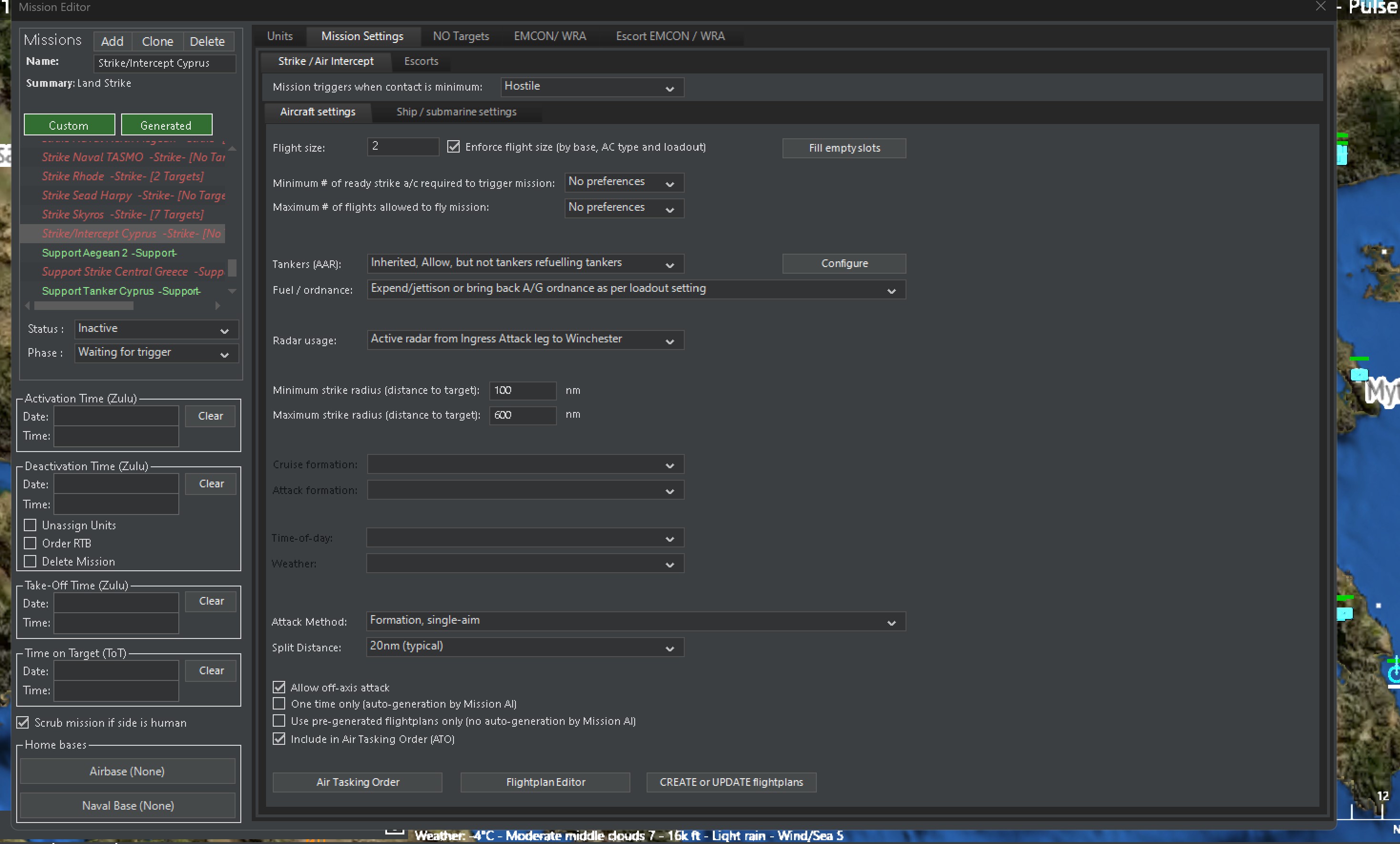
Its the Strike/Intercept Cyprus mission. Its mission parameters are way too broad. I think thats the worst one, but there might be issues with a couple others also.
- Screenshot 2024-12-17 184803.jpg (514.19 KiB) Viewed 474 times
It has a strike radius in settings that are just too broad for an open-ended strike mission. The circle encompasses just too much of the map. People have had off and on issues with performance in the specific scenario. Now I know why.
Re: [PEBKAC] can we look at my save game it is laggy and nothing is happening
Posted: Wed Dec 18, 2024 7:51 am
by Dimitris
Thanks, that's a headache. It is being looked into.
Re: can we look at my save game it is laggy and nothing is happening
Posted: Thu Dec 19, 2024 5:41 am
by Dimitris
We tweaked the related code for one of the forthcoming updates, so that it becomes less sensitive to this issue.
Still a good principle to avoid over-stacking targets on strike missions, nevertheless.