History:
Played DW2 (1.2.2.0) just fine till 15.05.2024. No crashes, no problems, nothing.
After that was too busy with work, income tax approaching etc.
Launched game (from external USB 3 SSD) yesterday to look at something and left to get something to drink.
Coming back I see my PC restart. Waited till it booted and relaunched DW2, initial screen came up, game started loading then PC just went into reboot.
No BSOD, nothing
I installed DW2 on local NVMe M2 and launched the game, initial screen comes up and nothing...no reboot but looking at task manager DW2 not executing.
Tried couple times and gave up. Always crash on launch.
No SessionLog or DW2_Crash Dump in DW2 Data logs, nothing.
Obtained the Report.wer from Windows (attached) and it indicated an unhandled exception (0xe0434352). The error code 0xe0434352 is associated with the .NET Runtime
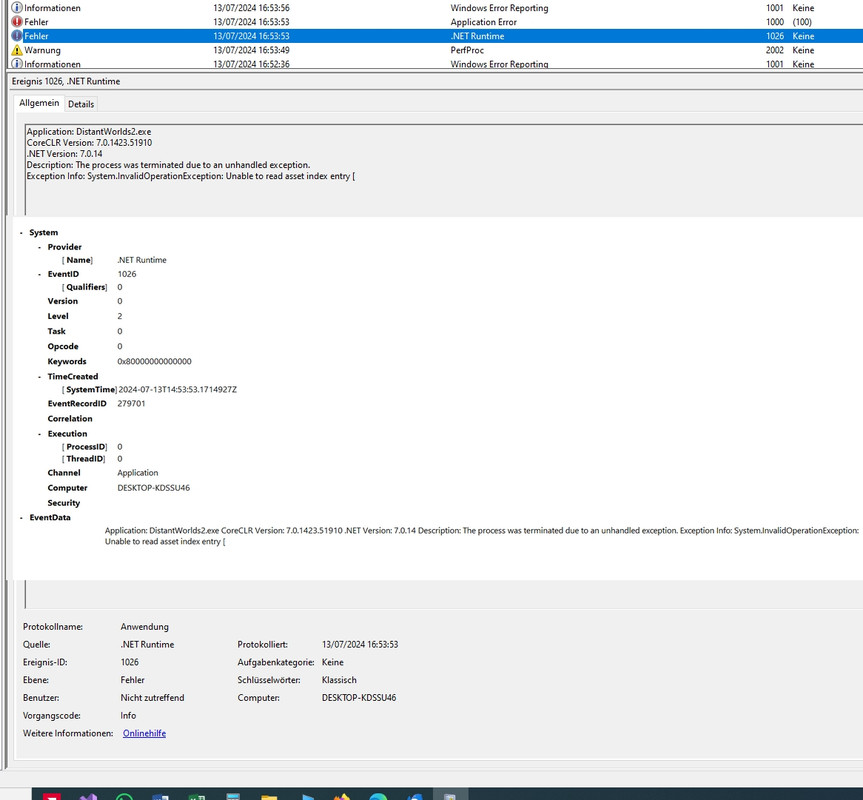
Checked Windows Event Viewer and found same, game crashes on .NET exception error Event 1026 (which is unspecific)...fantastic !!!

It has to be said every other game still launched just fine. World of Tanks, Skyrim Ultramodded, Cyberpunk 2077, Subnautica, Dying Light 2 and few others
I left it at that to recapitulate what I did to the system from May 15th to July 13th and if I installed or changed something which could influence .NET runtime execution.
.NET crash reason and temporary workaround
Due to some changes in my profesional workflow I abandoned a cloud service which was hosting my profesional database, management and accountability software to administer my clientes and their accounts.
I had to install the software on to my local PC and found it did not work because of problems with SQL server versions and language settings.
My Win 10 is german, the profesional software is for local Spain market and needed specific SQL versions to work.
So I had the developer on remote and they did install the corresponding SQL server versions and everthing was fine at first.
However a couple days later I notived that the accountability module would reject to close buisness years accountability stating error: date not matching the date of closure of excercise.
I looked at my local clock and dates matched apparently. So I got back to the software developers and had them on remote again. Long story short.
The problem was caused by spanish software using a different formatting for the date than my OS local clock. My date formatting was 30.06.2024 while the software was looking for 30/06/2024.
The / formatting option is not shown under german Win 10 but after changing Regional option to Spain they could select to show the date as 30/06/2024 instead of 30.06.2024.
After that my management software was working properly and I did not notice any other effects until DW2 got crashing yesterday.
After finding the .NET runtime error and the info:Unable to read asset index entry I suspected the date formatting issue.
I tested the relation between date formatting and DW2 by setting the local date formatting back to 13.07.2024 from 13/07/2024 and the game launched instantly fine and no problems.
Session Log from later the evening attached
I set it back to show as 13/07/2024 and its instacrash.
Some game function calls the date while loading the game and is unable to handle the 13/07/2024 date formatting causing the .NET runtime expception error and crash.
I hope the function could be amended to treat date formatting indiscriminately of seperator so I dont have to reset the OS date formatting every time I want to launch DW2.
This crash may affect people in countrys or regions where date is formatted with / and they will never know why.
Thank you for your attention.