Page 1 of 1
Editor Guide
Posted: Thu Apr 07, 2022 8:18 pm
by benpark
Is there an existing guide to the editor handy?
Re: Editor Guide
Posted: Fri Apr 08, 2022 5:44 pm
by Saint Ruth
Re: Editor Guide
Posted: Sat Apr 09, 2022 1:21 am
by governato
If we have done everything correctly, this should be a "Live" document, that will be periodically updated by the developers.
All users with this link can access and print the latest version of the document, leave comments, but cannot edit the main txt.
Let us know!
Re: Editor Guide
Posted: Sun Apr 10, 2022 12:03 pm
by kevinkins
Thanks for the link.
Re: Editor Guide
Posted: Sun Apr 10, 2022 2:35 pm
by kevinkins
Create Army Units
Not sure how the info in the HQ tab and Army Table tab are linked. How does the software know where to place subordinate units e.g. battalions under specific divisions where they belong? Seems like the Army Table can be filled out in any order. But the software knows under which HQ to place units. If I add an armor battalion to the Army Table it will appear on the map during set-up. But the HQ table never detects the new unit. Oh, is there a way to delete added HQs within the HQ tab? I see how to add them. Looks like control Z only works until the map file is saved. To edit existing maps you need to use a photo editing program. What is the lowest echelon that can be AI controlled. With the tutorial OOB I can only get the entire 14th PzD to move but not the battalions within it.
Thanks,
Kevin
Re: Editor Guide
Posted: Sun Apr 10, 2022 10:11 pm
by bcgames
kevinkins wrote: Sun Apr 10, 2022 2:35 pm
Create Army Units
How does the software know where to place subordinate units e.g. battalions under specific divisions where they belong?
You have to create the units and then assign them to the appropriate HQ. There are two ways to assign units to headquarters. One is using the editor. After the HQ and subordinate units are created, go to the HQs tab and right click on the unit you want to move. Select Cut, Select the HQ unit you want to subordinate them to then select Paste.
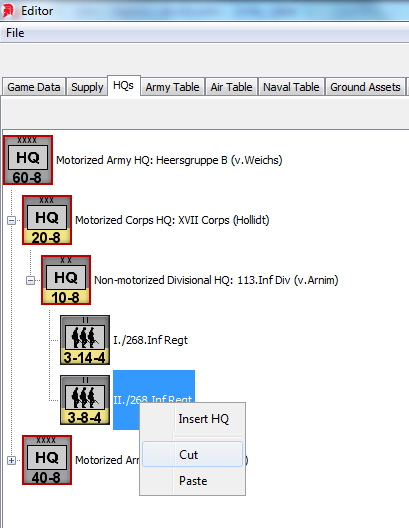
Note: By default all units are subordinated directly to the rootHQ when they are created. In the example above, the rootHQ is Heersgruppe B (v.Weichs)
The other method is to export the Army Table as a CSV file. Open the CSV file with either Excel, Open Office or LibreOffice spreadsheet programs and fill out
column V using the appropriate HQ Name (from column A). The CSV file is the method I use most often when creating scenarios.

kevinkins wrote: Sun Apr 10, 2022 2:35 pm
Seems like the Army Table can be filled out in any order. But the software knows under which HQ to place units.
Yes you can fill it out in any order but you have to assign units to HQs using one of the two methods described above.
kevinkins wrote: Sun Apr 10, 2022 2:35 pm
What is the lowest echelon that can be AI controlled.
If you are talking about during gameplay, the lowest echelon is the organization. An organization is any HQ with subordinate units. Generally speaking we are talking divisions, artillery brigades, Corps troops, etc.
Re: Editor Guide
Posted: Mon Apr 11, 2022 10:49 am
by kevinkins
Thanks for the answers. I can put together the OOB structure OK using the editor and will try the CSV method. In the editor, I have noticed that the name of a Corps sometimes gets assigned to its lone division HQ. Sometimes while working, that division HQ jumps ahead of the Corps HQ in the OOB structure. If reproducible, I will send a small file.
So, if the lowest AI maneuver element is the division in a particular OOB, and if not careful, the entire division could charge a single hex. Any tips on spreading out the attack? Will be experimenting with this using subordinate units within the Division to avoid that.
Was I correct about maps being locked up after being saved?
Re: Editor Guide
Posted: Mon Apr 11, 2022 1:29 pm
by bcgames
kevinkins wrote: Mon Apr 11, 2022 10:49 am
In the editor, I have noticed that the name of a Corps sometimes gets assigned to its lone division HQ. Sometimes while working, that division HQ jumps ahead of the Corps HQ in the OOB structure. If reproducible, I will send a small file.
Create a csv file and check the command structure in column V. Make sure the higher headquarters of the corps is an army or the rootHQ and not a division HQ.
kevinkins wrote: Mon Apr 11, 2022 10:49 am
So, if the lowest AI maneuver element is the division in a particular OOB, and if not careful, the entire division could charge a single hex. Any tips on spreading out the attack? Will be experimenting with this using subordinate units within the Division to avoid that.
Are you talking AI scripting or in-game AI assist?
kevinkins wrote: Mon Apr 11, 2022 10:49 am
Was I correct about maps being locked up after being saved?
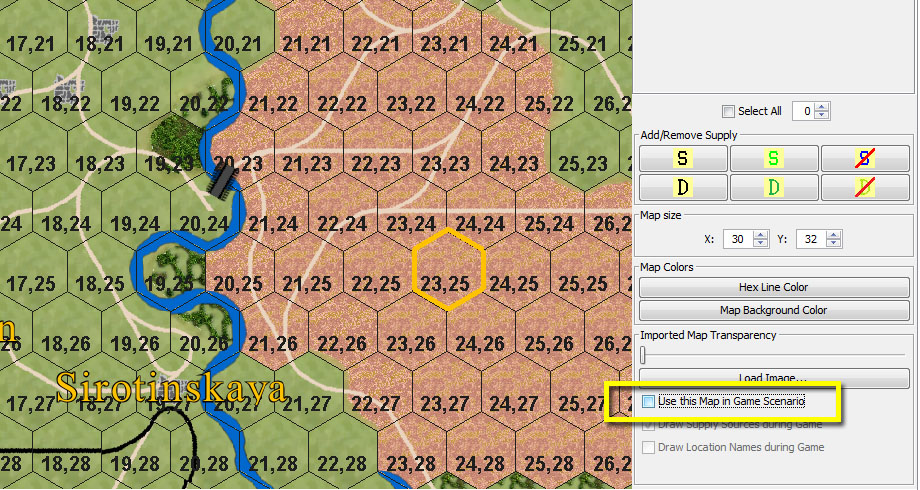
A tile map is mandatory. An image map is optional. You can change anything you please on the tile map and can play with those changes as long as you unselect
Use this Map in Game Scenario. If you still wish to use the image map that came with the game, you will have to make the appropriate changes using a image editing program like PhotoShop or GIMP.
Re: Editor Guide
Posted: Tue Apr 12, 2022 2:36 pm
by kevinkins
Thanks again- getting there. I will start new threads for dedicated topics/questions.
Kevin
Re: Editor Guide
Posted: Sat Apr 16, 2022 8:51 am
by terminator
Is it possible to modify existing scenarios or campaigns ?
Re: Editor Guide
Posted: Sat Apr 16, 2022 7:53 pm
by Saint Ruth
Hi, yes, you can edit existing ones.
You can also load the mega map scenario that has the entire stalingrad map and "cut" out sections to create smaller specific scenarios using portions of the map.
By the way, every time you edit the scenario, the scenario version is updated, so you can always check to see if a scenario has been edited.
Cheers,
Brian
Re: Editor Guide
Posted: Wed Mar 22, 2023 6:24 am
by Casus_Belli
I'm playing the Desert War version of this game, and I want to modify some of the existing scenarios, mostly to give them more turns. How do you open an existing scenario in the editor? I can't find a way to do it.
Thanks in advance for any hints.
Re: Editor Guide
Posted: Mon Mar 27, 2023 5:01 am
by bcgames
Sorry. The Stalingrad and Desert War game engines are related but incompatible with each other.
Re: Editor Guide
Posted: Mon Aug 07, 2023 10:52 am
by scsfan
I'm trying the editor at the moment, the link provided for Editor Guide Google document is unavaliable.
The page showing: Sorry, the file you have requested has been deleted.
Is there any credential needed to reach the document?
thanks
Re: Editor Guide
Posted: Tue Aug 08, 2023 5:04 am
by bcgames
I'm not sure what Google doc you are trying to access so I can't help you there...BUT...if you navigate to C:/Program Files (x86)/Matrix Game/Stalingrad/Manuals you will discover this file:
WEGO.editor.25Feb2022.docx
Re: Editor Guide
Posted: Fri Aug 11, 2023 7:20 am
by scsfan
thanks! Don't konw how could I miss that!

Re: Editor Guide
Posted: Thu Aug 17, 2023 2:29 am
by bcgames
We could make this easier for folks to access ALL game manuals. I think we can do this with some menu modifications. More to follow...
Re: Editor Guide
Posted: Fri Nov 21, 2025 12:21 pm
by StuccoFresco
bcgames wrote: Thu Aug 17, 2023 2:29 am
We could make this easier for folks to access ALL game manuals. I think we can do this with some menu modifications. More to follow...
Hi, is it possible to find the editor manual online somewhere?