

Thanks to your report, I´ve identified the exact issue:
The mod does identify the factions at the start of the game, but if CMO fails to include the standard "side-change" line, which caused the advisor to process both sides simultaneously (picking up enemy radar data and misidentifying friendly losses). E.g. This can happen when loading a save file, or when creating a scenario in the editor and playing it directly
I have fixed this in version v1.2.17, which now mandates a side selection whenever that line is missing: the advisor scans the scenario's sides and prompts you to choose yours. This ensures that the "fog of war" is fully maintained and that enemy kills are correctly distinguished from friendly losses.
You can download v1.2.17 here: https://github.com/Correcaminos737/CMO- ... ag/v1.2.17
Ej: No automatic side selection detected (Quick Play / Saved game).
Sides in the theater of operations:
[1] NATO
[2] Russia
Select your side (1-2)
[TOOL / RELEASE] CMO Tactical Voice Advisor (Real-Time Neural Radio & CIC Watch Officers V1.2.18))
Moderator: MOD_Command
-
Correcaminos

- Posts: 255
- Joined: Sun Jun 01, 2025 7:25 am
Re: [TOOL / RELEASE] CMO Tactical Voice Advisor (Real-Time Neural Radio & CIC Watch Officers V1.2.16)
"Si vis pacem, para bellum."
Re: [TOOL / RELEASE] CMO Tactical Voice Advisor (Real-Time Neural Radio & CIC Watch Officers V1.2.17)
Wow! amazing. Such a fast response and fix! 


Re: [TOOL / RELEASE] CMO Tactical Voice Advisor (Real-Time Neural Radio & CIC Watch Officers V1.2.17)
Hello:
When I run START_VOICE_ENGLISH.bat I get an error message saying
" Cannot proceed without voice models. Aborting.
Press any key to continue . . ."
Not sure what I am doing wrong
Thanks!
CHiP
When I run START_VOICE_ENGLISH.bat I get an error message saying
"
 Cannot proceed without voice models. Aborting.
Press any key to continue . . ."
Not sure what I am doing wrong
Thanks!
CHiP
-
Correcaminos
- Posts: 255
- Joined: Sun Jun 01, 2025 7:25 am
Re: [TOOL / RELEASE] CMO Tactical Voice Advisor (Real-Time Neural Radio & CIC Watch Officers V1.2.17)
coh7res wrote: Fri Nov 06, 2026 10:34 pm Hello:
When I run START_VOICE_ENGLISH.bat I get an error message saying
"
Press any key to continue . . ."
Not sure what I am doing wrong
Thanks!
CHiP
On the first launch, the script automatically downloads the official Piper neural voice models (~180 MB) directly from Hugging Face into a local voices/ subfolder.
That error means the automatic download was blocked by Windows or your network.
1. Run as Administrator / Folder Permissions (Most Common): If you unzipped the mod inside C:\Program Files (x86)\... (like Steam's default folder), Windows UAC blocks Python from creating new folders and saving files.
* Fix: Right-click START_VOICE_ENGLISH.bat and select "Run as administrator".
* Alternatively, move the entire CMO-Tactical-Voice folder outside Program Files (e.g., to C:\CMO-Tactical-Voice or your Desktop).
2. Antivirus / Firewall: Ensure your Windows Defender, Antivirus, or VPN is not blocking Python from reaching https://huggingface.co.
3. Check the error detail: Look at the console window just a couple of lines above the " Cannot proceed without voice models" line. What does the specific error message say? (e.g. Permission denied, SSL: CERTIFICATE_VERIFY_FAILED, or Connection timed out?).
Once permissions are granted, it will download the 5 English watch officer voices with a progress bar, and you'll be ready to go!
"Si vis pacem, para bellum."
Re: [TOOL / RELEASE] CMO Tactical Voice Advisor (Real-Time Neural Radio & CIC Watch Officers V1.2.17)
Added huggingface.co. as an exception on my Antivirus program. Moved mod out of Program files and running as Admin. Progress bar starts showing downloading voices and am now getting error msg that says:
" Error al descargar voces de Hugging Face: <urlopen error [WinError 10054] An existing connection was forcibly closed by the remote host>
Por favor verifica tu conexión a internet o intenta de nuevo.
Cannot proceed without voice models. Aborting."
CHiP
"
Error al descargar voces de Hugging Face: <urlopen error [WinError 10054] An existing connection was forcibly closed by the remote host>Por favor verifica tu conexión a internet o intenta de nuevo.
Cannot proceed without voice models. Aborting."CHiP
-
Correcaminos
- Posts: 255
- Joined: Sun Jun 01, 2025 7:25 am
Re: [TOOL / RELEASE] CMO Tactical Voice Advisor (Real-Time Neural Radio & CIC Watch Officers V1.2.17)
If your network or antivirus is dropping Hugging Face downloads, you can now download the complete English voices package directly from GitHub Releases:coh7res wrote: Sun Nov 08, 2026 1:21 am Added huggingface.co. as an exception on my Antivirus program. Moved mod out of Program files and running as Admin. Progress bar starts showing downloading voices and am now getting error msg that says:
"
Por favor verifica tu conexión a internet o intenta de nuevo.
CHiP
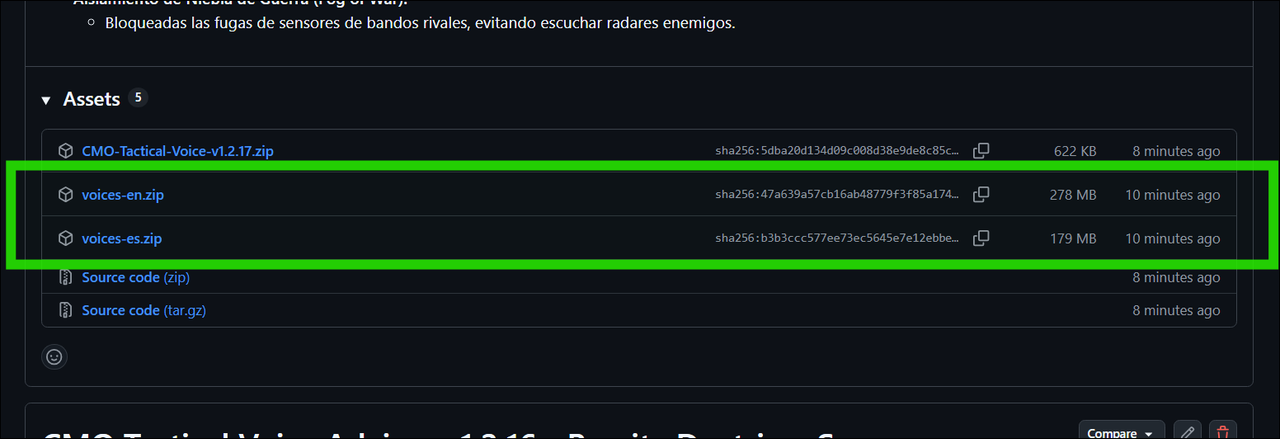
1. Go to the GitHub Release:
https://github.com/Correcaminos737/CMO- ... ag/v1.2.17
2. Download **`voices-en.zip`** (under the Assets section).
3. Extract the contents of `voices-en.zip` directly into your mod folder (so you have `voices/en/...`).
4. Run `START_VOICE_ENGLISH.bat`. It will detect the voices and launch immediately without downloading anything
"Si vis pacem, para bellum."
Re: [TOOL / RELEASE] CMO Tactical Voice Advisor (Real-Time Neural Radio & CIC Watch Officers V1.2.17)
Successfully downloaded and extracted the voices folder into my mod folder (which is in my CMO folder). I run INSTALL_DEPENDENCIES.bat and get the first terminal window, then run START_VOICE_ENGLISH.bat and the second terminal window appears briefly, then vanishes and nothing happens with the game.
Wondering if it's something with my PC setup, so I'm not going to worry about it for the time being, as the game works fine as is. Appreciate your assistance up to this point...
CHiP
Wondering if it's something with my PC setup, so I'm not going to worry about it for the time being, as the game works fine as is. Appreciate your assistance up to this point...
CHiP
-
Rekonize Butty
- Posts: 4
- Joined: Thu Mar 07, 2019 12:36 pm
Re: [TOOL / RELEASE] CMO Tactical Voice Advisor (Real-Time Neural Radio & CIC Watch Officers V1.2.17)
Can someone please explain how to download and set it up as I literally get lost with GitHub and version numbers etc
No worries now have it working great job, is there any way to change the accent?
No worries now have it working great job, is there any way to change the accent?
-
Correcaminos
- Posts: 255
- Joined: Sun Jun 01, 2025 7:25 am
Re: [TOOL / RELEASE] CMO Tactical Voice Advisor (Real-Time Neural Radio & CIC Watch Officers V1.2.17)
Hi CHiP,coh7res wrote: Mon Nov 09, 2026 10:09 pm Successfully downloaded and extracted the voices folder into my mod folder (which is in my CMO folder). I run INSTALL_DEPENDENCIES.bat and get the first terminal window, then run START_VOICE_ENGLISH.bat and the second terminal window appears briefly, then vanishes and nothing happens with the game.
Wondering if it's something with my PC setup, so I'm not going to worry about it for the time being, as the game works fine as is. Appreciate your assistance up to this point...
CHiP
When a terminal window vanishes instantly like that, it's almost always Windows getting confused by the folder name or path.
Here are two quick ways to solve it:
1. Rename the folder: Make sure your mod folder inside CMO has a simple, clean name without spaces or underscores (e.g. rename it simply to VoiceMod or CMO-Voice), then run START_VOICE_ENGLISH.bat again.
2. Run it directly via Command Prompt:
* Open the mod folder.
* Click on the Windows Explorer address bar, type cmd and press Enter.
* In the black window that appears, paste:
python cmo_tactical_voice.py --lang en
Press Enter.
This guarantees the window will stay open and show you exactly what is happening.
Hope this helps you get it running!
Last edited by Correcaminos on Thu Nov 12, 2026 5:26 pm, edited 1 time in total.
"Si vis pacem, para bellum."
-
Correcaminos
- Posts: 255
- Joined: Sun Jun 01, 2025 7:25 am
Re: [TOOL / RELEASE] CMO Tactical Voice Advisor (Real-Time Neural Radio & CIC Watch Officers V1.2.17)
Glad to hear you got it working!Rekonize Butty wrote: Mon Nov 09, 2026 10:34 pm Can someone please explain how to download and set it up as I literally get lost with GitHub and version numbers etc
No worries now have it working great job, is there any way to change the accent?
Regarding British accents: right now, the English watch team defaults to standard US military voices, with only the Sonar officer using a British voice (Alan).
However, I’ve taken note of your suggestion! If everything keeps running smoothly with this current release, a dedicated Royal Navy / British accent preset will be implemented very soon in an upcoming version
"Si vis pacem, para bellum."
Re: [TOOL / RELEASE] CMO Tactical Voice Advisor (Real-Time Neural Radio & CIC Watch Officers V1.2.17)
- You em.jpg (38.42 KiB) Viewed 636 times
Many thanks!
CHiP
-
Rekonize Butty
- Posts: 4
- Joined: Thu Mar 07, 2019 12:36 pm
Re: [TOOL / RELEASE] CMO Tactical Voice Advisor (Real-Time Neural Radio & CIC Watch Officers V1.2.17)
That would be fantastic, especially when doing Falklands War scenarios etc.Correcaminos wrote: Wed Nov 11, 2026 6:57 pmGlad to hear you got it working!Rekonize Butty wrote: Mon Nov 09, 2026 10:34 pm Can someone please explain how to download and set it up as I literally get lost with GitHub and version numbers etc
No worries now have it working great job, is there any way to change the accent?
Regarding British accents: right now, the English watch team defaults to standard US military voices, with only the Sonar officer using a British voice (Alan).
However, I’ve taken note of your suggestion! If everything keeps running smoothly with this current release, a dedicated Royal Navy / British accent preset will be implemented very soon in an upcoming version
-
Knightpawn
- Posts: 804
- Joined: Mon Dec 02, 2024 12:28 pm
Re: [TOOL / RELEASE] CMO Tactical Voice Advisor (Real-Time Neural Radio & CIC Watch Officers V1.2.17)
I have a case now where it detects my side but reports as if it is the adversary
- Screenshot 2026-11-15 235123.png (150.46 KiB) Viewed 399 times
-
Correcaminos
- Posts: 255
- Joined: Sun Jun 01, 2025 7:25 am
Re: [TOOL / RELEASE] CMO Tactical Voice Advisor (Real-Time Neural Radio & CIC Watch Officers V1.2.17)
Hi Knightpawn,
Thank you for reporting this! I found the exact root cause and it has just been fixed in version v1.2.18:
On systems running English / US Windows regional settings, CMO logs dates using "M/d/yyyy" or "h:mm:ss tt" (AM/PM), or single-digit days without leading zeros (e.g. 11/15/2026 2:15:30 PM).
(v1.2.18):
Windows systems running in English format were causing the game to leak enemy detection reports (like RFS KAZAN) through the Fog of War filter.
You can download the updated v1.2.18 release here:
https://github.com/Correcaminos737/CMO- ... ag/v1.2.18
(Simply extract the new zip over your mod folder. Your downloaded voice models are completely preserved and will not need to be re-downloaded).
Thanks again for testing and helping make the advisor rock-solid!
"Si vis pacem, para bellum."