Page 65 of 325
RE: WitPTracker AE Release 1.5.1 Available
Posted: Tue Mar 30, 2010 4:16 pm
by Moss Orleni
ORIGINAL: floydg
Moss -
I'll be adding the restricted HQ stuff in the next release.
I'll also add the notes fields you suggest.
Floyd
Great, instant 1st class service as usual!
With the 'HQ stuff', do you mean we will effectively be able to see which attachments are 'locked'?
Cheers,
Moss
RE: WitPTracker AE Release 1.5.1 Available
Posted: Tue Mar 30, 2010 4:28 pm
by floydg
ORIGINAL: Moss Orleni
ORIGINAL: floydg
Moss -
I'll be adding the restricted HQ stuff in the next release.
I'll also add the notes fields you suggest.
Floyd
Great, instant 1st class service as usual!
With the 'HQ stuff', do you mean we will effectively be able to see which attachments are 'locked'?
Cheers,
Moss
Whatever I can do, I will. [;)]
But yes, that's the aim.
RE: WitPTracker AE Release 1.0
Posted: Tue Mar 30, 2010 9:53 pm
by fflaguna
Bug: The "LCU Production" screen doesn't scale with the window when you resize the window. It stays a fixed size instead of resizing with the window. [:)] Also, the column sliders on the LCU Production appear are much more CPU-intensive than ALL other column sliders in WitPTracker. Try it and see if you notice it, too.
Missing feature: When showing the "History" of an air group on the "Air Groups and Pilots" screen, there is no column for total wing fatigue. It makes it tough to track your rest cycles on Tracker.
Bug: Supply showing as "0" when you click the LCU "History" button on the LCUs screen
RE: WitPTracker AE Release 1.0
Posted: Wed Mar 31, 2010 1:06 am
by n01487477
ORIGINAL: fflaguna
Bug: The "LCU Production" screen doesn't scale with the window when you resize the window. It stays a fixed size instead of resizing with the window. [:)] Also, the column sliders on the LCU Production appear are much more CPU-intensive than ALL other column sliders in WitPTracker. Try it and see if you notice it, too.
Yeah .. err it's meant to be like that, I just haven't got around to rewriting the interface for that or for the Production screen (which might be hard given the economy chart & how much will have to be changed) ...
Missing feature: When showing the "History" of an air group on the "Air Groups and Pilots" screen, there is no column for total wing fatigue. It makes it tough to track your rest cycles on Tracker.
I'll look into it ...
Bug: Supply showing as "0" when you click the LCU "History" button on the LCUs screen
I'm sure that will be a quick fix
Thanks again for the report
RE: WitPTracker AE Release 1.0
Posted: Wed Mar 31, 2010 4:52 am
by castor troy
Hi guys
Even though I´ve used tracker only for my last 200 turns in my PBEM, I really love it. Problem now is that I seem to have issues starting up tracker. I usually fire up the game, run the replay, alt tab out and double click the exe of tracker. Alt tab in into the game again, giving some orders, alt tab out again loading the turn in tracker, alt tab into the game. Couple of minutes later I alt tab out to look at tracker. This worked for months.
Out of a sudden I have problems starting up tracker, it most often takes me halve a dozen attempts or more to see the programme starting. Double click the exe, this "black window" opens but nothing else happens, no matter how long I wait. Don´t know if some auto update of Java or any other update did something to my tracker install, I´m no guru in those things. Can I reinstall tracker without losing the statistics for the 200 turns I´ve loaded in the last months? Guess there´s a "save" for all the data, can I just copy it out, deinstall, install and copy it in again?
thanks for any help
RE: WitPTracker AE Release 1.0
Posted: Wed Mar 31, 2010 8:19 am
by Smeulders
I seem to have a problem with the devices window, when looking through the "Current Device Usage", I get units that have since upgraded to new devices shown (and those units are not shown in the device usage of the upgraded device). Interesting is that this does not happen when I've just loaded a turn, but it does happen when I start tracker, but before loading a new turn.
RE: WitPTracker AE Release 1.0
Posted: Wed Mar 31, 2010 9:55 am
by floydg
ORIGINAL: fflaguna
Bug: The "LCU Production" screen doesn't scale with the window when you resize the window. It stays a fixed size instead of resizing with the window. [:)] Also, the column sliders on the LCU Production appear are much more CPU-intensive than ALL other column sliders in WitPTracker. Try it and see if you notice it, too.
Missing feature: When showing the "History" of an air group on the "Air Groups and Pilots" screen, there is no column for total wing fatigue. It makes it tough to track your rest cycles on Tracker.
Bug: Supply showing as "0" when you click the LCU "History" button on the LCUs screen
Adding the AG fatigue will not be easy, since we do a deferred calculation based on the pilot's fatigue, so it's not stored in the history. I'll need to spend a decent amount of time on that.
The LCU supply was my bad - I moved the data item to a different table and never adjusted the history function.
RE: WitPTracker AE Release 1.0
Posted: Wed Mar 31, 2010 10:07 am
by floydg
ORIGINAL: castor troy
Hi guys
Even though I´ve used tracker only for my last 200 turns in my PBEM, I really love it. Problem now is that I seem to have issues starting up tracker. I usually fire up the game, run the replay, alt tab out and double click the exe of tracker. Alt tab in into the game again, giving some orders, alt tab out again loading the turn in tracker, alt tab into the game. Couple of minutes later I alt tab out to look at tracker. This worked for months.
Out of a sudden I have problems starting up tracker, it most often takes me halve a dozen attempts or more to see the programme starting. Double click the exe, this "black window" opens but nothing else happens, no matter how long I wait. Don´t know if some auto update of Java or any other update did something to my tracker install, I´m no guru in those things. Can I reinstall tracker without losing the statistics for the 200 turns I´ve loaded in the last months? Guess there´s a "save" for all the data, can I just copy it out, deinstall, install and copy it in again?
thanks for any help
It should load. It may take a long time with a large database. One short-term fix would be to start over with a fresh database at some point (this means you'll need to start tracking from an intermediate point, though).
Long-term, I'm looking at a way to improve loading times while still preserving the history. Stay tuned.
RE: WitPTracker AE Release 1.0
Posted: Wed Mar 31, 2010 10:10 am
by floydg
ORIGINAL: Smeulders
I seem to have a problem with the devices window, when looking through the "Current Device Usage", I get units that have since upgraded to new devices shown (and those units are not shown in the device usage of the upgraded device). Interesting is that this does not happen when I've just loaded a turn, but it does happen when I start tracker, but before loading a new turn.
Interesting. The history should be based on the same thing regardless of when you call it up. I'll need to take a look, but I may need more information from you.
RE: WitPTracker AE Release 1.0
Posted: Wed Mar 31, 2010 8:17 pm
by Smeulders
I'm running 1.5.1, all filters are used in the devices screen ("allied", "squads" and "hide 99/99") and I got this after loading the new turn.
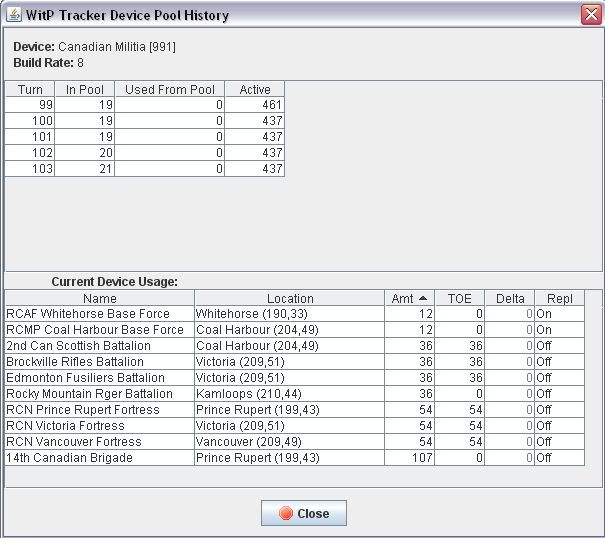
But after having tracker closed down and restarted the following comes up
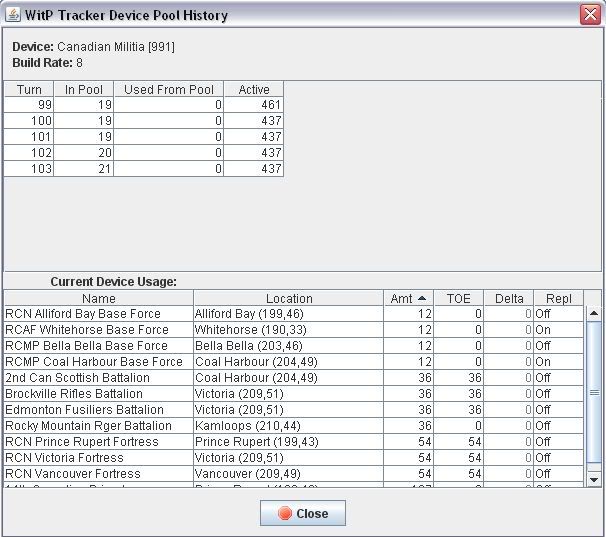
Which appears to be the situation when I started with a fresh database, the first screen is correct. Feel free to ask whatever you need to know about the bug.
RE: WitPTracker AE Release 1.0
Posted: Wed Mar 31, 2010 9:30 pm
by Zemke
Is this written in C++ Visual or Java, and I know nothing about programing, just asking?
RE: WitPTracker AE Release 1.0
Posted: Wed Mar 31, 2010 9:35 pm
by Nomad
Hi Floyd and Damian. I just ran my 1 March 1942 Allied turn and tracker refused to accept the sigint file for 28 Feb 1942. When I tried to load it manually I got an error that said "Turn for that date was not loaded yet", but 28 Feb 1942 is loaded. I looked on the turn loaded list and I see all of the last 5 turns or so. Not sure what is happening.
RE: WitPTracker AE Release 1.0
Posted: Wed Mar 31, 2010 9:48 pm
by floydg
ORIGINAL: Zemke_4
Is this written in C++ Visual or Java, and I know nothing about programing, just asking?
It's all in Java, with an SQL database.
RE: WitPTracker AE Release 1.0
Posted: Wed Mar 31, 2010 9:50 pm
by floydg
ORIGINAL: Nomad
Hi Floyd and Damian. I just ran my 1 March 1942 Allied turn and tracker refused to accept the sigint file for 28 Feb 1942. When I tried to load it manually I got an error that said "Turn for that date was not loaded yet", but 28 Feb 1942 is loaded. I looked on the turn loaded list and I see all of the last 5 turns or so. Not sure what is happening.
Did you upgrade to 1.5.1? I thought I fixed that problem...
RE: WitPTracker AE Release 1.0
Posted: Wed Mar 31, 2010 10:56 pm
by Nomad
ORIGINAL: floydg
ORIGINAL: Nomad
Hi Floyd and Damian. I just ran my 1 March 1942 Allied turn and tracker refused to accept the sigint file for 28 Feb 1942. When I tried to load it manually I got an error that said "Turn for that date was not loaded yet", but 28 Feb 1942 is loaded. I looked on the turn loaded list and I see all of the last 5 turns or so. Not sure what is happening.
Did you upgrade to 1.5.1? I thought I fixed that problem...
oops. Missed this one, sorry. [8|]

RE: WitPTracker AE Release 1.0
Posted: Thu Apr 01, 2010 2:35 am
by n01487477
ORIGINAL: floydg
ORIGINAL: castor troy
Hi guys
Even though I´ve used tracker only for my last 200 turns in my PBEM, I really love it. Problem now is that I seem to have issues starting up tracker. I usually fire up the game, run the replay, alt tab out and double click the exe of tracker. Alt tab in into the game again, giving some orders, alt tab out again loading the turn in tracker, alt tab into the game. Couple of minutes later I alt tab out to look at tracker. This worked for months.
Out of a sudden I have problems starting up tracker, it most often takes me halve a dozen attempts or more to see the programme starting. Double click the exe, this "black window" opens but nothing else happens, no matter how long I wait. Don´t know if some auto update of Java or any other update did something to my tracker install, I´m no guru in those things. Can I reinstall tracker without losing the statistics for the 200 turns I´ve loaded in the last months? Guess there´s a "save" for all the data, can I just copy it out, deinstall, install and copy it in again?
thanks for any help
It should load. It may take a long time with a large database. One short-term fix would be to start over with a fresh database at some point (this means you'll need to start tracking from an intermediate point, though).
Long-term, I'm looking at a way to improve loading times while still preserving the history. Stay tuned.
I also note that some of this is my problem, the way I get/ iterate for information for some of the normal histories on the production screen need to be streamlined or rethought (maybe to just show the last 30 turns with option to look at it all) for larger DB's ...
I'll get back to it when I have some time in a few weeks ...
RE: WitPTracker AE Release 1.0
Posted: Thu Apr 01, 2010 7:29 pm
by CapAndGown
I cannot find the charts for HI, Fuel, Oil, Resources, etc. I have the 1.5.1 version of tracker.
This may possibly be caused by the fact that the bottom of certain tracker screens does not show up in several of the screens. Instead, the pixels at the bottom are often cut off.
Example:

RE: WitPTracker AE Release 1.0
Posted: Thu Apr 01, 2010 8:37 pm
by Jones944
Proper screen resizing would be a very welcome addition to Tracker, I agree.
RE: WitPTracker AE Release 1.0
Posted: Thu Apr 01, 2010 9:00 pm
by CapAndGown
OK, I finally found the chart. I had not seen the button before because I resize the window to better fit my screen and the bottom of the industry/global screen usually doesn't show. Even now I can just barely see the top of the button because the rest of the tracker screen is hidden behind my windows bar at the bottom of the screen.
Proper resizing of tracker screens would be nice.
RE: WitPTracker AE Release 1.0
Posted: Thu Apr 01, 2010 9:11 pm
by n01487477
ORIGINAL: cap_and_gown
OK, I finally found the chart. I had not seen the button before because I resize the window to better fit my screen and the bottom of the industry/global screen usually doesn't show. Even now I can just barely see the top of the button because the rest of the tracker screen is hidden behind my windows bar at the bottom of the screen.
Proper resizing of tracker screens would be nice.
What screen resolution are you running ?