Page 2 of 3
RE: Editor Functions
Posted: Thu Dec 30, 2010 7:11 am
by Helpless
Right now map should be centered automatically over the highest level HQ on map.
Edit: said above is true when you hit end the turn. In editor is should go to the calculated center of the front line.
RE: Editor Functions
Posted: Thu Dec 30, 2010 7:12 am
by Helpless
I have suggested that the map only be allowed to scroll around the playable area of the map but it is low priority and difficult to implement.
It was like that, but your small VL scenario screwed all the stuff

RE: Editor Functions
Posted: Thu Dec 30, 2010 7:27 am
by bcgames
ORIGINAL: Helpless
Right now map should be centered automatically over the highest level HQ on map.
Edit: said above is true when you hid end the turn. In editor is should go to the calculated center of the front line.
I'm on it!
RE: Editor Functions
Posted: Fri Dec 31, 2010 4:54 pm
by bcgames
Do you have to maintain the command hierarchy...even in a small scenario? IOW, do I have to have a chain of command all the way up to OKH and STAVKA? If so, do these higher HQs have to be in the playable area of the scenario?
RE: Editor Functions
Posted: Fri Dec 31, 2010 7:49 pm
by Great_Ajax
Yes, you need to have them in the hierachy and on the map for best results.
Trey
ORIGINAL: bcgames
Do you have to maintain the command hierarchy...even in a small scenario? IOW, do I have to have a chain of command all the way up to OKH and STAVKA? If so, do these higher HQs have to be in the playable area of the scenario?
RE: Editor Functions
Posted: Sun Jan 02, 2011 1:20 am
by bcgames
ORIGINAL: el hefe
Yes, you need to have them in the hierachy and on the map for best results.
Trey
ORIGINAL: bcgames
Do you have to maintain the command hierarchy...even in a small scenario? IOW, do I have to have a chain of command all the way up to OKH and STAVKA? If so, do these higher HQs have to be in the playable area of the scenario?
Thx Trey.
RE: Editor Functions
Posted: Sun Jan 02, 2011 1:22 am
by bcgames
Double posted.
RE: Editor Functions
Posted: Sun Jan 02, 2011 4:50 am
by bcgames
Column AV of the _units.csv is labeled "hidden". 0=false, 1=true; right? How do I access this unit attribute via The Editor?
RE: Editor Functions
Posted: Sun Jan 02, 2011 12:23 pm
by Great_Ajax
Personally, I don't fool with editing the CSV files. I'm not sure what that column does. Pave lwould have to answer that.
Trey
ORIGINAL: bcgames
Column AV of the _units.csv is labeled "hidden". 0=false, 1=true; right? How do I access this unit attribute via The Editor?
RE: Editor Functions
Posted: Sun Jan 02, 2011 2:02 pm
by joey
Anyone know what the following do in the editor?
build cost
build limit
and expansion rate
thanks, j
RE: Editor Functions
Posted: Mon Jan 03, 2011 2:33 am
by bcgames
ORIGINAL: el hefe
Personally, I don't fool with editing the CSV files. I'm not sure what that column does. Pavel would have to answer that.
I have been messing with both--the editor and the CSV files. I've always gravitated towards editing CSV files but I'm not sure that this is a wise move in the case of WitE. On the other hand, I've learned that inserting a unit via the editor Units tab will screw up the Higher Headquarters assignments for every unit that follows the insertion. If that's 200+ units--then that's alot of work to fix that one additional unit. That's when the CSV edit can save some time...though it is still a pain.
I think there is a correct sequence for using both and leveraging their unique strengths; but I'm just too inexperienced with WitE scenario design to know where those points are with any precision...so far.
RE: Editor Functions
Posted: Mon Jan 03, 2011 2:34 am
by bcgames
ORIGINAL: joey
Anyone know what the following do in the editor?
build cost
build limit
and expansion rate
thanks, j
bump
RE: Editor Functions
Posted: Mon Jan 03, 2011 2:41 am
by bcgames
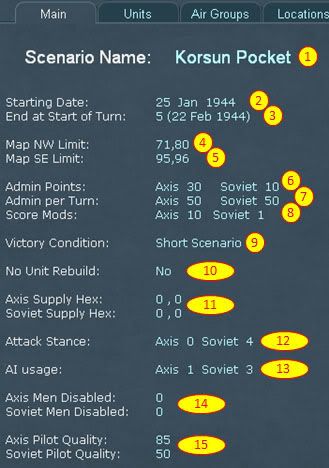
On item 11 above, all the scenarios I've looked at list the Axis and Soviet Supply Hex as 0,0. Is there any reason to change these numbers?
On items 12 & 13, what do the settings mean? Under what conditions do you change the Attack Stance and AI Usage numbers?
On item 14, are there any rules-of-thumb we can use for putting numbers to Men Disabled?
RE: Editor Functions
Posted: Mon Jan 03, 2011 11:44 am
by Great_Ajax
There have been cases where it is helpful to add an additional supply source somewhere besides the normal east and west map edges.
Attack Stance and AI usage I never use as it may be another one of those developer tools.
For 14, I would look at your starting OOB manpower numbers and use something relative here. For example, if the Germans have 1.6M men in the field, I would use maybe 200k in the disabled as this number will provide some return to duty replacements.
Trey
ORIGINAL: bcgames
On item 11 above, all the scenarios I've looked at list the Axis and Soviet Supply Hex as 0,0. Is there any reason to change these numbers?
On items 12 & 13, what do the settings mean? Under what conditions do you change the Attack Stance and AI Usage numbers?
On item 14, are there any rules-of-thumb we can use for putting numbers to Men Disabled?
RE: Editor Functions
Posted: Mon Jan 03, 2011 9:10 pm
by bcgames
Thanks Trey. That's good info.
And from another post...
ORIGINAL: Joel Billings
Attack stances: 4- All out attack, 3 - Sustained Attack, 2 - Normal attack, 1 - Cautious Attack, 0 - Defend
AI usage: 2- Use Defend AI Only, 1 = Use Attack AI Only, 0 - Use Campaign AI. In scenarios where a side is only going to attack or defend, setting the AI usage will speed up the AI and will lead to slightly improved AI. If the AI usage is set to campaign, the attack stance will be ignored.
RE: Editor Functions
Posted: Thu Jan 27, 2011 6:47 pm
by bevans
I believe that I know the answer to joey's question:
build cost: basic resource level required for building that element
Build limit: max number of elements (per turn) that a factory will produce of that element (AFV or aircraft)
expansion rate: many (maybe all, don't know) factories grew over time, expansion rate determines how fast that happens
Build cost is more important than one might think as the 'total industrial capacity' is divided between factories producing elements and all the rest of military needs. Convert all your factories to Tigers and you'll end up with no rifle squads, ammo or some other basic requirement.
RE: Editor Functions
Posted: Sun Apr 03, 2011 10:54 pm
by bcgames
Q. Will the editor accept dates before June 1941? If so, how far back?
Q. Will the editor accept dates after October 1945? If so, how far forward?
RE: Editor Functions
Posted: Sun Apr 03, 2011 11:42 pm
by TAIL_GUNNER
Nice thread....I'll throw out some questions too:
When a unit is Withdrawn, do the ground elements of said unit go to the pools?
Is there a way to make a certain unit withdraw on a certain date (keeping its ground elements), but come back into the theater at a later date (with a different TOE even)?
I see a lot of reinforcements with the delay of '250' and '999'.....what do these special numbers mean?
RE: Editor Functions
Posted: Mon Apr 04, 2011 10:58 am
by Great_Ajax
Editor will not accept any of these dates.
Trey
ORIGINAL: bcgames
Q. Will the editor accept dates before June 1941? If so, how far back?
Q. Will the editor accept dates after October 1945? If so, how far forward?
RE: Editor Functions
Posted: Mon Apr 04, 2011 11:00 am
by Great_Ajax
When withdrawn, a unit's ground elements will not go to the pool. In fact, if the unit has less than a certain % of TO&E, it will say on the edge of the map and draw replacements until it is back up to x TO&E.
Delays of 150 and 999 just mean that they are prevented from showing up in the scenario. Its an easy way to drop a unit out of a scenario without deleting it.
Trey
ORIGINAL: TAIL_GUNNER
Nice thread....I'll throw out some questions too:
When a unit is Withdrawn, do the ground elements of said unit go to the pools?
Is there a way to make a certain unit withdraw on a certain date (keeping its ground elements), but come back into the theater at a later date (with a different TOE even)?
I see a lot of reinforcements with the delay of '250' and '999'.....what do these special numbers mean?