Page 2 of 3
Re: FAQ: Slow Performance / Integrated and Dedicated GPUs
Posted: Fri Mar 11, 2022 6:36 pm
by MikeToth
Im experiencing same black screen after the latest patch I grabbed off of Steam.... 1.0.1.6 version
tried all the suggestions... nada.... wont keep my High Performance option set either...
I can hear the music etc just blackness .......... I do have an integrated graphics card and an NVidia RTX dedicated on AMD Ryzen 9 laptop
Re: FAQ: Slow Performance / Integrated and Dedicated GPUs
Posted: Fri Mar 11, 2022 7:12 pm
by bell117
Generally slow performance late game, don't have integrated graphics in my CPU and double checked it's using my GPU and went through to display to set it to high priority.
Patch fixed the hard freezing and crashing but still lots of stutters and low FPS despite my PC being... well I won't call it new but it isn't exactly chugging especially for a small-mid size galaxy like what I've been playing on.
Re: FAQ: Slow Performance / Integrated and Dedicated GPUs
Posted: Fri Mar 11, 2022 7:13 pm
by Erik Rutins
xarvioto wrote: Fri Mar 11, 2022 5:55 pm
Erik Rutins wrote: Fri Mar 11, 2022 3:14 pm
Thank you. It certainly looks like this is due to the integrated/dedicated GPU issue. The update we are releasing soon today should help with that. Please check back and let us know how things work after that update releases.
Update: 1016 patch came out via Steam. Result is the same as during manual patching to 1016. Black screen remained. But now i cannot make the game run on Integrated card (as on 1014), because the Game is still changing Windows graphics setting to "use high performance Nvidia card", every time the Game starts. After steam pathch release, i cannot go back to 1014 (and i dont want to)
there must me something else to be done in order to allow the Game running
When you see the black screen, please hit Alt+Enter to see if that switched you into Windowed mode and allows the game to proceed.
Re: FAQ: Slow Performance / Integrated and Dedicated GPUs
Posted: Fri Mar 11, 2022 7:14 pm
by Erik Rutins
MikeToth wrote: Fri Mar 11, 2022 6:36 pm
Im experiencing same black screen after the latest patch I grabbed off of Steam.... 1.0.1.6 version
tried all the suggestions... nada.... wont keep my High Performance option set either...
I can hear the music etc just blackness .......... I do have an integrated graphics card and an NVidia RTX dedicated on AMD Ryzen 9 laptop
Thank you for the DxDiag. When you see the black screen, if you hit Alt+Enter it should switch you to Windowed mode and hopefully allow the game to continue.
Re: FAQ: Slow Performance / Integrated and Dedicated GPUs
Posted: Fri Mar 11, 2022 7:17 pm
by Erik Rutins
bell117 wrote: Fri Mar 11, 2022 7:12 pm
Generally slow performance late game, don't have integrated graphics in my CPU and double checked it's using my GPU and went through to display to set it to high priority.
Patch fixed the hard freezing and crashing but still lots of stutters and low FPS despite my PC being... well I won't call it new but it isn't exactly chugging especially for a small-mid size galaxy like what I've been playing on.
I do not see an obvious issue based on your DxDiag. If you open the task manager (Ctrl+Alt+Del) while playing the game and watch the CPU and GPU and Memory usage during the stutters, what do you see?
Re: FAQ: Slow Performance / Integrated and Dedicated GPUs
Posted: Fri Mar 11, 2022 8:16 pm
by bell117
Erik Rutins wrote: Fri Mar 11, 2022 7:17 pm
bell117 wrote: Fri Mar 11, 2022 7:12 pm
Generally slow performance late game, don't have integrated graphics in my CPU and double checked it's using my GPU and went through to display to set it to high priority.
Patch fixed the hard freezing and crashing but still lots of stutters and low FPS despite my PC being... well I won't call it new but it isn't exactly chugging especially for a small-mid size galaxy like what I've been playing on.
I do not see an obvious issue based on your DxDiag. If you open the task manager (Ctrl+Alt+Del) while playing the game and watch the CPU and GPU and Memory usage during the stutters, what do you see?
CPU hovers almost exact at 80% usage, GPU never goes above 40%, stays down by 25-30% most of the time.
Edit: CPU actually stays between 55-70% most of the time, the 80% was due to have the browser open. Still no change in performance though.
Re: FAQ: Slow Performance / Integrated and Dedicated GPUs
Posted: Fri Mar 11, 2022 9:42 pm
by MikeToth
Alt-Enter worked Eric. Seems to be running smoother now . Looking forward to the next patch that I'm sure will make things even better
Re: FAQ: Slow Performance / Integrated and Dedicated GPUs
Posted: Sat Mar 12, 2022 2:53 am
by xarvioto
Erik Rutins wrote: Fri Mar 11, 2022 7:13 pm
xarvioto wrote: Fri Mar 11, 2022 5:55 pm
Erik Rutins wrote: Fri Mar 11, 2022 3:14 pm
Thank you. It certainly looks like this is due to the integrated/dedicated GPU issue. The update we are releasing soon today should help with that. Please check back and let us know how things work after that update releases.
Update: 1016 patch came out via Steam. Result is the same as during manual patching to 1016. Black screen remained. But now i cannot make the game run on Integrated card (as on 1014), because the Game is still changing Windows graphics setting to "use high performance Nvidia card", every time the Game starts. After steam pathch release, i cannot go back to 1014 (and i dont want to)
there must me something else to be done in order to allow the Game running
When you see the black screen, please hit Alt+Enter to see if that switched you into Windowed mode and allows the game to proceed.
Alt-Tab didnt work now as it didnt work before.
High performance card is obviosly working at the moment. The description is about the same. CPU is loaded like 40-50%, High performance GPU is loaded 30-40%.
Talking about Window mode: back on 1014 i exprerimented with it (started the game using intergrated card, i set window mode in Game's options, exited the game, forced to use dedicated card vie either Windows graphic or Nvidia panel, started the game) -> it did not help. I had the same black screen, but in window.
Re: FAQ: Slow Performance / Integrated and Dedicated GPUs
Posted: Sat Mar 12, 2022 2:58 am
by xarvioto
xarvioto wrote: Sat Mar 12, 2022 2:53 am
Erik Rutins wrote: Fri Mar 11, 2022 7:13 pm
xarvioto wrote: Fri Mar 11, 2022 5:55 pm
Update: 1016 patch came out via Steam. Result is the same as during manual patching to 1016. Black screen remained. But now i cannot make the game run on Integrated card (as on 1014), because the Game is still changing Windows graphics setting to "use high performance Nvidia card", every time the Game starts. After steam pathch release, i cannot go back to 1014 (and i dont want to)
there must me something else to be done in order to allow the Game running
When you see the black screen, please hit Alt+Enter to see if that switched you into Windowed mode and allows the game to proceed.
Alt-Enter did work this time
Thanks a lot
Re: FAQ: Slow Performance / Integrated and Dedicated GPUs
Posted: Sat Mar 12, 2022 2:59 am
by xarvioto
Erik Rutins wrote: Fri Mar 11, 2022 7:13 pm
When you see the black screen, please hit Alt+Enter to see if that switched you into Windowed mode and allows the game to proceed.
Alt-Enter did work this time
Thanks a lot
Re: FAQ: Slow Performance / Integrated and Dedicated GPUs
Posted: Sun Mar 13, 2022 7:56 am
by ClassicAz
Running the game at default settings in 2790+.
The vast resources of my PC are barely being utilised. Don't be fooled by the GPU util %, 493 mhz clock is laughably low. If I had to guess naively, perhaps only the x86 libraries are being used. In any case there is something REALLY wrong....
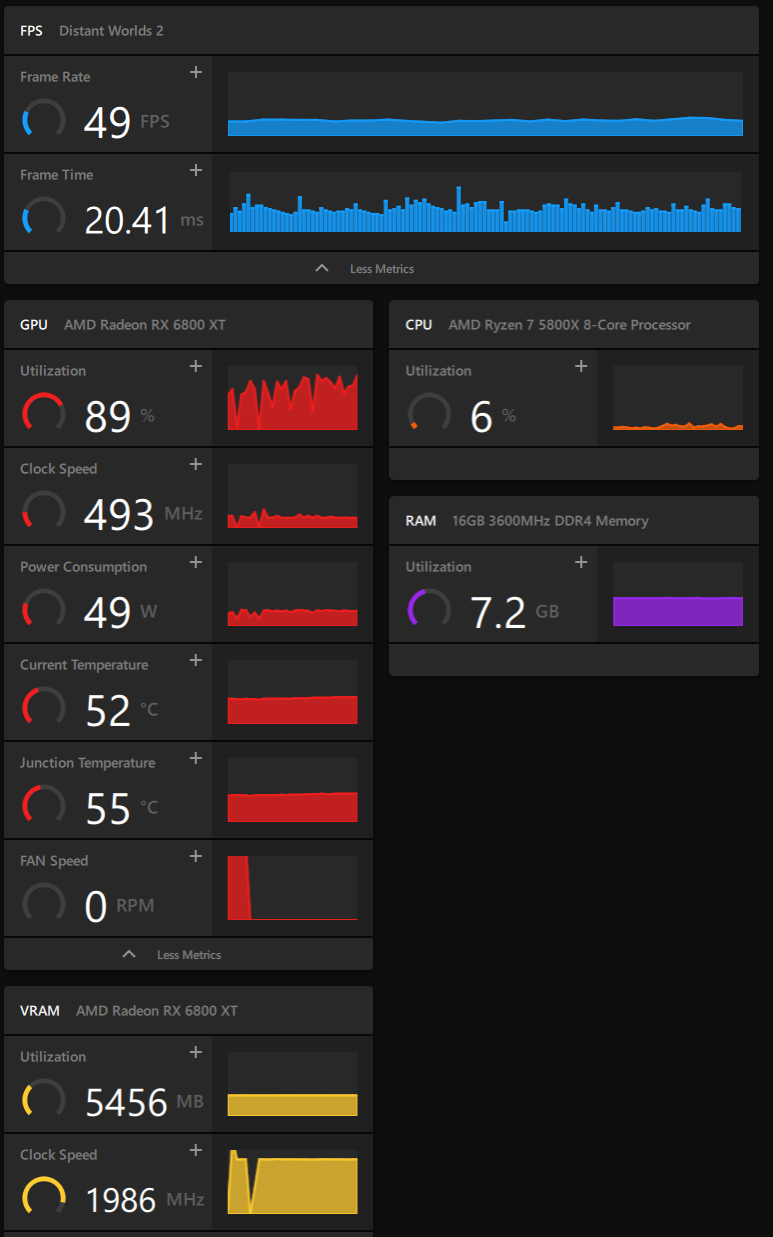
- DW2utilisation.png (121 KiB) Viewed 2616 times
Re: FAQ: Slow Performance / Integrated and Dedicated GPUs
Posted: Sun Mar 13, 2022 12:26 pm
by MikeToth
For that black screen work around use ALT-ENTER not ALT-TAB...... I was doing that at first until I went back and re-read Eric's suggestion.....
Re: FAQ: Slow Performance / Integrated and Dedicated GPUs
Posted: Sun Mar 13, 2022 1:24 pm
by rxnnxs
Be careful in what yoj do, because it can happen that more than you thought goes wrong.
And you maybe can not revert it easy..
I had a problem that has nothing to do with the dw2 graphics problems, but please listen carefully.
I activated my inboard graphic and also switched cables.
I always had my monitor connected with dmi and a television connected with hdmi. Both on dedicated gpu.
Now i wanted to play se5 with my integrated graphic card on windows xp. It did not work out, because there are no drivers for win xp and the onboard/gpu on quad core cpu.
However, i destroyed my second os, mageia 8 by "just" changing cables from monitor dmi to hdmi, because it always nagged me that windows handles hdmi before dmi.
So, after booting linux, icon and fontbsize behaved odd, and later,micould jot even log in xserver as root.
I reversed everyrhjng, but linux did not recover. Adding a newnuser first worked, but i managed to kill it definitely..
But,
tldr
hdmi is taken as Main display, even if it is not the preferred Monitor, but a televison.
So when i switch via win+p to my televison, i have to say main display.
When switching to my dmi monitor, i have to say projector.
It can happen, that a hdmi cable, even if the second display is not even active, is preferred before that active dmi device/cable.
It is pretty complicated, so i would advice to unplug all cables and Monitors that are secondary and so on.
Re: FAQ: Slow Performance / Integrated and Dedicated GPUs
Posted: Mon Mar 14, 2022 2:43 pm
by Yskonyn
Game version 1.0.1.8 refuses to start.
The splashscreen shows up, but then the game returns to desktop. Please see the attached files for more info.
No crashlog gets generated, just the Sessionlog.txt which Ive added alongside the dxdiag.
The beta ran fine on this system.
Re: FAQ: Slow Performance / Integrated and Dedicated GPUs
Posted: Tue Mar 15, 2022 10:10 am
by Yskonyn
The latest 1.0.1.9 patch did not result in my laptop starting the game unfortunately. Just FYI.
Re: FAQ: Slow Performance / Integrated and Dedicated GPUs
Posted: Thu Mar 24, 2022 11:43 pm
by rockyrds13
I am experiencing performance issues. I load my saved game and it seems all but frozen. Even the hot key will not work to take me to my home world. Attached are the following files. Thanks.
DistWorld1.docx
Re: FAQ: Slow Performance / Integrated and Dedicated GPUs
Posted: Fri Mar 25, 2022 2:58 am
by Erik Rutins
rockyrds13 wrote: Thu Mar 24, 2022 11:43 pm
I am experiencing performance issues. I load my saved game and it seems all but frozen. Even the hot key will not work to take me to my home world. Attached are the following files. Thanks.
DxDiag.txtSessionLog.txt
DistWorld1.docx
Based on your DxDiag and log files, your system only has an integrated Intel UHD 630 GPU which is well below the minimum GPU spec (GeForce 760 or equivalent) for Distant Worlds 2. You can try to give it a higher memory budget manually in the /data/gamesettingsoverrides.txt file but fundamentally DW2 will never perform well on your system without a dedicated proper GPU.
Re: FAQ: Slow Performance / Integrated and Dedicated GPUs
Posted: Sat Mar 26, 2022 1:13 pm
by tehferretstrikes
Attached files for linking in issue report
Re: FAQ: Slow Performance / Integrated and Dedicated GPUs
Posted: Sun Mar 27, 2022 12:27 am
by dahtnor
bonjour,
ça plante !!!!
bon courage
merci
Re: FAQ: Slow Performance / Integrated and Dedicated GPUs
Posted: Fri Apr 01, 2022 6:27 pm
by bristolduke
I am on 1.0.2.8
The game crashes regularly, but not repeatable. I never get a crash dump file. This crash I was had just set an explorer to a particular system. Frequently, I am doing nothing.
I was struck by the sessionLog constantly looking for drivers and display parameters since it found it initially, why keep looking?