Page 2 of 3
Re: Importing Map Graphics
Posted: Sun Nov 20, 2022 7:36 pm
by taijeronv
IronMikeGolf wrote: Sun Nov 20, 2022 2:54 pm
"One nearly impossible thing is preventing units from shooting across a boundary or assigning "sectors" in an engagement area. Of course, it's not a showstopper, and most players won't care about such things."
That's because we've not (yet) implemented any control measures for the human players. We sort of have a bit of that for the computer player with the Battle Plan mechanics, but that is largely limited to route/axis level control.
We did start down this path some time ago before coming up with Battle Plans. It isn't very easy, more so than we expected. Battle Plans was a more straightforward solution to the problem of making a smarter computer player than that in RS.
Another thing to consider is which control measures to implement. You mentioned sectors. That's a special case of inclusion/exclusion areas. So, you can add NAI, TAI, EA, time boxed RF and FFA. And the other "beyond this line" sorts of things like FCL.
Oh, PLs. Yes, PLs. Throw in BPs (Battle Positions, not Battle Plans). These are needed for synching multiple groups of units to cooperate (in an Attack, a Defense in Depth, and a Delay), but there is a raft of infrastructure to define and build to support those. I like a lot about doing this, but it's a big lift.
I'm not sure how much fire control support measures will add to the game, which will only appeal to players who want that kind of control/realism. NAI/TAIs are more or less implemented, seeing as how the sensors, in this case, are actual units like scouts. When I was at CGSC, we used Decisive Action, which had a simple abstraction model for NAIs. The students always wanted to place them in areas they had no sensors.
TacOps had a very good system for controlling direct fires. I suppose the simplest way to implement fire control in FPSC is to allocate specific hexes for which a unit is responsible. At a minimum, it keeps them shooting in the desired direction while not violating boundaries. Another way might be to use a "smart graphic" like a target reference point. If you assign a unit a TRP, it will shoot targets within a certain radius of the TRP. In TacOps, MajorH allowed you to place a TRP and specify its radius, but it was tied to a specific unit.
I think both methods would be nice. From an individual unit, specify the hexes they are responsible for. They will engage all enemy units who enter those hexes. Given the size of the hexes, you may limit this to no more than three, maybe even two. The other method would be to specify hexes and create a named EA. Now, you have to tell the unit what EA they are responsible for. I do realize that what I think is easy may not be when it comes to coding.
TacOps also allowed you to assign a unit a priority type to shoot at. For example, you could assign your tank units a high priority to engage other tanks. So, given a choice between an AFV and a tank, that unit would shoot at the tank first. I attached some screens of the TacOps interface for fire control.
As a contractor at CGSC, I considered using the first version of FP in the classroom. I can't remember who I spoke to, but we corresponded briefly. If I recall, the original program was coded using Delphi, although I could be mistaken. The map used squares instead of hexes and an excel spreadsheet to code the terrain type, with each cell in the spreadsheet corresponding to a piece of "dirt" on the map.
Re: Importing Map Graphics
Posted: Mon Nov 21, 2022 1:44 am
by theWombat
Darn, I miss TacOps. Found an old version of it laying around but could not get it to run on modern machines....
Re: Importing Map Graphics
Posted: Mon Nov 21, 2022 5:15 am
by JohnOs
theWombat wrote: Mon Nov 21, 2022 1:44 am
Darn, I miss TacOps. Found an old version of it laying around but could not get it to run on modern machines....
I still have mine as well. The TacOpsUSMC version still works.
JohnO
Re: Importing Map Graphics
Posted: Mon Nov 21, 2022 6:03 am
by taijeronv
JohnOs wrote: Mon Nov 21, 2022 5:15 am
theWombat wrote: Mon Nov 21, 2022 1:44 am
Darn, I miss TacOps. Found an old version of it laying around but could not get it to run on modern machines....
I still have mine as well. The TacOpsUSMC version still works.
JohnO
I have the TacOpsCav version that MajorH did for the Army/Armor School. We used it for one exercise at CGSC along with Decisive Action. It was a non-contiguous AO with DA representing the division and TacOps the brigade. It was a fun exercise and showed that we could run a division STAFFEX with a commercial game. It was the beginning of the end for the very large and expensive Prairie Warrior exercise, which used CBS or Corps Battle Simulator.
Re: Importing Map Graphics
Posted: Mon Nov 21, 2022 3:44 pm
by JohnOs
I meant to say, I have both CAV and MC versions. The MC version I still have it on my laptop.
I used to work at CGSC with Dr. James Sterrett in the DLDC Department. Not only ran DA and TacOps I help teach FA57 students. I have also worked with Jim Lunsford and now I can't find my copy of DA

Then after about four years there, I transfer to MCTP, Ops Group Bravo, Artillery department and went to different bases to run Warfighter exercises. I enjoyed it and then due to health and I retired last year now I stay home and play war games and drink JD on the deck with my dogs

JohnO
Re: Importing Map Graphics
Posted: Mon Nov 21, 2022 3:55 pm
by taijeronv
JohnOs wrote: Mon Nov 21, 2022 3:44 pm
I meant to say, I have both CAV and MC versions. The MC version I still have it on my laptop.
I used to work at CGSC with Dr. James Sterrett in the DLDC Department. Not only ran DA and TacOps I help teach FA57 students. I have also worked with Jim Lunsford and now I can't find my copy of DA
Then after about four years there, I transfer to MCTP, Ops Group Bravo, Artillery department and went to different bases to run Warfighter exercises. I enjoyed it and then due to health and I retired last year now I stay home and play war games and drink JD on the deck with my dogs
JohnO
Is this john Osborne? It's me TJ.
Re: Importing Map Graphics
Posted: Mon Nov 21, 2022 4:03 pm
by JohnOs
I know

shoot me a private message.
Re: Importing Map Graphics
Posted: Mon Nov 21, 2022 4:57 pm
by blackcloud6
Once you save a game and exit, then later restart, the user made graphics are not saved and have to be reimported. Is this supposed to be this way? Or am I doing something wrong and there is a way to save the imported user graphics?
Re: Importing Map Graphics
Posted: Mon Nov 21, 2022 5:00 pm
by JohnOs
Each scenario folders have a custom folder try and place it there and see if that will work.
Re: Importing Map Graphics
Posted: Mon Nov 21, 2022 5:06 pm
by blackcloud6
JohnOs wrote: Mon Nov 21, 2022 5:00 pm
Each scenario folders have a custom folder try and place it there and see if that will work.
Place the save file there? Or which file?
Re: Importing Map Graphics
Posted: Mon Nov 21, 2022 6:47 pm
by IronMikeGolf
The imported overlay is in memory only. We don't know what any Player is going to put in an overlay, so we treat each as a specific plan, not a general "whenever I play this scenario" artifact. So, you, the Player, get to manage that over your universe of playing a scenario. Some suggestions:
1. Use a graphic editing tool that supports layers.
2. Some info is reusable from plan to plan. Probably mostly (if not entirely) terrain based. Things like identifying key terrain and possible routes/axis of advance things. Make that and save it as your base for making actual op graphics overlays.
3. As you play and re-play a scenario, you will likely come to settle on various aspects of your overlay as being pretty much the same. Here I am talking (in US Army terms) NAIs (Named Areas of Interest, which you surveil to ascertain enemy plan), TAIs (area that are common to possible enemy plans, so deserve the tender attention of artillery).
4. Then you get to things that really are customized to that run, like where have you chosen to attack or where you've decided to kill the enemy. These would be objectives and EAs (Engagement Areas). I'd save these for "historical purposes".
All the above give you what you need to assemble your overlay.
Now, if you also save your final overlay and your plan is the same, then that saves some steps for a given scenario run.
I don't see us doing much to enhance reusability of imported overlay artifacts. There's bigger fish for us devs to fry and managing this on your computer isn't all that hard.
Re: Importing Map Graphics
Posted: Mon Nov 21, 2022 7:13 pm
by WildCatNL
blackcloud6 wrote: Mon Nov 21, 2022 5:06 pm
JohnOs wrote: Mon Nov 21, 2022 5:00 pm
Each scenario folders have a custom folder try and place it there and see if that will work.
Place the save file there? Or which file?
Once you have imported your mission graphics in the game, you can use the Save and Load Mission Graphics to store them and retrieve them in your next session.

- load_save_mission_graphics.png (303.54 KiB) Viewed 1815 times
The are being stored in a scenario specific folder. In my case:
C:\Users\william\Documents\My Games\Flashpoint Campaigns Player Files\Modules\FCSS\Scenarios\Tutorial #1 - The Basics\Custom\Overlay0.png (for playing NATO aka side 0).
William
Re: Importing Map Graphics
Posted: Mon Nov 21, 2022 7:38 pm
by blackcloud6
Once you have imported your mission graphics in the game, you can use the Save and Load Mission Graphics to store them and retrieve them in your next session.
Ahh...
Re: Importing Map Graphics
Posted: Mon Nov 21, 2022 10:26 pm
by nukkxx5058
Hi,
I'm still having a problem with the transparency. When I import the drawing back into the game, my drawings are not solid anymore but have some transparency.
My procedure:
1) Staff/copy map to clipboard for mission graphics
2) Open Paint 3D
3) open a new blank file
4) ctrl-v to paste the content of the clipboard into the blank file in Paint 3D
5) Draw my arrows and the rest
6) Ctrl-a to select all objects in Paint 3D
7) Ctrl-c to copy the selection into the clipboard
8) Alt-tab to FCSS > staff/import Mission Graphics from Clipboard
It works but arrows now have some degree of transparency.
What should I do ?
Thanks
Re: Importing Map Graphics
Posted: Mon Nov 21, 2022 10:35 pm
by CapnDarwin
The transparency is part of the overlay when imported. William is seeing if we can add a transparency setting, but it may be a while with other priorities for fixes.
Re: Importing Map Graphics
Posted: Mon Nov 21, 2022 10:56 pm
by nukkxx5058
CapnDarwin wrote: Mon Nov 21, 2022 10:35 pm
The transparency is part of the overlay when imported. William is seeing if we can add a transparency setting, but it may be a while with other priorities for fixes.
Ah ! Ok. Sure no big deal, it's definitely not a priority.
Thank you
Re: Importing Map Graphics
Posted: Wed Nov 23, 2022 12:49 am
by qsmiron
I've made a hacked files with symbols for editing in gimp and inkscape. Copying from gimp using the clipboard works. However, copying from Inkscape is not visible in the game. What do you need to set in Inkscape for this to work?
Illustrative photo
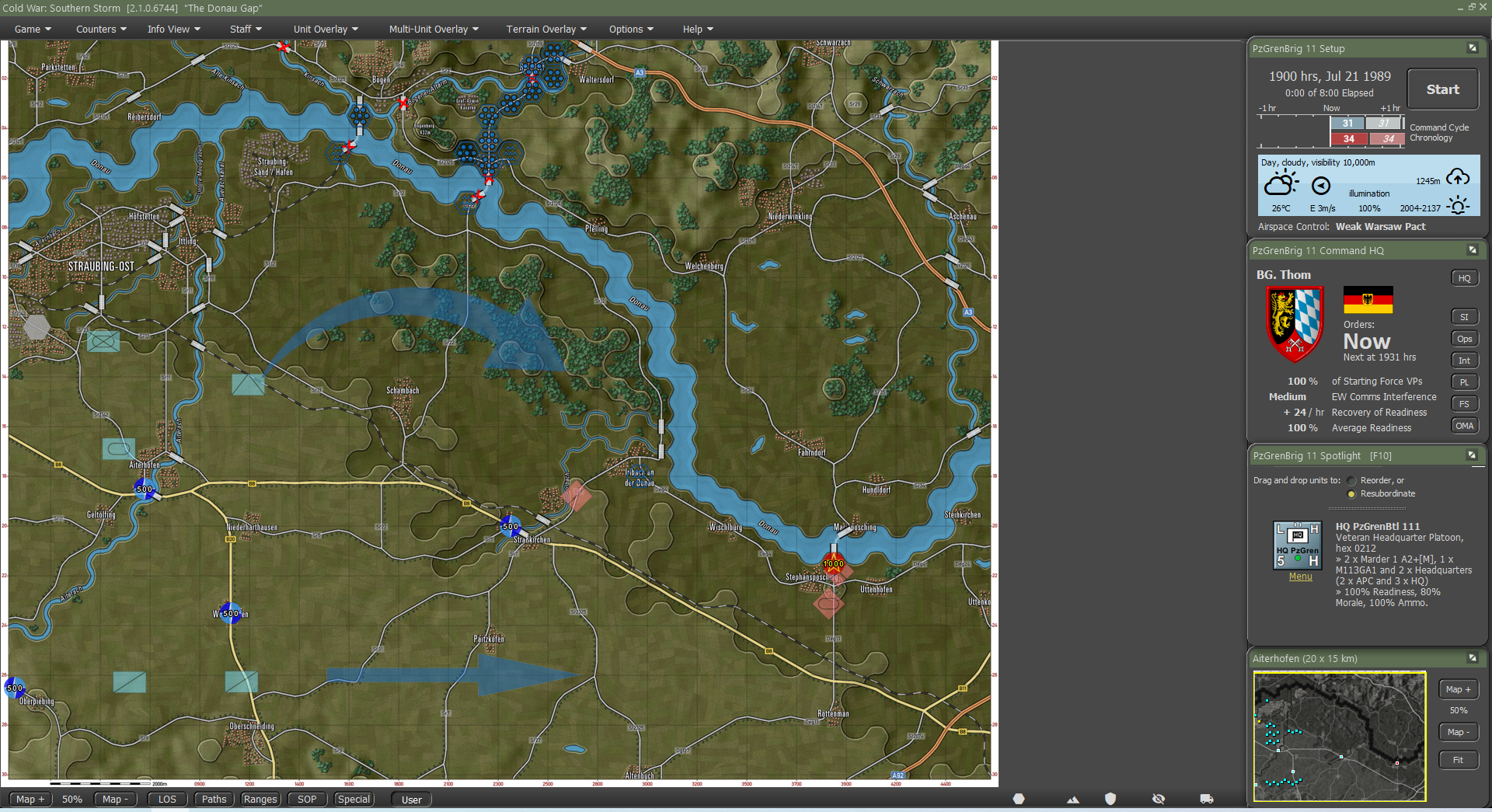
- 022.png (2.8 MiB) Viewed 1724 times
Re: Importing Map Graphics
Posted: Wed Nov 23, 2022 8:46 am
by DCETRADER
qsmiron wrote: Wed Nov 23, 2022 12:49 am
I've made a hacked files with symbols for editing in gimp and inkscape. Copying from gimp using the clipboard works. However, copying from Inkscape is not visible in the game. What do you need to set in Inkscape for this to work?
Illustrative photo
022.png
Hi,I think you don't need draw symbols,Nato symbols (you and enemy) will still keep appear and update realtime on the "TOC-Operations-Map Overlay (clilck HQ window's Ops)" map, and you can monitor through the whole combat.
Such as the attachment

- t1.jpg (811.58 KiB) Viewed 1709 times
Re: Importing Map Graphics
Posted: Wed Nov 23, 2022 3:52 pm
by taijeronv
qsmiron wrote: Wed Nov 23, 2022 12:49 am
I've made a hacked files with symbols for editing in gimp and inkscape. Copying from gimp using the clipboard works. However, copying from Inkscape is not visible in the game. What do you need to set in Inkscape for this to work?
Illustrative photo
022.png
Try exporting instead of copying.
1. Make sure you resize the canvas to content.
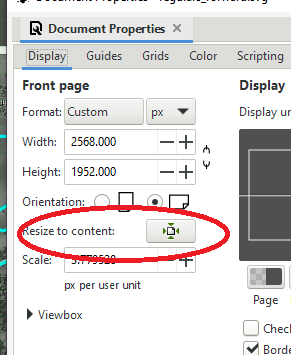
- inkscape3.png (21.8 KiB) Viewed 1693 times
2. When exporting make sure the size of the map matches what you have in Gimp. For some reason the size may not be correct. Setting the DPI to 96 should fix the size issue.
3. Before exporting turn "off" the map layer, all you want is your graphic control measures. Note you do not have to merge anything when using Inkscape everything can remain in its own layer.

- inkscape1.jpg (178.97 KiB) Viewed 1693 times
4. Export "Document" or "Page"

- inkscape2.png (33.53 KiB) Viewed 1693 times
5. Open in Photoviewer right click copy.
6. Import into FPSC.
I've attached some screenshots for reference.
TJ
Re: Importing Map Graphics
Posted: Wed Nov 23, 2022 9:47 pm
by WildCatNL
TJ,
any idea why InkScape's Edit/Make a Bitmap Copy doesn't create a bitmap copy to the clipboard? I was hoping that would do the job, but I cannot even paste the result in another graphics tool (Paint.NET, GIMP).
It would have been great if InkScape supported layered bitmap + vector graphics editing, and an easy way to deliver a 'flattened bitmap' to the game.
William