Page 2 of 2
Re: Hexgrid maps
Posted: Tue Nov 29, 2022 1:44 am
by CapnDarwin
Grid is the default. That won't change. Optional maps with a grid are supported.
Re: Hexgrid maps
Posted: Wed Nov 30, 2022 12:11 pm
by CheerfullyInsane
WildCatNL wrote: Mon Nov 21, 2022 8:28 pm
Here are the Southern Storm maps, this time rendered without the 1km square grid, and with a black hex grid baked in.
https://www.dropbox.com/s/x7x1osnephv66 ... x.zip?dl=0 (140MB download).
Drop the maps in your Matrix Games\Flashpoint Campaigns Southern Storm\Modules\FCSS\Maps\Custom folder, and restart the game.
William
Outstanding service.

I get why people may not want hexes, and I'll fully agree that the maps look fabulous without them.
But for me, if the game engine uses hexes in the first place, I'd rather have them visible.
Horses for courses, and all that.
Re: Hexgrid maps
Posted: Thu Dec 01, 2022 9:05 am
by maitrebongo
CheerfullyInsane wrote: Wed Nov 30, 2022 12:11 pm
WildCatNL wrote: Mon Nov 21, 2022 8:28 pm
Here are the Southern Storm maps, this time rendered without the 1km square grid, and with a black hex grid baked in.
https://www.dropbox.com/s/x7x1osnephv66 ... x.zip?dl=0 (140MB download).
Drop the maps in your Matrix Games\Flashpoint Campaigns Southern Storm\Modules\FCSS\Maps\Custom folder, and restart the game.
William
Outstanding service.
I get why people may not want hexes, and I'll fully agree that the maps look fabulous without them.
But for me, if the game engine uses hexes in the first place, I'd rather have them visible.
Horses for courses, and all that.
It is for this reason that I would be happy to provide all the cards with my kind of hexagons BUT WITHOUT the squares if you would kindly make available to us the blank cards without the squares. Thanks in advance
Re: Hexgrid maps
Posted: Sat Dec 03, 2022 12:18 am
by cbelva
@Phoenix100, I don't think you have anything to worry about.
Re: Hexgrid maps
Posted: Sat Dec 03, 2022 7:34 am
by JacquesDeLalaing
Thanks a lot for the hex maps! I also think the game is easier and more accurate to handle with hex maps.
Re: Hexgrid maps
Posted: Sat Feb 04, 2023 10:01 am
by mazex
A big thank you!
I understand that the devs have put down quite some effort to remove the hexes as it really looks more "realistic" without them. But under the hood it still is hexbased as you see when clicking on the map. So then I very much prefer this version - especially the one with only hexes and no lines...
The whole category is called hex based war games

It really would be nice if the developers included your maps and added an option "use optional hex based overlay" - as many of us like it better that way.
And finally - as you have done different versions it would be great with all download links in the first post - I like the one in post 13 very much
Re: Hexgrid maps
Posted: Sat Feb 04, 2023 1:58 pm
by CapnDarwin
The latest beta update and the upcoming Update have a new option to add hexes to maps on the fly, thanks to William's work. So players have the option to have or not have hexes on the maps.
Re: Hexgrid maps
Posted: Thu Mar 23, 2023 7:08 pm
by mazex
CapnDarwin wrote: Sat Feb 04, 2023 1:58 pm
The latest beta update and the upcoming Update have a new option to add hexes to maps on the fly, thanks to William's work. So players have the option to have or not have hexes on the maps.
Mmm - I guess that you are getting tired of whining old men
But the new option "show hexgrid" becomes a mix of square network and hexes that gets a bit messy, and rather odd in some situations where the square grid lines get different thickness as the hexes fade out the grid... But the new ones being light works better over the forests etc than the excellent mod.
So - it really would be nice if the square network was not baked into the underlying map but overlayed like the hexes. So when you select hex grid you don't get the square grid
So for now I have realized that using this mod AND the overlay hexgrid works best for me...
Re: Hexgrid maps
Posted: Thu Apr 06, 2023 9:57 pm
by HobbesACW
Now I have a UI I love. I can scroll the screen in any direction just by pushing the mouse to the PC screen edges.
This only works at the bottom of the screen if you hide the Windows taskbar.
Press and hold (or right-click) any empty space on the taskbar, select taskbar settings, select taskbar behaviors, and select automatically hide the taskbar.
We are whining old men - but proud of it. Playing wargames for 50 odd years. Something about a light grey hex grid hits the spot for me. Something to do with the games I was brought up on. A light grey hex grid just seems right. Thank's so much for that WildCatNL You made an old man very happy.
I can now also use hotkeys without having to press cntl thanks to Shadrach and I can also bind them to the keys I find easiest to hit.
Autohotkeys download here:
https://www.autohotkey.com/
https://www.matrixgames.com/forums/view ... 0#p5089800
I have made my own script using Shadrach's as a base. It's very easy to amend his script to do anything you want it to.
Mine basically gets rid of all need to use cntl keys and puts all of the most useful reports onto the first few function keys.
Chris
Re: Hexgrid maps
Posted: Sun Dec 31, 2023 11:47 am
by xtom
Would it be possible to add a color and transparency option for the hex grid lines on the game colors option screen. The default is kinda too bright which creates visual clutter. Would prefer a more subtle black with maybe 50% transparency something like in Red Storm.
Re: Hexgrid maps
Posted: Wed Jan 03, 2024 1:37 am
by CapnDarwin
xtom - go to the game folder, open overlays.ini in a text editor like Notepad, and then search for HexGrid. There are values there for Color (in hex value RGB, #FFFFFF - Black) and also Alpha for transparency which is set to #9F (70% opaque roughly). Try a color of #EEEEEE or #DDDDDD for a dark gray and set Alpha to #80 to #70 and see if that fades it to your liking.
Re: Hexgrid maps
Posted: Thu Jan 04, 2024 2:39 pm
by xtom
That's awesome, thanks. I set alpha to #61 which looks nice and subtle for me. I couldn't get the color to change but I'm happy with just that extra bit of transparency.
Re: Hexgrid maps
Posted: Thu Jan 04, 2024 3:45 pm
by CapnDarwin
I was able to change color. Try again and ensure the color's value is in hexadecimal format. It is possible that the transparency diluted the color.
Re: Hexgrid maps
Posted: Thu Jan 04, 2024 5:12 pm
by CapnDarwin
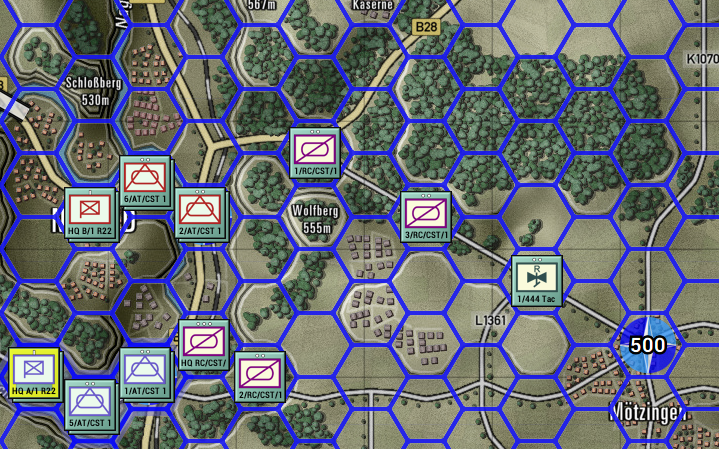
As seen below, I was able to change color (blue), transparency (not much at all), and line thickness (5 shown). You have to restart the game and toggle the hex grid option to get things to show up revised.
- Screenshot 2024-01-04 120944.png (763.23 KiB) Viewed 2488 times
Re: Hexgrid maps
Posted: Thu Jan 04, 2024 7:10 pm
by xtom
I have managed to change the color but for some reason black/grey always comes out more light/white for me. I am wondering if there is a day time overlay affecting it because I have a save game at dusk and I notice the twilight overlay affects the color of the hex grid. If you min/max the slider on it and click Apply it seems to be filtering/inverting the hex grid color which confused me when I was testing color changes on that save. I also notice changing the color for twilight in the UI doesn't actually change it's color either.
These are my settings below now but I haven't tested at night time yet.
Code: Select all
[DayTwilight]
Alpha=#3B
[DayNight]
Alpha=#65
...
...
[HexGrid]
Color=#FFFFFF
Alpha=#61
Width=2
Re: Hexgrid maps
Posted: Thu Jan 11, 2024 10:21 am
by Widukind59
I also use only hexgrids in fantasy roleplay games. I downloaded thge hex... and it works fine for me!
Re: Hexgrid maps
Posted: Thu Jan 11, 2024 12:22 pm
by CapnDarwin
You can turn the hex grid on/off from the Options menu of the game's main menu.