Page 2 of 3
Re: At Wits End...
Posted: Fri Nov 24, 2023 8:27 pm
by Platoonist
BBfanboy wrote: Fri Nov 24, 2023 7:01 pm
One of the things that really slows down map rendering during movement of the whole frame is redrawing the overlays like range circles, search vectors (z), weather, hex details (F6) and hex ownership (w), etc. Those features are only needed for setting up your next turn and should be turned off for turn execution.
I'm finding that even with these features turned off it's still laggy without the dd_sw switch on Win 11. However, there have been zero of the graphic issues like the desktop bleeding through that others have encountered, which is a relief. Not as quick and responsive as my old system, but least it's playable and viewable.
Re: At Wits End...
Posted: Sun Nov 26, 2023 5:17 pm
by Suribachi
This game really tests your patience... for some reason now, I cannot exit the game or end my turn. Just hangs up. I can hit esc key on my keyboard after attempting to end my turn or exit the game and it will basically return me to my turn. I have to hit ctrl/alt/delete to take to me to task manager and I have to end task to get out of the game. Any ideas? Thanks!
Re: At Wits End...
Posted: Sun Nov 26, 2023 5:52 pm
by Platoonist
Suribachi wrote: Sun Nov 26, 2023 5:17 pm
This game really tests your patience... for some reason now, I cannot exit the game or end my turn. Just hangs up. I can hit esc key on my keyboard after attempting to end my turn or exit the game and it will basically return me to my turn. I have to hit ctrl/alt/delete to take to me to task manager and I have to end task to get out of the game. Any ideas? Thanks!
Sounds familiar. Do you have the dd_sw switch installed in the shortcut? I also had this issue of the game intermittently locking up on the quit command until I removed it.
Re: At Wits End...
Posted: Sun Nov 26, 2023 8:25 pm
by Suribachi
I removed the dd_sw switch from my shortcut and I can now end my turn and quit the game. Thank you. However, I have no sound now... are the two possibly connected? If I ctrl/alt/del and go to task manager, the sound returns until I close task manager without ending the game, silence again.
Re: At Wits End...
Posted: Sun Nov 26, 2023 8:48 pm
by Platoonist
Suribachi wrote: Sun Nov 26, 2023 8:25 pm
I removed the dd_sw switch from my shortcut and I can now end my turn and quit the game. Thank you. However, I have no sound now... are the two possibly connected? If I ctrl/alt/del and go to task manager, the sound returns until I close task manager without ending the game, silence again.
Are you using the -multiaudio switch?
Re: At Wits End...
Posted: Sun Nov 26, 2023 9:49 pm
by Suribachi
Yes. I looked at the short cut again and now I see that I screwed up when I removed -dd_sw, I had left two spaces between the - and multiaudio. Still no sound though.
I wish there was a thread on the forum that lays out all the switches and an explanation of what it does. At some point I'll have to search out all the threads on switches and see if there are any that I would like to try. Gotta be.
Platoonist - what WW2 carrier is displayed in your responses?
Thank You
Re: At Wits End...
Posted: Sun Nov 26, 2023 10:51 pm
by Platoonist
Suribachi wrote: Sun Nov 26, 2023 9:49 pm
I wish there was a thread on the forum that lays out all the switches and an explanation of what it does. At some point I'll have to search out all the threads on switches and see if there are any that I would like to try. Gotta be.
I've also been struggling a bit now that Win 11 is my OS. Sometimes I temporarily put the -dd_sw switch in for entering orders faster but delete it for running turns. Sometimes it works fine for a while but eventually it causes issues. Like not being able to exit the game in a normal manner.
Suribachi wrote: Sun Nov 26, 2023 9:49 pm
Platoonist - what WW2 carrier is displayed in your responses?
It's the USS Lexington as modeled in the Silent Hunter 4 sub simulation game. In that game you could battle the Japanese on the micro-level whereas in WITP you do it at the macro.


- Lexington.jpg (32.61 KiB) Viewed 1557 times
Re: At Wits End...
Posted: Mon Nov 27, 2023 1:17 am
by RangerJoe
Suribachi wrote: Sun Nov 26, 2023 9:49 pm
Yes. I looked at the short cut again and now I see that I screwed up when I removed -dd_sw, I had left two spaces between the - and multiaudio. Still no sound though.
I wish there was a thread on the forum that lays out all the switches and an explanation of what it does. At some point I'll have to search out all the threads on switches and see if there are any that I would like to try. Gotta be.
Platoonist - what WW2 carrier is displayed in your responses?
Thank You
From a readme file in the folder:
Command Line Switches:
There are a number of command line switches that may be useful to players. To use these, Right click to edit the Properties on the “Quick Start” shortcut to the game (located in your Start Menu folder for War in the Pacific: Admiral’s Edition). You’ll want to add these to the end of the “Target” field to get them to work
-dual : Enables better support for processors with more than one core (i.e. Intel Core 2 Duo)
-colorBlind : Support for color blindness
-deepColor : Enables 32 bit color
-altFont : Enables alternate in-game font (Lucida Sans Unicode)
-w : Windowed mode
-wd : Windowed mode, daily autosaves
-ww : Windowed mode, weekly autosaves
-fd : Full screen, daily autosaves
-fw : Full screen, weekly autosaves
-r : Show Roads
-autosave : Daily autosave
Re: At Wits End...
Posted: Mon Nov 27, 2023 1:31 am
by RangerJoe
Suribachi wrote: Sun Nov 26, 2023 9:49 pm
Yes. I looked at the short cut again and now I see that I screwed up when I removed -dd_sw, I had left two spaces between the - and multiaudio. Still no sound though.
I wish there was a thread on the forum that lays out all the switches and an explanation of what it does. At some point I'll have to search out all the threads on switches and see if there are any that I would like to try. Gotta be.
Platoonist - what WW2 carrier is displayed in your responses?
Thank You
Here is a thread with more switches:
Switch thread?
https://www.matrixgames.com/forums/view ... 25+scaling
Re: At Wits End...
Posted: Mon Nov 27, 2023 7:32 pm
by Suribachi
Thanks for posting the switch thread location! Very helpful.
Re: At Wits End...
Posted: Tue Nov 28, 2023 1:31 am
by RangerJoe
Suribachi wrote: Mon Nov 27, 2023 7:32 pm
Thanks for posting the switch thread location! Very helpful.
You are most welcome.
Here is another thread:
How to get the game to run
https://www.matrixgames.com/forums/view ... 4&t=392927
Re: At Wits End...
Posted: Tue Nov 28, 2023 5:31 am
by BananaConvention
Suribachi wrote: Mon Nov 27, 2023 7:32 pm
Thanks for posting the switch thread location! Very helpful.
Check PMs. If you need any more one on one help, I got you covered.
Re: At Wits End...
Posted: Sun Dec 03, 2023 2:44 pm
by Gangir
Hi dudes, where do you set these parameters?
I have a large widescreen and would like to run it as windowed mode with like 1600 resolution.
Thanks
Re: At Wits End...
Posted: Sun Dec 03, 2023 3:26 pm
by Platoonist
Gangir wrote: Sun Dec 03, 2023 2:44 pm
Hi dudes, where do you set these parameters?
I have a large widescreen and would like to run it as windowed mode with like 1600 resolution.
Thanks
You have to create a shortcut. Don't use the one that the game created for you and put on the desktop. Right click the shortcut icon to get properties and then under properties type in the desired switches in the target field after the .exe. Leave a space between each switch. Some of them are case sensitive, so watch the spelling.
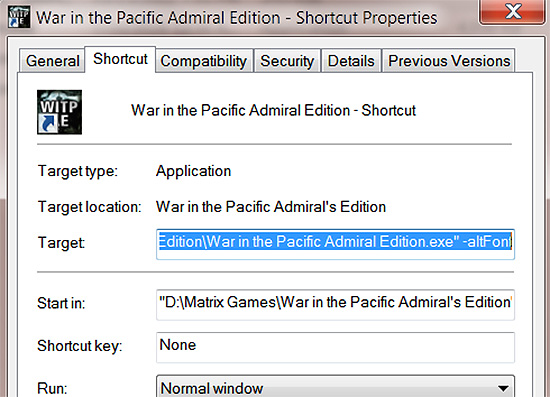
- Shortcut.jpg (113.93 KiB) Viewed 1407 times
Re: At Wits End...
Posted: Sun Dec 03, 2023 4:13 pm
by RangerJoe
Platoonist wrote: Sun Dec 03, 2023 3:26 pm
Gangir wrote: Sun Dec 03, 2023 2:44 pm
Hi dudes, where do you set these parameters?
I have a large widescreen and would like to run it as windowed mode with like 1600 resolution.
Thanks
You have to create a shortcut. Don't use the one that the game created for you and put on the desktop. Right click the shortcut icon to get properties and then under properties type in the desired switches in the target field after the .exe. Leave a space between each switch. Some of them are case sensitive, so watch the spelling.
Shortcut.jpg
If you use the Seabee utility program, it will do this for you. Then you can adjust the switches if you want to do so.
Re: At Wits End...
Posted: Sun Dec 03, 2023 4:29 pm
by Suribachi
Is the Seabee utility program still supported? I tried downloading it several days ago and I couldn't get it to download? Thanks
Re: At Wits End...
Posted: Sun Dec 03, 2023 4:45 pm
by RangerJoe
Suribachi wrote: Sun Dec 03, 2023 4:29 pm
Is the Seabee utility program still supported? I tried downloading it several days ago and I couldn't get it to download? Thanks
Try this link:
https://drive.google.com/file/d/1c_kbK1 ... view?pli=1
Re: At Wits End...
Posted: Mon Dec 04, 2023 10:47 am
by Gangir
Thanks solved!
Love the community support here!!
Platoonist wrote: Sun Dec 03, 2023 3:26 pm
Gangir wrote: Sun Dec 03, 2023 2:44 pm
Hi dudes, where do you set these parameters?
I have a large widescreen and would like to run it as windowed mode with like 1600 resolution.
Thanks
You have to create a shortcut. Don't use the one that the game created for you and put on the desktop. Right click the shortcut icon to get properties and then under properties type in the desired switches in the target field after the .exe. Leave a space between each switch. Some of them are case sensitive, so watch the spelling.
Shortcut.jpg
Re: At Wits End...
Posted: Mon Dec 04, 2023 1:13 pm
by BBfanboy
Gangir wrote: Mon Dec 04, 2023 10:47 am
Thanks solved!
Love the community support here!!
The community is why most of us continue to stay on the forum. Many just lurk without comment and that is OK too - the stats on post reads encourage the posters to continue their efforts and newcomers often have new takes on the game design or AAR play. All good!
Re: At Wits End...
Posted: Tue Dec 05, 2023 5:26 pm
by Suribachi
I've got the game working fine, full screen on my gaming monitor at its highest resolution. Thanks again for all the help! The game runs crazy slow during the computer-generated night air raids, and I can't use the close button on the combat views during this period as well. But as soon as the nighttime raids have completed, the game runs at normal speed.
Like I had indicated at the beginning of this post, I hadn't played the game in probably 8 or 10 years, so my recollections/memory are sketchy at best. I thought in the combat view that the damaged ships showed smoke when hit by enemy ship's guns/torpedoes as well as bomb and torpedo hits by enemy planes or am I just imaging that?
Planning on downloading and reading the manual over again a couple of times to re-learn the games operation. The same stuff I had difficulties with when I played it years ago... industry management, loading troops, difference between strategic and marching, etc. I forgot how much fun this game is.