Page 2 of 3
Re: Unable to open any old scenarios using 1744
Posted: Sun Nov 23, 2025 8:47 am
by Nikel
It is fully writable if CMO is installed in a folder like:
But not so much if installed inside:
Code: Select all
C:\program files (x86)\matrix games\
Windows controls "program files" folders. May not cause problems with the logs, but causes them with the Webview files.
Re: Unable to open any old scenarios using 1744
Posted: Sun Nov 23, 2025 3:14 pm
by DWReese
Nikel,
Is there an EASY way to move my files from C:\program files (86) to c:\matrix games\cmo?
Re: Unable to open any old scenarios using 1744
Posted: Sun Nov 23, 2025 3:25 pm
by DWReese
Let's recap:
Now that your Command.ini points to C:\ProgramData\CMO, do you get the pop-up saying “Microsoft Edge can't read and write to its data directory”? No. I only received that message once when I was first installing the program.
Can you check if the EBWebView folder has been created in C:\ProgramData\CMO? It's there
In 1728.2, this directory was: C:\Windows\Temp It's there
You should have an EBWebView folder there. If it exists there, can you change the field from
CustomFolder_WebviewCache = C:\Windows\Temp
and launch CMO again?
Re: Unable to open any old scenarios using 1744
Posted: Sun Nov 23, 2025 3:28 pm
by Nikel
I have done it for other Matrix games, just copy and paste the whole game folder, when I wanted to try a mod, or have an alternate version not updated with patches. Not deleting the old folder.
But never did it with CMO, because is huge, even more right now, 37 GB here.
It should work.
But of course it is much more simple just to edit the file command.ini
May you upload it zipped?
Re: Unable to open any old scenarios using 1744
Posted: Sun Nov 23, 2025 3:37 pm
by DWReese
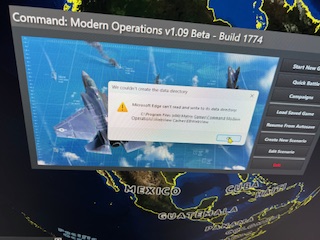
- IMG_1140.JPG (107.85 KiB) Viewed 848 times
I took a picture of the error message that I received when the program was installing the upgrade.
This is the ONLY time that I ever saw this message. After I clicked on OK it was gone. I took the picture because it was an error, not knowing at the time if it was going to be a problem. Unfortunately, it has been.
Re: Unable to open any old scenarios using 1744
Posted: Sun Nov 23, 2025 3:59 pm
by thewood1
I used to get similar folder access errors years ago on a number of older games and some Matrix games. I created a Matrix folder under C drive and now run CMO and Combat Mission from there.
Re: Unable to open any old scenarios using 1744
Posted: Sun Nov 23, 2025 5:06 pm
by DWReese
thewood1,
Thanks for the info. I sincerely appreciate your input.
You are correct, the 1744 was a typo. Sorry for the confusion.
Re: Unable to open any old scenarios using 1744
Posted: Sun Nov 23, 2025 5:16 pm
by DWReese
blu3s and nikel,
Thanks so much for spending the time trying to get my 1774 update running. Unfortunately, nothing has worked, and I am concerned that adding and subtracting lines of text may cause my ini file and game to become unstable, and that may cause issues down the line, which I do not want to encounter.
Therefore, at this time, I have reverted back to 1728.2. Hopefully, that is still stable. While I really wanted to play with the new update, the effort by everyone involved just doesn't seem to be worth it, especially if an official version is due to come out on the horizon.
I have NOT attempted to move my game files from the program files (86) folder. Another user stated that he is also having the same issue, so I assume that there will be others as well. Hopefully, when the official update is released you will allow it to properly function for those who do have it residing in the program files (86) folder. That would be great.
Thanks again for all of your efforts and extensive help.
Re: Unable to open any old scenarios using 1744
Posted: Sun Nov 23, 2025 8:48 pm
by KLAB
[attachment=0]ERROR SG CMO.png[/attachment
Also got this pop up.
Copied entire folder from the program files 86 to C: and it now works.
Never had problem like this before and a bit of a fiddle.
K
Re: Unable to open any old scenarios using 1744
Posted: Sun Nov 23, 2025 10:17 pm
by pboiler
I am getting the same error message pop up. I'm not a computer person at all and don't understand the thread about possible fixes. Is it possible to have an update that fixes this issue for people like me?
Re: Unable to open any old scenarios using 1744
Posted: Mon Nov 24, 2025 9:44 am
by Dimitris
KLAB wrote: Sun Nov 23, 2025 8:48 pm
[attachment=0]ERROR SG CMO.png[/attachment
Also got this pop up.
Copied entire folder from the program files 86 to C: and it now works.
Never had problem like this before and a bit of a fiddle.
K
Is Command running as admin ?
Re: Unable to open any old scenarios using 1744
Posted: Tue Nov 25, 2025 7:36 am
by motoyuki1970
I also got that pop up same with KLAB shown.
As he suggested, I copied entire CMO folder to C: from x86/Matrix folder.
It quite work. Now, no pop up and successfully loading scenario files.
Thanks a lot.
Moto
Re: Unable to open any old scenarios using 1744
Posted: Tue Nov 25, 2025 8:04 am
by blu3s
DWReese wrote: Sun Nov 23, 2025 3:14 pm
Nikel,
Is there an EASY way to move my files from C:\program files (86) to c:\matrix games\cmo?
You can copy the entire CMO folder to the new location or uninstall and install CMO to that location (but I'd wait a bit for the 1.09 release to do that)
Re: Unable to open any old scenarios using 1744
Posted: Wed Nov 26, 2025 2:09 am
by coh7res
I got the same pop-up error message. Messed around with it for a bit but finally just reverted back to 1728. Weird thing is I loaded 1776 on my old laptop and it ran with no error msg (???). I'll just wait till 1.09 is officially rolled out.
CHiP
Re: Unable to open any old scenarios using 1744
Posted: Wed Nov 26, 2025 6:11 pm
by DWReese
blu3s,
FYI, I copied all of the files over to a new directory, as was discussed, and everything works fine, even after applying the update. Thanks again for your help.
Re: Unable to open any old scenarios using 1744
Posted: Wed Nov 26, 2025 8:24 pm
by pboiler
I am getting the same error as originally reported in this thread. I am not very knowledgeable in windows and can't figure out how to fix the issue.
Is anyone able to repost a summary of all the steps needed to do to fix this problem?
Thanks!
Re: Unable to open any old scenarios using 1744
Posted: Wed Nov 26, 2025 8:32 pm
by Nikel
pboiler wrote: Wed Nov 26, 2025 8:24 pm
I am getting the same error as originally reported in this thread. I am not very knowledgeable in windows and can't figure out how to fix the issue.
Is anyone able to repost a summary of all the steps needed to do to fix this problem?
Thanks!
It is explained in this thread. If you not know how to, just upload your command.ini file zipped.
https://forums.matrixgames.com/viewtopic.php?t=414072
Re: Unable to open any old scenarios using 1744
Posted: Wed Nov 26, 2025 8:57 pm
by pboiler
here is my command.ini zipped. thanks so much.
Re: Unable to open any old scenarios using 1744
Posted: Wed Nov 26, 2025 9:03 pm
by Nikel
Here is the edited one.
You will have to create a new folder.
Change your command.ini file with the one edited.
Run CMO.
Re: Unable to open any old scenarios using 1744
Posted: Wed Nov 26, 2025 9:11 pm
by pboiler
Thanks so much for your help.
I already have a C:\Temp folder. There are already a few sub folders in it, but none are recent and none seem to be related to command.
When i unzip and then open the file you sent me, the folder is empty. Can you repost it?