Page 2 of 4
Re: WitPTracker News
Posted: Mon Mar 02, 2026 4:42 am
by pbiggar
Hey Floyd,
You are too hard on yourself - there were a lot of great design decisions in the original Tracker.
- The Industry Screen for Japan is amazing. A fantastic 1 screen view of Japan's key production levers. I still remember how excited I was when I found that screen.
- Squadrons to upgrade to with PDU Off is a great tool as well
I expect all the posters here have their favorite features they stumbled across!
The one area I would like more from tracker is around combat tracking and keeping track of sightings by ship types.
I also experienced a problem with a very long game that got into 1944 and tracker stopped working and I had to create a new instance of it to keep track of future turns. I did not note the error at the time, but it might have been a database full or something like that. That instance in my game no longer loads when I boot it up.
Tracker has greatly improved my enjoyment of this game and I appreciate your work.
Re: WitPTracker News
Posted: Mon Mar 02, 2026 8:02 am
by Yaab
Floydg, here is a feature you can add to the new Tracker.
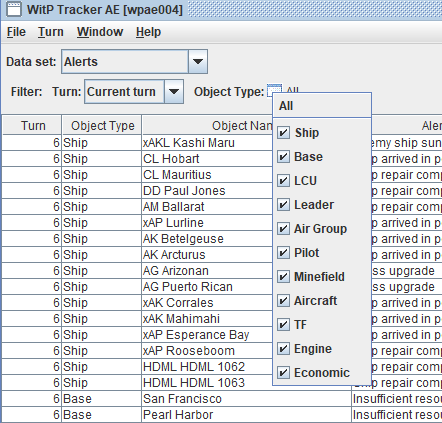
When I load a new turn in Tracker, I go to the Alerts. By default all Alerts are ON. I mostly use Tracker to read LCU Alerts, so every turn I have to manually de-select all Alerts INDVIDUALLY.
A simple button of "De-select All" would be nice.
- tracker.png (28.42 KiB) Viewed 1944 times
Re: WitPTracker News
Posted: Mon Mar 02, 2026 4:21 pm
by floydg
Yaab wrote: Mon Mar 02, 2026 8:02 am
Floydg, here is a feature you can add to the new Tracker.
When I load a new turn in Tracker, I go to the Alerts. By default all Alerts are ON. I mostly use Tracker to read LCU Alerts, so every turn I have to manually de-select all Alerts INDVIDUALLY.
A simple button of "De-select All" would be nice.
tracker.png
Yeah, I feel the same way about multi-select cases. For the new version, I have a (Show All) context menu to show all items and you can multi-select individual items and it starts with a "blank slate", so selecting the first single item will filter just on that item initially.
Re: WitPTracker News
Posted: Tue Mar 03, 2026 7:07 pm
by PaxMondo
floydg wrote: Mon Mar 02, 2026 4:21 pm
Yeah, I feel the same way about multi-select cases. For the new version, I have a (Show All) context menu to show all items and you can multi-select individual items and it starts with a "blank slate", so selecting the first single item will filter just on that item initially.
SWEET!!!

Re: WitPTracker News
Posted: Fri Mar 06, 2026 7:10 pm
by Skyros
Is there a way to list LCU formations based on the squads they contain? For example I want to upgrade my CMF squads to Aus Inf. A list of all the formations containing the CMF squad would help me locate them to turn on upgrade.
Re: WitPTracker News
Posted: Fri Mar 06, 2026 7:38 pm
by floydg
Skyros wrote: Fri Mar 06, 2026 7:10 pm
Is there a way to list LCU formations based on the squads they contain? For example I want to upgrade my CMF squads to Aus Inf. A list of all the formations containing the CMF squad would help me locate them to turn on upgrade.
In Devices, select the CMF Inf Section and select Pool History. The bottom table lists all LCU using that device.
Unless you meant something else...
Re: WitPTracker News
Posted: Tue Mar 10, 2026 7:04 pm
by Skyros
Thank you. I think I was fooled by the pool history label on the button. I thought it listed the use of the squads. This will be very useful.
Re: WitPTracker News
Posted: Thu Mar 12, 2026 11:46 am
by erstad
Another big thank you! I'm not sure I'd play PBEM without Tracker.
On the Intel/Sigint screen, if you sort by Details it currently does a literal sort based on unit name, which means a fragment like 3/15th Naval guard doesn't sort with 15th Naval guard or 8/15th Naval guard or whatever. It would be nice to generate a sort key that removes the fragment identifier, then all fragments would sort with each other and the parent. "Details" could still show the full name.
You can do this today by dumping the csv and some simple excel work, but it'd be incrementally nicer if this was native.
Re: WitPTracker News
Posted: Wed Mar 18, 2026 2:06 pm
by Skyros
floydg wrote: Fri Mar 06, 2026 7:38 pm
Skyros wrote: Fri Mar 06, 2026 7:10 pm
Is there a way to list LCU formations based on the squads they contain? For example I want to upgrade my CMF squads to Aus Inf. A list of all the formations containing the CMF squad would help me locate them to turn on upgrade.
In Devices, select the CMF Inf Section and select Pool History. The bottom table lists all LCU using that device.
Unless you meant something else...
Can you add a column for Upgrade status next to replacement status? That would help in determining which units need attention.
Re: WitPTracker News
Posted: Thu Mar 26, 2026 9:23 pm
by GrosserKreuzer
Very nice to hear this news.
For the feature wishlist, an option to show Ship Classes/Aircraft that use a given Device would be nice. It took some time until I realized I could build the Type D1 SST and convert it to carry the Kaiten for example.
Re: WitPTracker News
Posted: Thu Mar 26, 2026 9:32 pm
by floydg
GrosserKreuzer wrote: Thu Mar 26, 2026 9:23 pm
Very nice to hear this news.
For the feature wishlist, an option to show Ship Classes/Aircraft that use a given Device would be nice. It took some time until I realized I could build the Type D1 SST and convert it to carry the Kaiten for example.
Good idea. I added it to my list.
Re: WitPTracker News
Posted: Sun Mar 29, 2026 11:29 am
by erstad
It'd be nice to have filters on the base screen for various "stockpile" settings and added supply draw.
And in the summary pane by base, but filter on the list would be handiest so you can periodically check for something that was set for some reason and forgotten.
Re: WitPTracker News
Posted: Sun Mar 29, 2026 11:31 am
by erstad
Skyros wrote: Wed Mar 18, 2026 2:06 pm
floydg wrote: Fri Mar 06, 2026 7:38 pm
Skyros wrote: Fri Mar 06, 2026 7:10 pm
Is there a way to list LCU formations based on the squads they contain? For example I want to upgrade my CMF squads to Aus Inf. A list of all the formations containing the CMF squad would help me locate them to turn on upgrade.
In Devices, select the CMF Inf Section and select Pool History. The bottom table lists all LCU using that device.
Unless you meant something else...
Can you add a column for Upgrade status next to replacement status? That would help in determining which units need attention.
"Upgr" is just to the right of "Repl" - try growing the window width. Assuming by upgrade status you mean whether the owning LCU is set to allow upgrades. It's not filterable, but it's sortable which is almost as good.
Re: WitPTracker News
Posted: Sun Mar 29, 2026 3:23 pm
by floydg
erstad wrote: Sun Mar 29, 2026 11:29 am
It'd be nice to have filters on the base screen for various "stockpile" settings
and added supply draw.
And in the summary pane by base, but filter on the list would be handiest so you can periodically check for something that was set for some reason and forgotten.
I think I can add that.
Re: WitPTracker News
Posted: Tue Apr 21, 2026 5:45 pm
by GrosserKreuzer
Metalist wrote: Fri Feb 27, 2026 9:08 pm
Not being able to run the tracker on my Linux is one of the reasons I postpone beginning to play this game as people keep telling it is a must. I think Python has much better chance of working, so I am looking forward for the new version. Good luck and thanks in advance!
Not to hijack this thread, but I run tracker under Linux without noticing a problem using Wine.
You need to install the Windows version of Java in Wine (this was the hardest part for me because the installer crashed. In the end I just copied the folder I had Java installed in from my old Windows PC and it works fine) and the rest is similar to doing it under Windows.
Re: WitPTracker News
Posted: Thu Apr 23, 2026 8:54 pm
by RangerJoe
GrosserKreuzer wrote: Tue Apr 21, 2026 5:45 pm
Metalist wrote: Fri Feb 27, 2026 9:08 pm
Not being able to run the tracker on my Linux is one of the reasons I postpone beginning to play this game as people keep telling it is a must. I think Python has much better chance of working, so I am looking forward for the new version. Good luck and thanks in advance!
Not to hijack this thread, but I run tracker under Linux without noticing a problem using Wine.
You need to install the Windows version of Java in Wine (this was the hardest part for me because the installer crashed. In the end I just copied the folder I had Java installed in from my old Windows PC and it works fine) and the rest is similar to doing it under Windows.
You don't need Tracker to play the game, especially not as the Allies. It can help but I can play the Japanese side against the computer without using Tracker. Against a human, it can be a valuable tool.
Re: WitPTracker News
Posted: Tue May 12, 2026 4:56 am
by dchunghk
Thank you! The Tracker is an invaluable tool. Looking forward to a new version of the app!
I would love to see juicy device stats such as Armor, Anti-Armor, and Anti-Soft somewhere on the LCU screen...
Re: WitPTracker News
Posted: Thu Jul 02, 2026 9:21 pm
by GrosserKreuzer
I was looking at the air group screen a bit and could not find anything on scheduled resizing. I looked up most of it in the editor, going by id made it easy (although some information like on scen 1 ijn carrier air groups seems to be missing in the editor

).
Maybe something for the future version (or just me being blind

).
Re: WitPTracker News
Posted: Fri Jul 03, 2026 6:22 am
by Chris21wen
GrosserKreuzer wrote: Thu Jul 02, 2026 9:21 pm
I was looking at the air group screen a bit and could not find anything on scheduled resizing. I looked up most of it in the editor, going by id made it easy (although some information like on scen 1 ijn carrier air groups seems to be missing in the editor
).
Maybe something for the future version (or just me being blind
).
Unfortunately AG resizing is one of the things missing from tracker but it's also missing from the game as well unless you open or hover over each and every AG. Similar problem with the Editor in that you have to select each AG. There is a way of finding this out by extracting the scenario data using the witploadAE.exe. Then open WITPgrp002.csv using a spreadsheet can find it in column DV on mine plus renaming etc. However scen #1 attached as a zip.
Not sure ehat you mean by this?
(although some information like on scen 1 ijn carrier air groups seems to be missing in the editor
)
Re: WitPTracker News
Posted: Fri Jul 03, 2026 11:32 am
by GrosserKreuzer
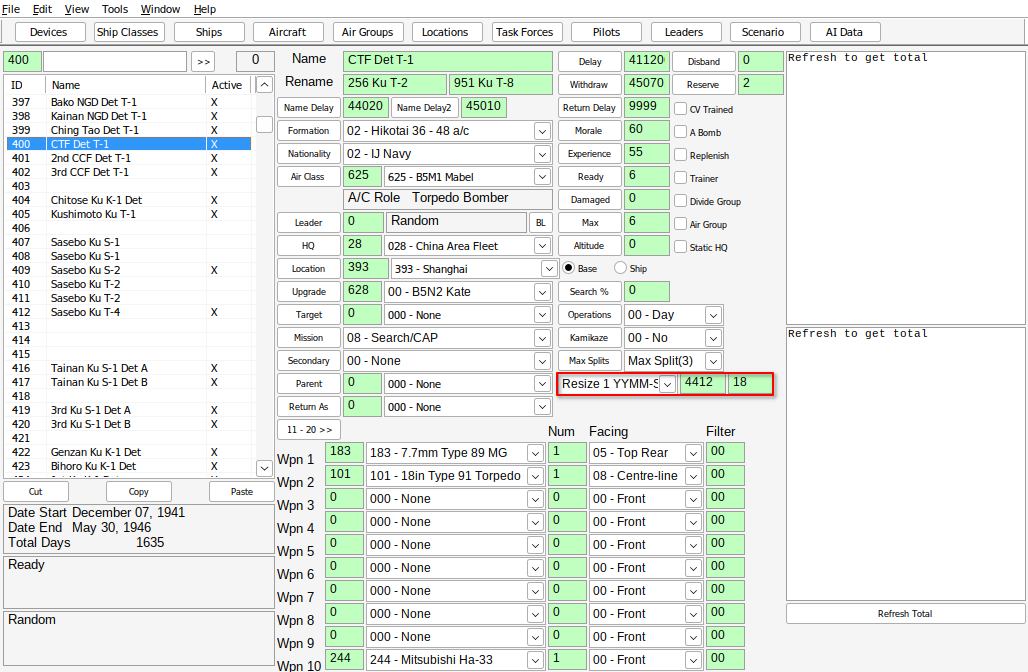
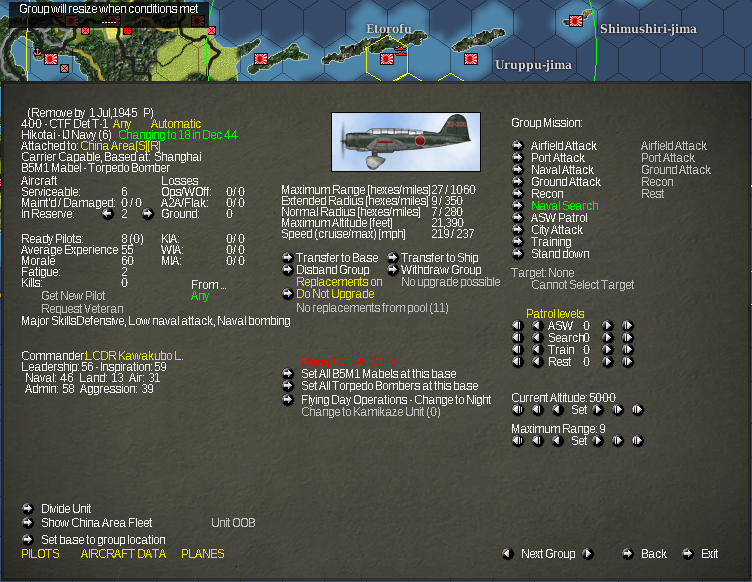
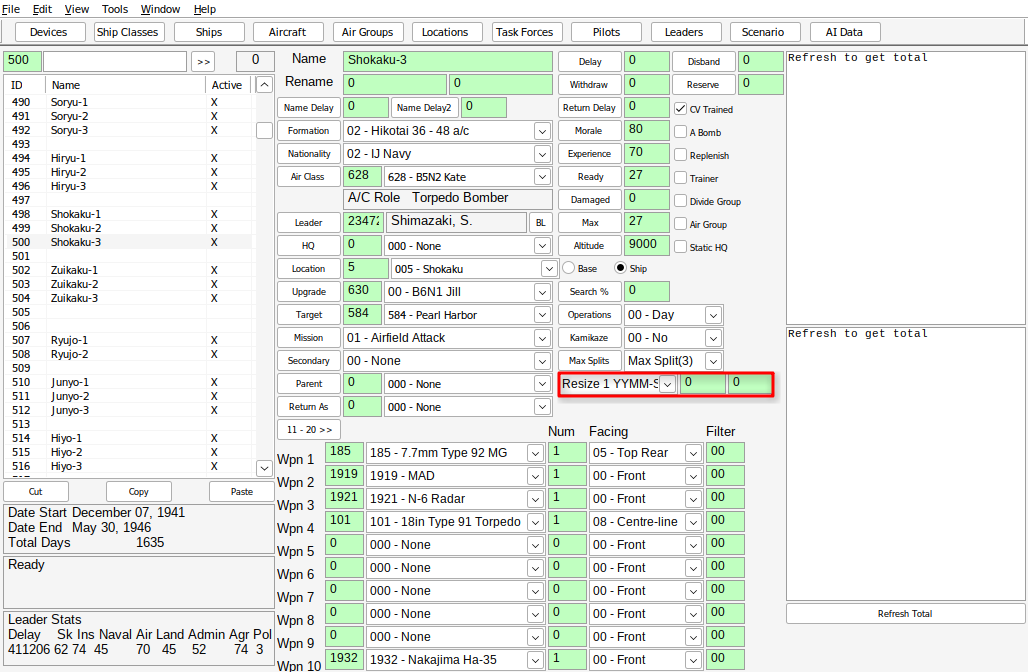
The following screenshots show what I mean by not seeing info in the editor.
For airgroup #400, the scheduled resize is listed in the editor, I have highlighted the field in red.
For airgroup #500, this is one of the ijn carrier airgroups, the scheduled resize is
not listed in the editor, I have also highlighted the empty field in red.
Both units show a scheduled resize in game.
- Bildschirmfoto_20260703_131038.png (168.25 KiB) Viewed 445 times
- Bildschirmfoto_20260703_131944.png (520.54 KiB) Viewed 445 times
- Bildschirmfoto_20260703_131118-1.png (166.84 KiB) Viewed 445 times
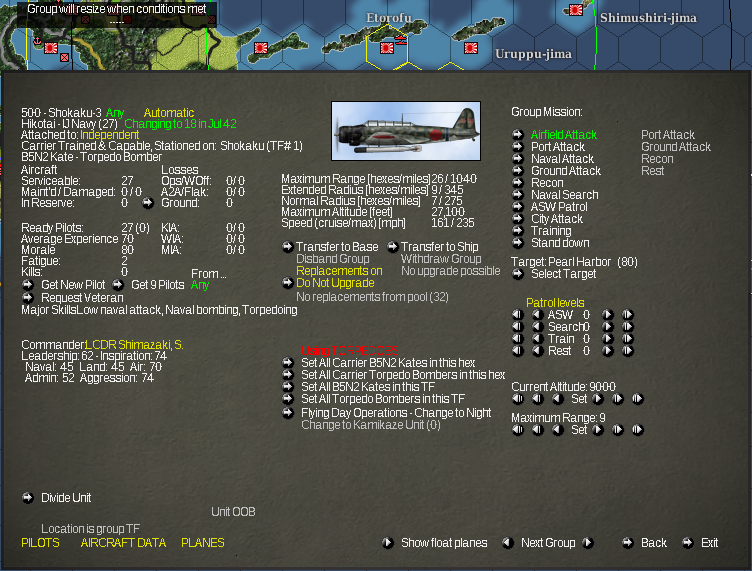
- Bildschirmfoto_20260703_131819.png (514.23 KiB) Viewed 445 times