Page 2 of 2
Re: UI bug
Posted: Tue Mar 10, 2026 3:25 pm
by Markdegamer
I think they should now yeah, just updated the graphics and chipset drivers
Here is the DxDiag
Re: UI bug
Posted: Tue Mar 10, 2026 3:46 pm
by Nikel
You did not comment on this:
- Also have you checked in the task manager, any software that is running from startup and that could interfere with CMO?
- As in the previous dxdiag file, the Microsoft Edge update error appears too many times.
If you open Microsoft Edge...Help...About, it should update automatically.
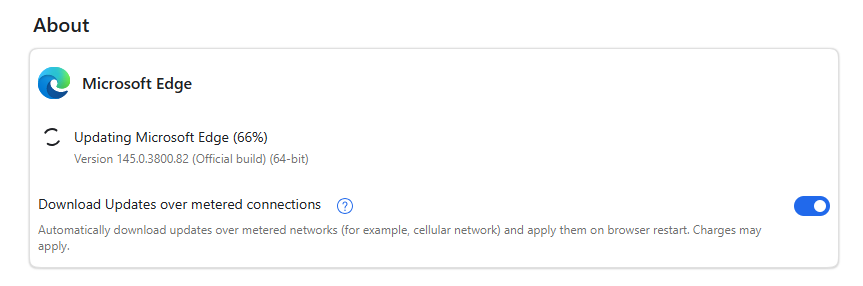
- MEU.png (18.61 KiB) Viewed 178 times
Re: UI bug
Posted: Tue Mar 10, 2026 3:52 pm
by Markdegamer
Yeah sorry, forgot to type it out. I am not entirely sure what I should be looking for when it comes to that
I do not understand what it is throwing that error as it is up to date
Re: UI bug
Posted: Tue Mar 10, 2026 4:00 pm
by Nikel
In the Task Manager...Startup Tab, the only one I have enabled is the Windows Security notification icon

But it is up to you what should be and what should not.
Running out of ideas.
Re: UI bug
Posted: Tue Mar 10, 2026 6:45 pm
by Markdegamer
I found it! It was the damn Overwolf overlay that I use for teamspeak!
Disabled it and now it functions properly!
Re: UI bug
Posted: Tue Mar 10, 2026 6:51 pm
by Nikel
Finally, enjoy the game!
But how many overlays are there?