Page 12 of 16
Re: New Forum Tips and Issues
Posted: Sat Apr 16, 2022 3:23 pm
by Jason Petho
pzgndr wrote: Sat Apr 16, 2022 1:15 pm
valeryvdr wrote: Sat Mar 26, 2022 2:46 am
Jason Petho wrote: Mon Mar 21, 2022 4:00 pm
Any news on Pinning and Unpinning threads for moderators?
This should be operational as of now.
I'm still not seeing how to do this? Please clarify how to pin/unpin threads. Thanks.
Using the management tools, they are called "Sticky" now.
"Change to Sticky" is how you do so.
Re: New Forum Tips and Issues
Posted: Sat Apr 16, 2022 7:44 pm
by pzgndr
Jason Petho wrote: Sat Apr 16, 2022 3:23 pm
Using the management tools, they are called "Sticky" now.
"Change to Sticky" is how you do so.
I see now. We have to go into Edit Post, and then Change topic type. Not intuitive. Thanks!
Re: New Forum Tips and Issues
Posted: Sun Apr 17, 2022 1:32 am
by valeryvdr
pzgndr wrote: Sat Apr 16, 2022 7:44 pm
Jason Petho wrote: Sat Apr 16, 2022 3:23 pm
Using the management tools, they are called "Sticky" now.
"Change to Sticky" is how you do so.
I see now. We have to go into Edit Post, and then Change topic type. Not intuitive. Thanks!
You do not need to Edit Post, you can do this by clicking at the Quick-mod tools menu at the bottom of the Posts List.
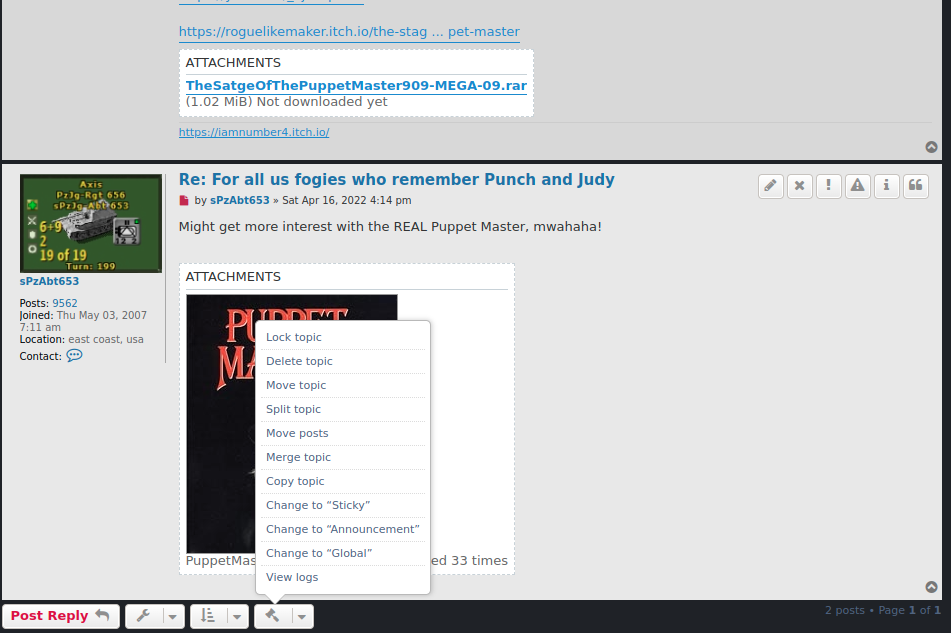
- Screenshot from 2022-04-16 21-27-29.png (126.97 KiB) Viewed 14929 times
Re: New Forum Tips and Issues
Posted: Tue Apr 19, 2022 1:04 pm
by 100thMonkey
ClaudeJ wrote: Sat Apr 16, 2022 10:59 am
100thMonkey wrote: Fri Apr 15, 2022 4:22 pm
I'm trying to attach a saved game to a post in the DW2 support thread. While creating the post, the attachement seems to be there, but as soon as I either do a preview or submit the post, the attachment disappears. It is zipped, and under 10 MB (7.254 KB according to Windows).
Here's the link to that post:
(
https://www.matrixgames.com/forums/view ... 2#p4987432)
Any idea about what's going on, or about how to make that work?
Did you press the
Place Inline button ?
It should generate a code such as
No, I had not clicked the
Place Inline button. I've just tried and it worked. Thanks!
Re: New Forum Tips and Issues
Posted: Fri Apr 22, 2022 5:41 pm
by Centuur
How can I get rid of those topics which I consider to be spam. It's annoying, irritating and even insulting to me.
One place where these topics appear is enough. To have them opening on every page in this forum makes me mad.
I don't have a huge screen, so I want to get rid of these totally uninteresting topics.
Re: New Forum Tips and Issues
Posted: Fri Apr 22, 2022 6:07 pm
by Jason Petho
Centuur wrote: Fri Apr 22, 2022 5:41 pm
How can I get rid of those topics which I consider to be spam. It's annoying, irritating and even insulting to me.
One place where these topics appear is enough. To have them opening on every page in this forum makes me mad.
I don't have a huge screen, so I want to get rid of these totally uninteresting topics.
+1
Re: New Forum Tips and Issues
Posted: Fri Apr 22, 2022 8:56 pm
by Nomad
Centuur wrote: Fri Apr 22, 2022 5:41 pm
How can I get rid of those topics which I consider to be spam. It's annoying, irritating and even insulting to me.
One place where these topics appear is enough. To have them opening on every page in this forum makes me mad.
I don't have a huge screen, so I want to get rid of these totally uninteresting topics.
Agree, on the main forum is enough, why are they in every sub forum also?
Re: New Forum Tips and Issues
Posted: Sun Apr 24, 2022 7:41 pm
by springel
Nomad wrote: Fri Apr 22, 2022 8:56 pm
Centuur wrote: Fri Apr 22, 2022 5:41 pm
How can I get rid of those topics which I consider to be spam. It's annoying, irritating and even insulting to me.
One place where these topics appear is enough. To have them opening on every page in this forum makes me mad.
I don't have a huge screen, so I want to get rid of these totally uninteresting topics.
Agree, on the main forum is enough, why are they in every sub forum also?
Because many readers only read one or two sub forums and use direct bookmarks. They would never see announcements if they were not repeated in each sub forum.
But it would be nice if they disappeared if confirmed, like the announcements on the Paradox forums.
Re: New Forum Tips and Issues
Posted: Mon Apr 25, 2022 3:05 pm
by Nomad
springel wrote: Sun Apr 24, 2022 7:41 pm
Nomad wrote: Fri Apr 22, 2022 8:56 pm
Centuur wrote: Fri Apr 22, 2022 5:41 pm
How can I get rid of those topics which I consider to be spam. It's annoying, irritating and even insulting to me.
One place where these topics appear is enough. To have them opening on every page in this forum makes me mad.
I don't have a huge screen, so I want to get rid of these totally uninteresting topics.
Agree, on the main forum is enough, why are they in every sub forum also?
Because many readers only read one or two sub forums and use direct bookmarks. They would never see announcements if they were not repeated in each sub forum.
But it would be nice if they disappeared if confirmed, like the announcements on the Paradox forums.
What I am trying to say is that on the main War in the Pacific AE forum is fine, but they are on all of the WitPAE sub forums also.
Re: New Forum Tips and Issues
Posted: Mon Apr 25, 2022 3:26 pm
by Jason Petho
What I am trying to say is that on the main War in the Pacific AE forum is fine, but they are on all of the WitPAE sub forums also.
Exactly, same for Campaign Series Vietnam. The main forum is fine, but quite excessive in all the sub forums.
Re: New Forum Tips and Issues
Posted: Thu Apr 28, 2022 7:03 pm
by Nomad
Any chance you could fix the whos online count? It always says it is me an 1 guest, no matter where I am.
Re: New Forum Tips and Issues
Posted: Thu Apr 28, 2022 7:59 pm
by BBfanboy
Nomad wrote: Thu Apr 28, 2022 7:03 pm
Any chance you could fix the whos online count? It always says it is me an 1 guest, no matter where I am.
If you click on the text "Who Is Online" you get a list, but it looks like it is for all the forums, not just the game forum you are interested in. Mind you, I am doing that in this forum, it might give the game forum only if I go back to the WITP-AE forum and try it.
EDIT - nope, I went back to the game forum and it still gave a list that is for multiple forums.
Re: New Forum Tips and Issues
Posted: Wed May 04, 2022 3:48 pm
by 100thMonkey
The attachment size limit prevents me to attach a zipped saved Distant Worlds 2 game for a bug report. Even with the maximum compression, the zip file size is 10,274KB (10,520,034 bytes). And when I try to attach it to a post, I get the following error message:

- Attachment too big.png (8.16 KiB) Viewed 13258 times
This is not my first bug report for DW2, and it worked fine before. So clearly, the game file have become too big for the forum limit. Maybe because of where I'm at in my game, or because of updates in DW2, or both...
Whatever the reason is, the forum attachment size limit is now preventing me from posting proper bug reports (with saved game attached).

And I'm sure I'm not (or will not be) alone in this situation.
The size limit needs to be increased.
Re: New Forum Tips and Issues
Posted: Wed May 04, 2022 7:50 pm
by rxnnxs
Re: New Forum Tips and Issues
Posted: Tue May 17, 2022 1:49 pm
by Lowpe
Nomad wrote: Thu Apr 28, 2022 7:03 pm
Any chance you could fix the whos online count? It always says it is me an 1 guest, no matter where I am.
+1
I think there is a toggle in your account that might be default set to hidden? Maybe?
I really miss this feature....it is motivating and sometimes very flattering especially when a developer drops by to read your AAR!

Re: New Forum Tips and Issues
Posted: Wed May 18, 2022 1:13 pm
by Yaab
YES! I finally discovered matrixgames-wide option for the forum!!
Re: New Forum Tips and Issues
Posted: Fri May 20, 2022 11:26 am
by Denniss
Just a reminder, GG WitW Forum still has an invalid link/redirect to buy it
https://www.matrixgames.com/forums/view ... hp?f=10555
2 valid buy links, one invalid, just the 2 valid ones are required
Re: New Forum Tips and Issues
Posted: Fri May 20, 2022 11:50 pm
by arvcran2
Curious question: is there a BBCode WYSIWYG editor available with this new forum software's BBCode?
Re: New Forum Tips and Issues
Posted: Wed May 25, 2022 2:53 pm
by ClaudeJ
YouTube tags doesn't seems to work.
Code: Select all
[YouTube]https://youtu.be/_qeXJWmRBks[/YouTube]
Re: New Forum Tips and Issues
Posted: Wed May 25, 2022 3:27 pm
by BBfanboy
ClaudeJ wrote: Wed May 25, 2022 2:53 pm
YouTube tags doesn't seems to work.
Code: Select all
[YouTube]https://youtu.be/_qeXJWmRBks[/YouTube]
You have a dot between the tu and the be. Is that a correct link you tried?