Page 15 of 60
RE: WitPTracker 1.0
Posted: Mon Jun 09, 2008 4:58 pm
by cantona2
first time user, why dnt i get any reports generated?
RE: WitPTracker 1.0
Posted: Mon Jun 09, 2008 5:33 pm
by saj42
ORIGINAL: n01487477
The airgroup upgraded to P-47C (does appear on the a/c screen under ID 169) and some LCUs appearing at Aden and S.F. have unknown locations. Any ideas as to the problem ???? A very low priority issue - I can live with it.
Interestingly the 348th FG arrives 43/05/15 ... SO is this an arrival in fragments or from a TF unloading ? Or a pure upgrade ?
Game date is 43/08/23 - they arrived with a previous a/c model and I upgraded them in theatre. Unit was split over two bases. I noticed I had enough of the new model in the pool so I upgraded all 3 sub-units in the same turn.
RE: WitPTracker now at 1.1.1
Posted: Mon Jun 09, 2008 5:40 pm
by cantona2
This is the error message im getting
C:\Users\Jonathan\Desktop\Tracker>java -jar "WitPTracker.jar"
Initializing WitP Tracker database.
java.sql.SQLException: Numeric value out of range
at org.hsqldb.jdbc.Util.sqlException(Unknown Source)
at org.hsqldb.jdbc.jdbcStatement.fetchResult(Unknown Source)
at org.hsqldb.jdbc.jdbcStatement.executeUpdate(Unknown Source)
at witptracker.Database.InsertRow(Database.java:56)
at witptracker.LCU.InsertSmallDelta(LCU.java:336)
at witptracker.LCU.InsertInTable(LCU.java:315)
at witptracker.SaveFileReader.ReadLocationInfo(SaveFileReader.java:1131)
at witptracker.SaveFileReader.<init>(SaveFileReader.java:83)
at witptracker.Main.main(Main.java:108)
Insert Error code = -65
Table=LCUSmallDelta Values=(185,11,16,-1543503872)
RE: WitPTracker now at 1.1.1
Posted: Tue Jun 10, 2008 2:57 am
by floydg
ORIGINAL: cantona2
This is the error message im getting
C:\Users\Jonathan\Desktop\Tracker>java -jar "WitPTracker.jar"
Initializing WitP Tracker database.
java.sql.SQLException: Numeric value out of range
at org.hsqldb.jdbc.Util.sqlException(Unknown Source)
at org.hsqldb.jdbc.jdbcStatement.fetchResult(Unknown Source)
at org.hsqldb.jdbc.jdbcStatement.executeUpdate(Unknown Source)
at witptracker.Database.InsertRow(Database.java:56)
at witptracker.LCU.InsertSmallDelta(LCU.java:336)
at witptracker.LCU.InsertInTable(LCU.java:315)
at witptracker.SaveFileReader.ReadLocationInfo(SaveFileReader.java:1131)
at witptracker.SaveFileReader.<init>(SaveFileReader.java:83)
at witptracker.Main.main(Main.java:108)
Insert Error code = -65
Table=LCUSmallDelta Values=(185,11,16,-1543503872)
It's trying to insert a very large number for supply needed into the database and it fails. There must be some problem with how the information is being read from the file. Can you send me the save file and the witptracker.properties file to
witptracker@gmail.com?
In the mean time, you can remove the trackerdb files (usually four of them) and read in a different turn and see if that works.
Floyd
RE: WitPTracker 1.0
Posted: Tue Jun 10, 2008 2:58 am
by floydg
ORIGINAL: Tallyho!
Thankyou Floyd for pointing out my installation error [&o] - I should learn to read the instructions correctly.
Anyways now I've got this running I see a few anomalies on the alert screen (see attached). The airgroup upgraded to P-47C (does appear on the a/c screen under ID 169) and some LCUs appearing at Aden and S.F. have unknown locations. Any ideas as to the problem ???? A very low priority issue - I can live with it.
for info I'm playing BB 1.31 on Ex-map (imported the bb 1_4X txt file for region locations)
There is something fishy about how the alerts get the information. I'll have to take a better look at that (I've seen it myself, too).
Floyd
RE: WitPTracker now at 1.1.1
Posted: Tue Jun 10, 2008 11:00 am
by n01487477
In spite of having a pdf file, due to some requests ...
Started a small tutorial section on my AAR ... Will be bringing various updates over the next few weeks & as needed ...
I'll keep a link at the top of the first page of the AAR to each of the sections for convenience and so you don;t have to read my penmanship.
I start by looking at Basic Clusters, Air Production & LCU Production 101.
tm.asp?m=1822230
Any suggestions or queries please pm me, I'd rather have the AAR as clean as possible. Unless it is about the WAR ...
RE: WitPTracker 1.0
Posted: Tue Jun 10, 2008 12:29 pm
by rhohltjr
Sorry if this has been asked many times before, however are there plans to provide this tool for the Admirals Edition? Will it already work for that ?
Thanks in advance,
rhohltjr[:)]
RE: WitPTracker 1.0
Posted: Tue Jun 10, 2008 12:39 pm
by floydg
ORIGINAL: rhohltjr
Sorry if this has been asked many times before, however are there plans to provide this tool for the Admirals Edition? Will it already work for that ?
Thanks in advance,
rhohltjr[:)]
The save file format is supposed to be different, so, although we'd like to, there are presently no plans to offer this for AE.
RE: WitPTracker now at 1.1.1
Posted: Tue Jun 10, 2008 3:35 pm
by cantona2
ORIGINAL: floydg
ORIGINAL: cantona2
This is the error message im getting
C:\Users\Jonathan\Desktop\Tracker>java -jar "WitPTracker.jar"
Initializing WitP Tracker database.
java.sql.SQLException: Numeric value out of range
at org.hsqldb.jdbc.Util.sqlException(Unknown Source)
at org.hsqldb.jdbc.jdbcStatement.fetchResult(Unknown Source)
at org.hsqldb.jdbc.jdbcStatement.executeUpdate(Unknown Source)
at witptracker.Database.InsertRow(Database.java:56)
at witptracker.LCU.InsertSmallDelta(LCU.java:336)
at witptracker.LCU.InsertInTable(LCU.java:315)
at witptracker.SaveFileReader.ReadLocationInfo(SaveFileReader.java:1131)
at witptracker.SaveFileReader.<init>(SaveFileReader.java:83)
at witptracker.Main.main(Main.java:108)
Insert Error code = -65
Table=LCUSmallDelta Values=(185,11,16,-1543503872)
It's trying to insert a very large number for supply needed into the database and it fails. There must be some problem with how the information is being read from the file. Can you send me the save file and the witptracker.properties file to
witptracker@gmail.com?
In the mean time, you can remove the trackerdb files (usually four of them) and read in a different turn and see if that works.
Floyd
Mail sent Floyd
Cheers.
I tried running the latest received turn. No error messages but no reports either
RE: WitPTracker now at 1.1.1
Posted: Thu Jun 12, 2008 11:05 am
by Matto
I have problem find, that my production of HI is low ... where it is possible to see. I just see, that stock is xxxx, next turn xxxx +100 next turn xxxx -120 etc. but in fact I have not enough and some of my production is not in use because of lack of HI ...[/align]TY[/align]
RE: WitPTracker now at 1.1.1
Posted: Thu Jun 12, 2008 11:30 am
by n01487477
OK there are many places to save on HI ...
The first place to look is on the chart ... see the explanation
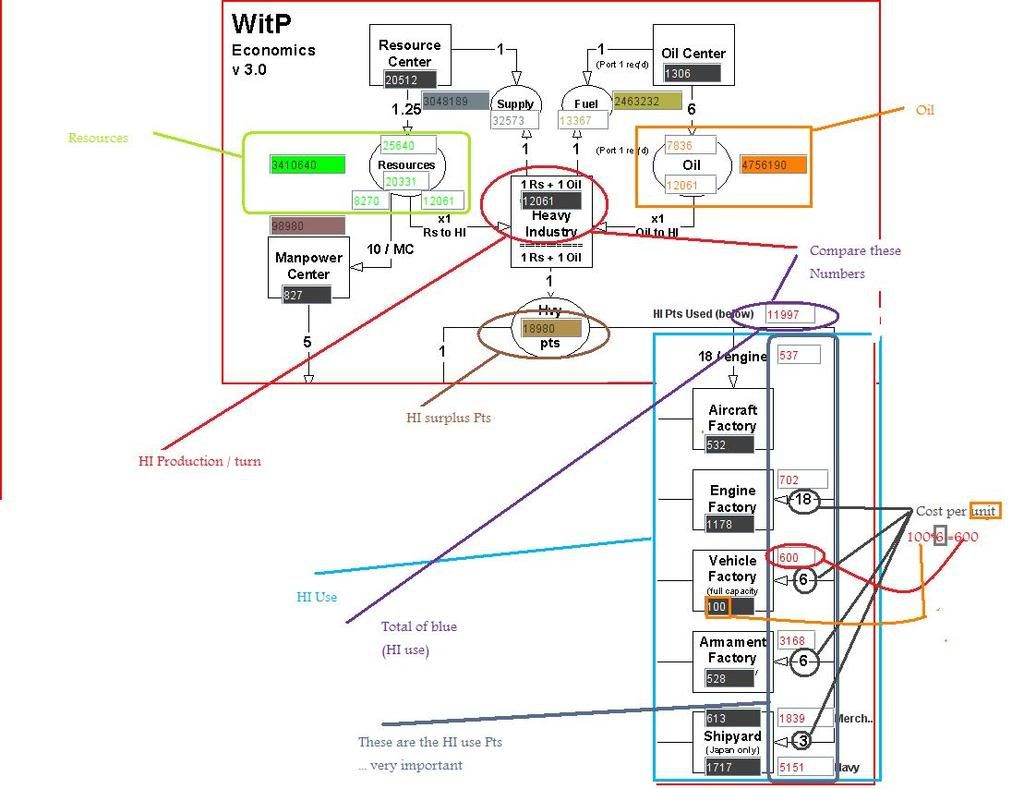
And then check you have enough Raw materials ...
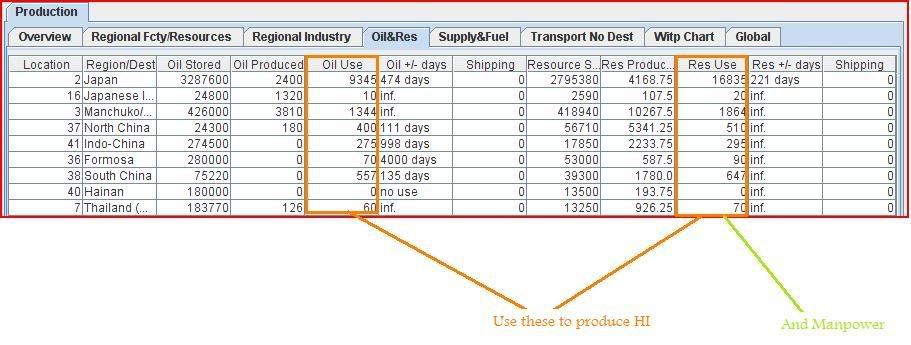
So the BIG questions are:-
DO YOU HAVE OIL AND RESOURCES AT THESE PLACES ?
ARE YOU OVERPRODUCING SOMETHING YOU DON"T NEED ?
Then turn off what you don't need ... if you have a surplus ...
[*] I usually check merchant shipyards first
[*] then ARM / VEH
[*] then streamline your airproduction ...
Started a small tutorial section on my AAR ... Will be bringing various updates over the next few weeks & as needed ...
I'll keep a link at the top of the first page of the AAR to each of the sections for convenience and so you don;t have to read my penmanship.
I start by looking at Basic Clusters, Air Production & LCU Production 101.
tm.asp?m=1822230
Or check out Johns AAR ... we have done a bit of chat about it on this site ...
fb.asp?m=1811761
Any suggestions or queries please pm me, I'd rather have the AAR as clean as possible. Unless it is about the WAR ...
And I am in the process of making a better tutorial for Production shortly ... and improving the Production screens
RE: WitPTracker now at 1.1.1
Posted: Fri Jun 13, 2008 12:27 am
by 2ndACR
Does it read the turns after you end your turn or should you copy them over before you end your turn? And is there a limit on how many turns it will store?
RE: WitPTracker now at 1.1.1
Posted: Fri Jun 13, 2008 12:51 am
by n01487477
ORIGINAL: 2ndACR
Does it read the turns after you end your turn or should you copy them over before you end your turn? And is there a limit on how many turns it will store?
Either way is fine..BUT tracker can only read once per turn.
As I play as the Japanese, I usually run the combat turn, then save before I do anything and load the turn into Tracker, then have it open and WITP windowed and do my changes. But it's up to the individual.
A mid-turn save is also good, if you do the economics first, then you can see the results and make adjustments ... then go onto lcu's etc ...
Theoretically, there is no limit to the number of turns stored, but as this is still being polished ... I'm only keeping about 10-20 Days data ... and realistically, that's all I want to see.
RE: WitPTracker now at 1.1.1
Posted: Fri Jun 13, 2008 12:57 am
by floydg
ORIGINAL: 2ndACR
Does it read the turns after you end your turn or should you copy them over before you end your turn? And is there a limit on how many turns it will store?
Whichever way you go, keep doing that way. Especially for the Allies. Once you finalize the turn, I think the turn number gets bumped up, which is the key to allowing (or disallowing) a turn from being read in.
With the database, there is no fixed limit, but we never tested with 100's of turns.
Floyd
RE: WitPTracker now at 1.1.1
Posted: Fri Jun 13, 2008 3:00 pm
by Chris21wen
Error 65 keeps occuring. I deleted the db files and started again the jpg is from the initialization. I've also had error 104.

RE: WitPTracker now at 1.1.1
Posted: Fri Jun 13, 2008 4:57 pm
by Chris21wen
Its v1.1.1
I've two games going PMEB as Japan its OK and one allies v AI and that the one thats ging the error. Check Witptracker.properties for both and they are OK. Note tracker is installed in two different folders enabling me to do this.
This is the setting for the one giving the error.
Dir=[C:\Matrix Games\War in the Pacific]
GameType=[0]
Side=[1]
Password=[abc123]
SaveFile=[witp007.pws]
RE: WitPTracker now at 1.1.1
Posted: Sat Jun 14, 2008 12:53 am
by floydg
ORIGINAL: Chris H
Error 65 keeps occuring. I deleted the db files and started again the jpg is from the initialization. I've also had error 104.
The ship seems to have 64,225 resources loaded. I don't think that's correct, but it's what the save file seems to indicate. If you send me the save file, I can see what's really there.
In the mean time, you can ignore the error - the ship would show with 0 resources loaded.
Floyd
RE: WitPTracker now at 1.1.1
Posted: Mon Jun 16, 2008 12:17 pm
by Matto
ORIGINAL: n01487477
OK there are many places to save on HI ...
The first place to look is on the chart ... see the explanation
...
So the BIG questions are:-
DO YOU HAVE OIL AND RESOURCES AT THESE PLACES ?
ARE YOU OVERPRODUCING SOMETHING YOU DON"T NEED ?
Then turn off what you don't need ... if you have a surplus ...
[*] I usually check merchant shipyards first
[*] then ARM / VEH
[*] then streamline your airproduction ...
And I am in the process of making a better tutorial for Production shortly ... and improving the Production screens
Thanks for answer ... it helps. I can compare it with witpdecoder which I was used before ... how it looks, I'm producting too many ARMs ... after some reduction it is fine
RE: WitPTracker now at 1.1.1
Posted: Mon Jun 16, 2008 11:11 pm
by HercMighty
Started a grand campaign playing as Allies and on the Air Production screen the Engine column are "0" no names.
Is this supposed to be that way?
Also, on the upgrade tab for engine it lists unknown type.
RE: WitPTracker now at 1.1.1
Posted: Mon Jun 16, 2008 11:16 pm
by n01487477
Started a grand campaign playing as Allies and on the Air Production screen the Engine column are "0" no names.
Is this supposed to be that way?
Also, on the upgrade tab for engine it lists unknown type.
Only the Japanese produce engines, therefore there are no entries for the Allied player... And I am endeavouring to improve the upgrade panel for Allied players ... Good luck and I hope Tracker serves you well ...