Page 3 of 5
RE: Change Graphics to Non-Nato Icons
Posted: Thu Nov 23, 2017 7:27 pm
by PoorOldSpike
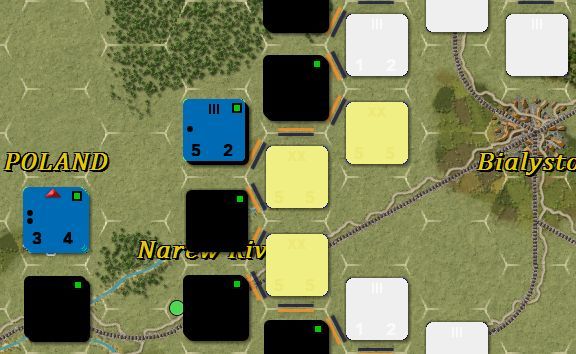
Well I did a few brief scribbles on the file h_counterunits (as in post 35) and this is the result, a total mess. If somebody cares to contact me to tell me the exact steps I need to take to do it properly I'll be happy to have another crack at it-
RE: Change Graphics to Non-Nato Icons
Posted: Thu Nov 23, 2017 8:21 pm
by sPzAbt653
If you have Skype you can always call me, but kinda have to let me know when. But first I think you used the file from Post #35, which won't work. You need to use the CounterUnits.png from the Graphics file.
RE: Change Graphics to Non-Nato Icons
Posted: Thu Nov 23, 2017 9:54 pm
by PoorOldSpike
ORIGINAL: sPzAbt653
If you have Skype you can always call me, but kinda have to let me know when. But first I think you used the file from Post #35, which won't work. You need to use the CounterUnits.png from the Graphics file.
I'm not on Skype, but if you or anybody cares to email me that'd be fine- pooroldspike (at) aol (dotcom).
And I did use the file 'h_counterunits' from the graphics folder, I did some experimental squiggles on all the counters but as you see in my post 41 they came out in different clours, and some had numbers and little green squares on them.
Also, at the zoomed out levels they all revert back to the standard stock icons.
RE: Change Graphics to Non-Nato Icons
Posted: Thu Nov 23, 2017 10:23 pm
by Meyer1
ORIGINAL: sPzAbt653
Prior to TOAW IV, we had 100+ Counter Sheets to work with, making modifications a snap. TOAW IV absent-mindedly reduced that to one sheet, making modifications near impossible. So what you see in Post #35 is all you get. We need this situation to be corrected, so I will gripe about it at every opportunity. However, my voice alone carries little weight, so more of you need to speak up so that we can get something done. Half measures will not work, we need FULL modification abilities returned.
Wonder what was the logic behind the change, oh well.
RE: Change Graphics to Non-Nato Icons
Posted: Thu Nov 23, 2017 10:47 pm
by Silvanski
BMP's were a piece of cake to mod. Even with Irfanview's pedestrian draw application.
RE: Change Graphics to Non-Nato Icons
Posted: Fri Nov 24, 2017 7:41 am
by sPzAbt653
I did use the file 'h_counterunits'
Skype is free and easy, except you have to buy a mic if you don't have one. It comes in handy for long distance conversations, I have had quite many with other scenario designers. Sometimes typing is time consuming and difficult to understand [;)]
h_counterunits is only for one of the zoom levels, as are the 's_units' and Micro views. You want the 'counterunits' to start with.
RE: Change Graphics to Non-Nato Icons
Posted: Fri Nov 24, 2017 6:44 pm
by PoorOldSpike
ORIGINAL: sPzAbt653
Skype is free and easy..
I tried Skype a while back when a guy was helping me get a game working, but I had to keep saying "Slow down a bit mate, I'm writing down everything you say for future reference".
We got there in the end but it'd have been much quicker and efficient for both of us if he'd simply sent me an email in the first place!
PS- I'm in my 60's, maybe today's younger snowflake generation is shy of giving away their email address, I dunno..

RE: Change Graphics to Non-Nato Icons
Posted: Fri Nov 24, 2017 7:04 pm
by sPzAbt653
I get that, but from my view, trying to help out, it's an awful lot of typing when we don't know each other. A quick call and in a minute or two I can gauge what I need to tell you. For example, I spend time typing out detailed instructions for 20 minutes, and the reply is 'ok thanks, too much for me'. So, I'm glad to help, but a call would suit the purpose initially.
RE: Change Graphics to Non-Nato Icons
Posted: Sat Nov 25, 2017 6:10 am
by jnpoint
RE: Change Graphics to Non-Nato Icons
Posted: Sat Nov 25, 2017 8:17 am
by sPzAbt653
Is it possible to switch the icons around so the 2D map uses the 3D icons?
In theory I think it is possible, by copying all the 2D map files and then renaming them as the 3D map files, then replacing the original 3D files with the newly renamed ones, I think. But I wouldn't do it myself unless several people asked for it. I'd rather that someone who wants such a thing do it themselves, but I shouldn't be so selfish [;)]
This means you would copy all the Graphics files titled 'tile_' and then rename them as you see the 'D3' tiles named. I think.
RE: Change Graphics to Non-Nato Icons
Posted: Sat Nov 25, 2017 10:27 am
by 76mm
ORIGINAL: sPzAbt653
...and some of these icons have obvious attributes that restrict their use for particular purposes.
What does the line above mean--does the program assign certain attributes to a unit if you select certain icons, or do you mean that the icons just indicate attibutes, but don't actually have any effect on the unit?
RE: Change Graphics to Non-Nato Icons
Posted: Sat Nov 25, 2017 10:48 am
by 76mm
ORIGINAL: sPzAbt653
Put the modified sheet into a scenario specific folder for it to be used. Hopefully someday we will have the ability to modify multiple sheets.
Just for clarity, does it go in the scenario folder, or the scenario's graphic override folder?
[EDIT]Nevermind, it seems to work in the graphics override folder.
I just added an icon for armored TD--currently the sheet has assault gun, and armored TD artillery, so I just removed the dot from the latter.
RE: Change Graphics to Non-Nato Icons
Posted: Sat Nov 25, 2017 11:39 am
by sPzAbt653
ORIGINAL: 76mm
ORIGINAL: sPzAbt653
...and some of these icons have obvious attributes that restrict their use for particular purposes.
What does the line above mean--does the program assign certain attributes to a unit if you select certain icons, or do you mean that the icons just indicate attributes, but don't actually have any effect on the unit?
Some are quite obvious. For example, changing the fighter icon to a tank icon doesn't give you a tank, it's still a fighter. Some are not so obvious. For example, change a HQ icon to a combat unit icon, and you still have a HQ which will attempt to stay out of the front lines in order to protect itself.
RE: Change Graphics to Non-Nato Icons
Posted: Sat Nov 25, 2017 11:41 am
by sPzAbt653
Just for clarity
Putting custom graphics in the graphic override folder will cause them to be used in all scenarios.
Putting custom graphics in a scenario specific folder located inside the graphic override folder will cause them to be used in that specific scenario only.
RE: Change Graphics to Non-Nato Icons
Posted: Sat Nov 25, 2017 3:25 pm
by SIPRES
just a test with tank unit
Shame that we cant have access to counters colors anymore, its seems to be hardcoded.

RE: Change Graphics to Non-Nato Icons
Posted: Sat Nov 25, 2017 3:31 pm
by sPzAbt653
Well, it goes against my religion, but at least I am fair:
tm.asp?m=4385511
Nice to see you working your majic here, Sipres !
RE: Change Graphics to Non-Nato Icons
Posted: Sat Nov 25, 2017 3:37 pm
by SIPRES
Just read the thread from Curtis
so still do able, but not so obvious.
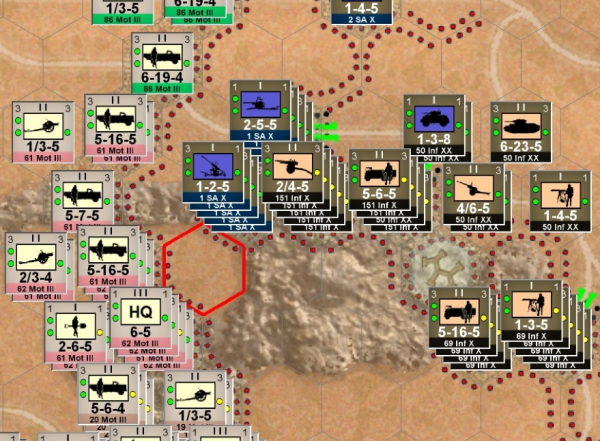
I may do so try at least for the silhouettes vs Natos (a WW2 version)
RE: Change Graphics to Non-Nato Icons
Posted: Sat Nov 25, 2017 8:51 pm
by PoorOldSpike
(Forthcoming 'Desert War 1940-1942'), Wow, nice ..

RE: Change Graphics to Non-Nato Icons
Posted: Sat Nov 25, 2017 9:20 pm
by 76mm
ORIGINAL: sPzAbt653
Some are quite obvious. For example, changing the fighter icon to a tank icon doesn't give you a tank, it's still a fighter. Some are not so obvious. For example, change a HQ icon to a combat unit icon, and you still have a HQ which will attempt to stay out of the front lines in order to protect itself.
Sorry, I'm still not totally understanding. Let's say I have an infantry unit and decide to give it a HQ icon instead of infantry, although all of the other attributes remain those of an infantry unit. Are you saying that just by assigning an HQ icon I will be affecting how the unit behaves in the game? As I mentioned, I changed one of the aviation icons to a TD unit--will that have weird affects on my TDs?
ORIGINAL: sPzAbt653
Putting custom graphics in the graphic override folder will cause them to be used in all scenarios.
Putting custom graphics in a scenario specific folder located inside the graphic override folder will cause them to be used in that specific scenario only.
Well in retrospect that makes sense but someone didn't get it till just now--thanks.
RE: Change Graphics to Non-Nato Icons
Posted: Sat Nov 25, 2017 9:34 pm
by sPzAbt653
Are you saying that just by assigning an HQ icon I will be affecting how the unit behaves in the game?
Oh my gosh, I said nothing like that. I said giving an icon to unit does not change the unit.
I changed one of the aviation icons to a TD unit--will that have weird affects on my TDs?
So you did nothing to change the aviation unit, other than to make it look like a TD. Now your TD will move and fight like a plane.
The program has no idea what graphical changes you are making. For example, take the Armor Icon and replace it with the words SHIT UNIT, and it will still be an Armor Unit, it has no idea that it is supposed to be a Shit Unit. Take a German Chocolate cake and cover it in American White Frosting, it is still a German Chocolate cake, it just looks funny.