RE: WitPTracker 1.2
Posted: Sun Sep 14, 2008 2:35 pm
This is from RHS CVO 7.7975 ... I loaded this scenario with no problems (both sides) ... so unless I am using the wrong scenario or Mistmatz has a different mod ...

What's your Strategy?
https://forums.matrixgames.com:443/
ORIGINAL: n01487477
This is from RHS CVO 7.7975 ... I loaded this scenario with no problems (both sides) ... so unless I am using the wrong scenario or Mistmatz has a different mod ...
ORIGINAL: OSO
...
What does this have to do with Tracker you might be wondering? As a last ditch effort to fix this problem I restored the PC to a restore point a week prior when I knew the monitor worked in Vista, but I did it in XP because I didn't have a restore point that was more than a few hours old in Vista. That didn't fix the problem. I had to replace the monitor with a different brand. When I loaded my new turn into the tracker the system restore seemed to have lost all the turns I had processed in the past week. I don't know if there is a way for you guys to program this so the files aren't restored. I just started over with my tracking from my current turn. It isn't a big deal but I wanted others to be aware that they need to back up their tracker files to external media before the do a system restore.
ORIGINAL: floydg
ORIGINAL: Mistmatz
Seems I was a bitt to quick mentioning that it works with RHSCVO. It works pretty much but I found some inconsistencies.
For example in menu air production, column Avail yy/mm shows 39/1 for the Corsair I. I checked in WitP itself, the availibility here is far later (cant remember exact date). The amount of unrepaired factories and the factory location are ok though.
So I did a fresh install of the tracker and found out there is an error message at the beginning. Eventually this messes something up, but as tracker lives out of a save file and not the scenario data I'm puzzled how I could try to repair that. The error message is:
... screenie removed ...
Looks like these guys have an endurance of 48864. Is that right? If so, then I'll have to bump up the database column size for this. [:(]
ORIGINAL: OSO
For example I can create a document in any software. Save it. Restore the OS using system restore and the document doesn't get changed or destroyed. In the case of tracker, the data was reverted back by the system restore function. I don't really expect you guys to change the code for something like this. But users should be aware that they need to back up the database created by the tracker to external media to avoid the problem.
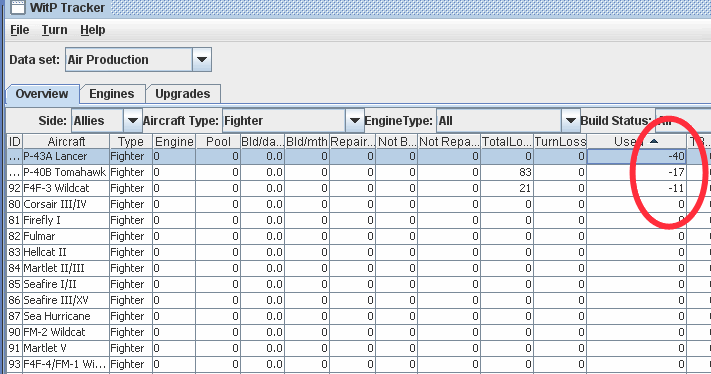
ORIGINAL: n01487477
Mistmatz,
where did you get this mod ? What version are you running ? The only concern I have is that the file is somehow corrupted and hence giving wrong information, although I doubt it ... I'd just like to double check everything. Can you send me the scenario files please ... or give us a screen shot of the ship class (like I did in the database editor)
Floyd,
yeah the information is all I could find about it, and I did look at 871, there is nothing there in my version of the mod.
Michael,
the map is golden, glad AE will implement something like it ...
--Damian--

ORIGINAL: BigBadWolf
Should I be seeing this?I'm playing as Japan
ORIGINAL: Mistmatz
ORIGINAL: n01487477
Mistmatz,
where did you get this mod ? What version are you running ? The only concern I have is that the file is somehow corrupted and hence giving wrong information, although I doubt it ... I'd just like to double check everything. Can you send me the scenario files please ... or give us a screen shot of the ship class (like I did in the database editor)
Floyd,
yeah the information is all I could find about it, and I did look at 871, there is nothing there in my version of the mod.
Michael,
the map is golden, glad AE will implement something like it ...
--Damian--
Damian, I got the files from the RHS primary distributon list, so they are directly from the source. The version is RHSCVO 7.946. Attached a screenshot of the class with endurance 48864. Obviously there is an overflow if displayed with the editor V6. Question is how WitP itself handles this number...
EDIT: The runner ups with endurance of 32750 are displayed ok, so its just this class.
EDIT2: Just checked the cls file again and it states 48864 in that particular field (as recognized by WitP tracker).
ORIGINAL: Mistmatz
Something totally different... [8D]
I thought about user friendliness and things I miss in the tracker and had those ideas. Didn't read every earlier posting, so if this has been mentioned just ignore it.
- Aircraft comparison currently offers comparison of two planes, why not widen that to three or four. Alphabetical sorting of types would also be nice.
- Unless I know the class of an opponent vessel it's not possible to check out the stats as 'ships' shows only own vessels (correct due to the information provided in this sheet). Some information sheet would be nice showing all opposing vessel names and their class. Otoh this might give useful information away you wouldn't have if you just look at your own side of the game, so maybe better not. [&:]
ORIGINAL: floydg
...
- Unless I know the class of an opponent vessel it's not possible to check out the stats as 'ships' shows only own vessels (correct due to the information provided in this sheet). Some information sheet would be nice showing all opposing vessel names and their class. Otoh this might give useful information away you wouldn't have if you just look at your own side of the game, so maybe better not. [&:]
It doesn't look like the game readily gives that info. I suppose you could fire up the editor to see it -- I wonder if WitPLoad or any of the other extraction tools list the opposing ships with classes...
ring by side and only your side will be shown).
Floyd
ORIGINAL: Ambassador
Hi,
I have two minor "bugs" to report, two suggestions to make, and one question to ask.
And one more, maybe unrealistic, idea.
***
In the Alert panel, the Turn number column is still sorted "as text", not "as number".
That is, when you sort it, you get something like this :
1
10
11
12
13
14
...
19
2
20
21
22
...
3
4
5
6
7
8
9
instead of a more normal :
1
2
3
4
...
9
10
11
12
13
...
It's not important, but it nearly made me read a turn twice, thinking it didn't work the first time.
***
Another glitch. In the Ship Repair panel, the Port tab show a slightly delayed situation. It lists ships berthed in port for a few turns after they left in a TF, and it needs several turns to show newly docked/anchored ships.
*
An interesting addition to this same panel/tab would be the durability of each ship, shown in the table in addition to the damage of the ships. WitPTracker already shows the total durability of the damaged ships, but if this could be given for each ship individually, it'd be IMVHO better.
***
Another "relatively simple" suggestion, I believe : some more comments column (like in the ships sunk tab). Not everywhere, but at least in the Turn List box, as well as the LCU, Ship & Air Group panels.
***
Lastly, the question. I haven't found the number of sorties made by each side. Is it already implemented, or not yet ? If it is, could you tell me where to find it ?
As for the maybe unrealistic idea, it concerns the combat reports. Do you plan to include a panel listing all combats, split in various tabs according to the type (land, air, naval, naval bombardment and air bombardment).
I don't know if the combat report is included in the save in addition, or if it would need to refer to the combat report file.
The various tabs could be filtered by turn, location, maybe size of the opposing forces (in scales, like 1-99 AV, 100-199 AV, 200-499 AV, 500-999 AV, 1000-1999 AV, 2000+ AV for ground forces). The table could include, for example of land combat, force composition (men, guns, vehicle), max AV, adjusted AV for both sides, odds, reduction of forts, casualties (men/guns/vehicles) for each side, and whether there's a surrender, a retreat or a capture of a base.
I don't know if all this is possible, it's merely an idea I had. If not possible or too difficult, just turn it down.[;)]
quote:
An interesting addition to this same panel/tab would be the durability of each ship, shown in the table in addition to the damage of the ships. WitPTracker already shows the total durability of the damaged ships, but if this could be given for each ship individually, it'd be IMVHO better.
***
from Dtravel
Shipyard Repair uses Repair Points equal to the ship’s Durability +20. I.E., a DUR 5 DD will use 25 Repair Points, a DUR 120 CV will use 140. This is confirmed from actual play, the manual is incorrect on this point.
I'm using the version I downloaded a few days ago, maybe a week. I made sure to make a full fresh install of the program, starting a new database rather than converting the previous one (as my game was only five turns old anyway).ORIGINAL: floydg
Are you sure you're using the latest version? I thought that I fixed this a while back. If the text in a cell is right-justified, it will sort numerically and if it's left-justified, it will use an ASCII string sort. Typically.
Oh, ok. Thank you.It seems that you need to re-start the program for the port-based view to refresh.
Fine, glad to help.
Good idea. I'll try to add that in.
I saw it in the sunk ships and VPs, not in ships. It'd be helpful for OOB organization in the LCU/Air groups.
I have it in ships, sunk ships and victory points. I can add it to LCU and Air Groups.
It's not important, mostly for pure information about "global air balance". And the ratio of losses, especially operational, compared to #sorties.
I didn't add that in. If it's helpful, I can add it.
I feared that first part of your answer, but the second is hopeful.[;)]
The combat report information is only in the text file, not in the save game file. Maybe some day we'll read the text files.
Floyd