In Game map pics
Posted: Mon Sep 03, 2007 7:03 am
Since I joined in on these forums a short while ago I've seen a few questions regarding strategies concerning postions on the map of friednly and enemy forces. Although general strategies advice could be passed along some may want a closer look at the situation. I'm sure others use this but I haven't seen it here yet so I thought it may be something useful to pass along.
If there is a screen capture in game I can't find it so i d/l a shareware one and gave it a shot. -
The proggy used is: Any Capture 3.12
The default screen cap key is: ctrl+shift+alt+c for a client program like WITP.
Thought I'd pass along the idea in case it may help with tactical examples or questions.
EDIT* Smaller area can be zoomed in on and cropped out to use localized areas where relevent forces are engaged for much better detail.
If there is a screen capture in game I can't find it so i d/l a shareware one and gave it a shot. -
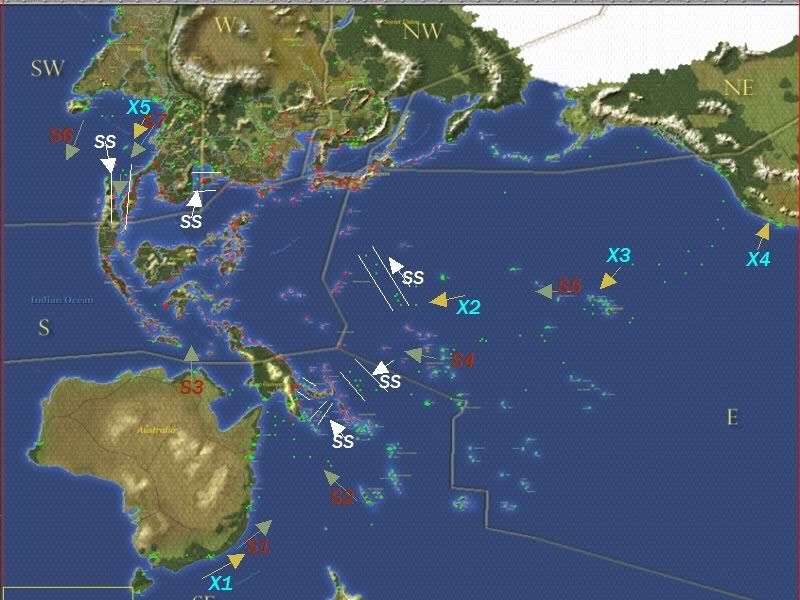
- Blue X# designate CV positions and gold arrow indicate direction of travel or intended area of control
- White lines indicate SS coverage of supposed shipping lang and white arrow indicate direction of attack on inbound shipping.
- Dark red S# indicate significant surface combat Groups including capital ships and Green arrow indicate direction of travel or intended area of coverage.
The proggy used is: Any Capture 3.12
The default screen cap key is: ctrl+shift+alt+c for a client program like WITP.
Thought I'd pass along the idea in case it may help with tactical examples or questions.
EDIT* Smaller area can be zoomed in on and cropped out to use localized areas where relevent forces are engaged for much better detail.