Page 1 of 1
Transferring Units?
Posted: Tue Mar 09, 2010 7:36 pm
by Naughteous Maximus
When transferring units from one army to another, does the color code change? eg. Tranferring a division from 1st Panzer army to 4th Panzer army, division color changes from 1st Panzer to that of 4th Panzer?[&:]
RE: Transferring Units?
Posted: Tue Mar 09, 2010 7:37 pm
by Great_Ajax
Yes.
RE: Transferring Units?
Posted: Fri Mar 12, 2010 7:21 pm
by wiking62
Is there any form of strategic deployment in the game, or do we have to manually move every unit that is re-assigned to a different command/sector?
RE: Transferring Units?
Posted: Fri Mar 12, 2010 7:41 pm
by elmo3
ORIGINAL: hart2412
Is there any form of strategic deployment in the game, or do we have to manually move every unit that is re-assigned to a different command/sector?
You move units manually. If they are moving a long way rail movement works best.
RE: Transferring Units?
Posted: Fri Mar 12, 2010 7:49 pm
by ComradeP
Elmo: Earlier you mentioned a national strategic air reserve or the like, where you rest/train units. How do you move units to that reserve (is it a switch, do they have to travel back to Germany?) and where do they reappear if you pull them back out?
RE: Transferring Units?
Posted: Fri Mar 12, 2010 8:00 pm
by elmo3
ORIGINAL: ComradeP
Elmo: Earlier you mentioned a national strategic air reserve or the like, where you rest/train units. How do you move units to that reserve (is it a switch, do they have to travel back to Germany?) and where do they reappear if you pull them back out?
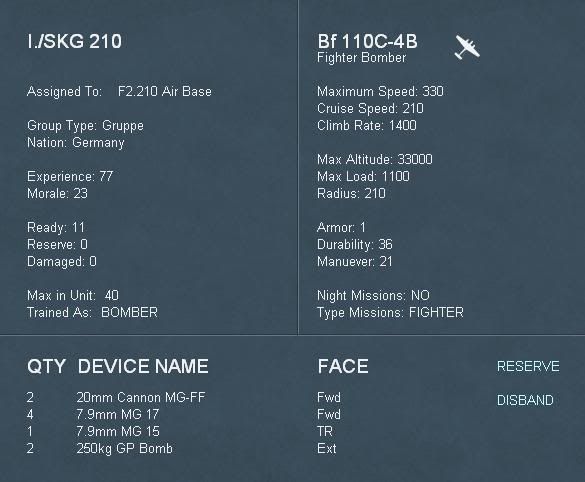
OK, that is different than the question I just answered above. You never really see air units on the map. They are assigned to airbases (up to 9 per base) and you see the airbases on the map. When you look at an airbase you can see the air units assigned to it. Clicking on an air unit brings up the information for that unit. There will be a "reserve" button on that screen if the air unit has not flown any missions that turn and if the airbase has not moved. Clicking on that button moves the unit to the National Reserve. Hope that is clear.
RE: Transferring Units?
Posted: Fri Mar 12, 2010 8:13 pm
by elmo3
A picture is worth yada yada yada... The unit has the Reserve button in the lower right. The airbase it is assigned to is in the upper left under the name of the unit.
RE: Transferring Units?
Posted: Fri Mar 12, 2010 8:28 pm
by ComradeP
OK, that's clear. Is there a reserve screen where you can see which units are in that national reserve, or do you manually have to keep track of every unit, possibly through the air unit list?
RE: Transferring Units?
Posted: Fri Mar 12, 2010 8:35 pm
by elmo3
ORIGINAL: ComradeP
OK, that's clear. Is there a reserve screen where you can see which units are in that national reserve, or do you manually have to keep track of every unit, possibly through the air unit list?
And here I thought you were actually paying attention to my AAR. Tsk, tsk. [:-] (
joke) See page 19 of my AAR for a shot of the Strategic National Reserve screen.
RE: Transferring Units?
Posted: Fri Mar 12, 2010 8:44 pm
by ComradeP
Ah, OK, so that was the national reserve screen, I thought it was a seperate selection screen for pulling units back into the field.
RE: Transferring Units?
Posted: Fri Mar 12, 2010 8:54 pm
by elmo3
ORIGINAL: ComradeP
Ah, OK, so that was the national reserve screen, I thought it was a seperate selection screen for pulling units back into the field.
It allows you to do that too. Clicking on a unit on that screen will move it to the airbase you selected to get to the screen in the first place. I "think" you also need an open slot at the airbase, based on commitment level, but I'll have to test that. And it looks like I just found a bug with that screen too so your question was productive.