Page 1 of 21
Detailed combat reporting
Posted: Wed Mar 31, 2010 12:12 pm
by elmo3
Someone asked about more detail in the combat reports. You can set the level of detail from 0 which is none to 7 which is excruciating. [:)]
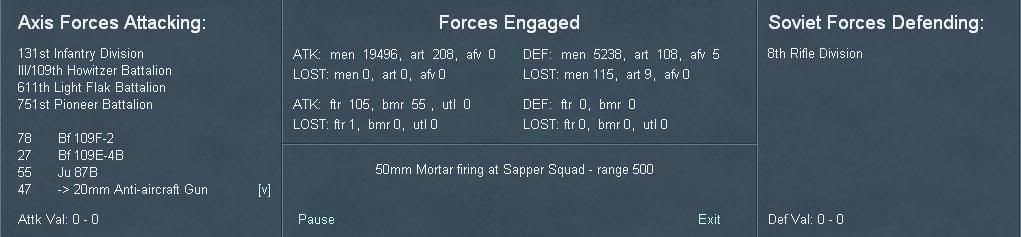
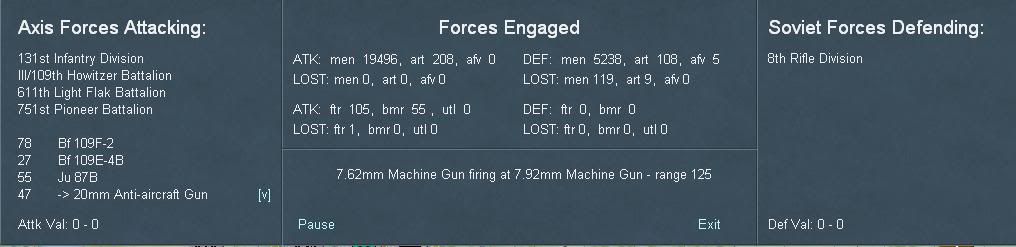
Here are two shots at level 7. The only part that changes is the part below the "Forces Engaged". Note that this was a pretty simple combat but there well were over 100 of these messages with more coming when I stopped the report. As I mentioned elsewhere, if you play the game with this level of detail turned on for every battle you will probably feel like you really fought in the campaign.
RE: Detailed combat reporting
Posted: Wed Mar 31, 2010 1:26 pm
by DivePac88
Cool... I love reports, the more the better.
I have a question please Elmo; Are these report summaries saved in a file for good, or are they written-over every turn?
Thanks Des.
RE: Detailed combat reporting
Posted: Wed Mar 31, 2010 2:15 pm
by elmo3
I'm not aware of this info being saved anywhere. Even a single turn of the full campaign could be thousands of lines with full detail being shown so it's unlikely anyone would want to read through that every turn.
RE: Detailed combat reporting
Posted: Wed Mar 31, 2010 3:46 pm
by The SNAFU
Elmo, do you read the report literally in terms of casualties? So for instance in the first report the Germans only lost on fighter plane while the Russians lost 115 men and 9 guns? Seems like light losses considering the size of the forces involved which leads me to think I may not be reading the results correctly.
RE: Detailed combat reporting
Posted: Wed Mar 31, 2010 4:04 pm
by ComradeP
It seems the report is updated with every combat action, note that the casualties have increased in the second screenshot.
RE: Detailed combat reporting
Posted: Wed Mar 31, 2010 5:28 pm
by elmo3
Those two shots were taken early in the report cycle but the first shot was not the very first report, and yes it updates as the combat is resolved. Remember there were easily over 100 reports on that one battle so by the end the losses were certainly higher but I did not take a shot at the end. At level 1 which is what I always use all you see if the final result.
RE: Detailed combat reporting
Posted: Wed Mar 31, 2010 5:49 pm
by malfid
Brilliant!
Love the feature, though, like you, I can't imagine playing at level seven detail...
RE: Detailed combat reporting
Posted: Wed Mar 31, 2010 5:52 pm
by wiking62
Yeah, i love detail, but level seven would be a bit too much even for me.
RE: Detailed combat reporting
Posted: Wed Mar 31, 2010 6:16 pm
by Lützow
Would it be possible to shim some artwork to the windows? In their current state they still look a bit, well, dry.

/edit: This was not meant to be artistically, just something I did in 5 min. with Photoshop. But guess you got the picture.
RE: Detailed combat reporting
Posted: Wed Mar 31, 2010 6:38 pm
by Joel Billings
I like the flags, but I'd be worried about having backgrounds behind the text as the text might become very difficult to read.
RE: Detailed combat reporting
Posted: Wed Mar 31, 2010 6:39 pm
by elmo3
It's alpha. More artwork will be added although I don't know if there are plans to add any to the battle reports.
RE: Detailed combat reporting
Posted: Wed Mar 31, 2010 6:50 pm
by malfid
What about a WIR-style listing of forces engaged as either a corollary window to the above or an attached sub-window? What I mean is, for example:
Forces Engaged:
ATK: so-and-so DEF: so-and-so (as it currently stands, above)
Then, below that:
Inf. Squads x 512 Inf Squads x347
L. Art x 96 L. Art x 44
H. Art x 50 H. Art x 27
AT Guns x 12 AT Guns x 16
AFV x 12 AFV x 6
etc. etc.
Items would be categorized, with graphics next to each category (a la WIR, with small tank graphics representing AFVs, etc)
Obviously, such a window would take up more of the screen - but it might be useful to the player in visually weighing up the forces involved.
In the above case, for example, there are ~19,000 men involved on the German side, but the actual number of combat troops would be perhaps half that (or even lower). On the Soviet side, of the 5,000 men involved, perhaps as many as 3,500 would be combat troops. The actual ratio would then be closer to 7,500-8,000 vs ~3,500 Soviets (the Soviet divisional slice was more favorable to higher concentrations of combat troops). This way, the player doesn't have to assume that 19,000 vs 5,000 listed means a numerical advantage of 4:1. The combat ratio/values system also lays this out, but less clearly (if more succinctly).
RE: Detailed combat reporting
Posted: Wed Mar 31, 2010 7:04 pm
by Lützow
Joel,
can adjust background transparency in order to keep legibility. It's not really a problem.
However, if you don't like pictorials behind text, add it beside - like in WitP or the remastered BoB. My concern here was to show that graphics add to flavor. [:)]
RE: Detailed combat reporting
Posted: Wed Mar 31, 2010 9:18 pm
by wodin
Thanks for that Elmo3. Yeah level 7 would be to much for me aswell.....however I do like some kind of report so it's good there are upto 7 levels so we all can find a happy medium. Game sounds better and better.
I like Malfid's suggestion.
RE: Detailed combat reporting
Posted: Wed Mar 31, 2010 9:31 pm
by Obsolete
I like the flags, but I'd be worried about having backgrounds behind the text as the text might become very difficult to read.
I have never liked flags, and always prefer battle insignias. In fact, at first I got the German flag mixed up with the French (too many similar stripes), and thought I was looking at the Vichy forces vs Russians.
I wonder who else is in the same boat?
RE: Detailed combat reporting
Posted: Wed Mar 31, 2010 10:50 pm
by Fred98
I think some players, will utilise these reports to help plan their next moves.
These players will become the best players.
However, I think most of us just want to push the counters around a bit !
-
RE: Detailed combat reporting
Posted: Thu Apr 01, 2010 1:55 am
by Captain B
Joel, I know you are in alpha and there will be other more important things to check on, but Lutzow is correct. Color makes a big difference. For instance if the text were a bright yellow on the background, the artwork and the text would be visible.
Forgive my much cruder attempt at making the text yellow, the "new" windows 7 paint program is much less user friendly than the xp version.

RE: Detailed combat reporting
Posted: Thu Apr 01, 2010 2:10 am
by Captain B
Push the counters around first, then find out why we are getting kicked around and start taking the time to worry about the details. I agree, does it run a summary report at all...such as all the individual battle results in a single run with the summary at the top?
55 Ju 87b firing at XXX - range YYY (or however aircraft are already modeled): ATK: No losses DEF: men-35, art-2, afv-0
50mm Mortar firing at Sapper Squad - range 500: ATK: No losses DEF: men-5, art-0, afv-0
7.62mm Machine Gun firing at 7.92 Machine Gun - range 125: ATK: No losses DEF: men-4, art-0, afv-0
RE: Detailed combat reporting
Posted: Thu Apr 01, 2010 8:10 am
by elmo3
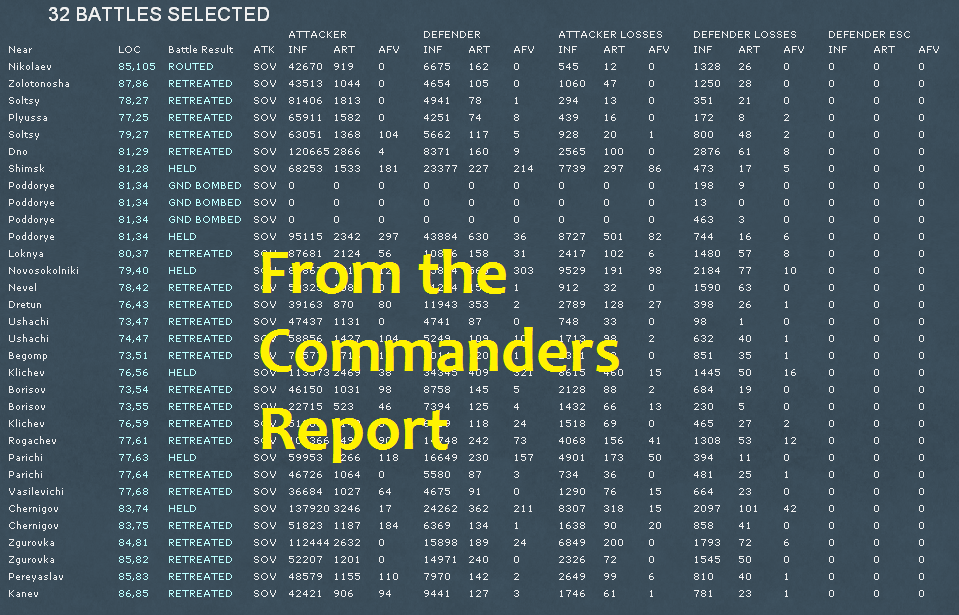
No there is no summary like that. There is a battle summary report but that is a list of all battles for the turn with locations and overall results, not detailed results.
RE: Detailed combat reporting
Posted: Thu Apr 01, 2010 9:34 am
by Zovs
For me after many many hours over several months while those graphics are neat, are really just a distraction from the information displayed. I like the flags, but not the graphics (or any graphics in that area, one needs to be able to read it at times).
Just my opinion of course.
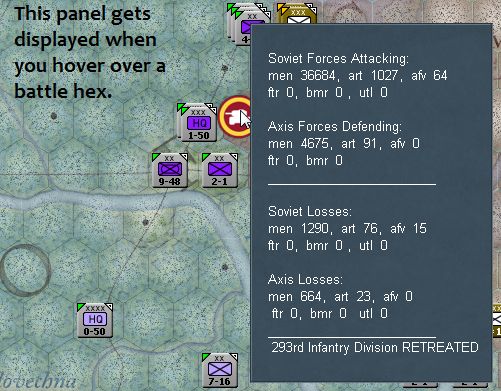
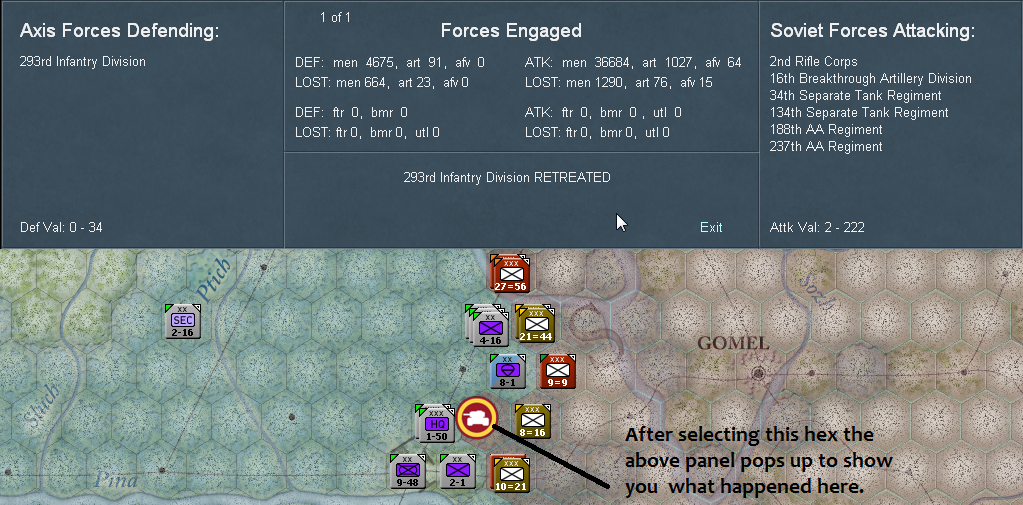
Besides the onscreen battle reports (a set of icons indicating where battles took place along with the details of that battle) there is a Commanders Report and one of the tabs lists all the battles and their details per turn.
This is what happens when you 'hover' over a battle location on the map:
This is what happens when you click a battle report:
And lastly there is a summary report by turn in the Commanders Report (CR):