Page 1 of 1
Quick Tip for Ship Modders
Posted: Thu Jun 17, 2010 8:56 pm
by WoodMan
Hey guys! I recently tried making a custom shipset for the first time and ran into a little problem. When I started up the game with my new ships there were flshing lights on them where there weren't meant to be! Doh, all that hard work making a full shipset only to have flashing lights all over them.
But I found an easy away around it in photoshop.
Place a 255 255 0 (pure yellow) dot somewhere next to your ship but not on it. Use the Magic Wand select tool with Tolerance set to 0 and Contiguous set to off to select your yellow dot, it should select all the other pure yellow dots on your ship too. Then choose colour 254 255 0 and go to edit fill. Then delete your extra dot and place your real lights.
Just thought I'd share in-case anyone else comes across the problem [;)]
RE: Quick Tip for Ship Modders
Posted: Mon Jun 21, 2010 6:52 am
by 2guncohen
Good tip,
Maybe we should make a thread for modders with tips and tricks ?
RE: Quick Tip for Ship Modders
Posted: Tue Jul 27, 2010 5:06 pm
by Slyke57
I'm trying to use this method but it's not working for me [&:] I'm probably doing something wrong >.<
:EDIT: I'm also wondering, since DW changes the ships the size they are according to the components installed in them. When they are shrunk the pixels cover more of the area on the ship so they blend the colors to make it appear the same. Which I would assume could possibly change the colors of the ship to pure yellow? You would also think that if none of them were brighter than yellow to begin with it wouldn't do that.
Maybe there was a very small amount of blue mixed with the red and green and when shrunk it removed that amount of blue to make yellow..
Or maybe I'm just doing it wrong lol.
Hmm I'll make 2 ships one huge and one smaller and see if the lights are in the same spot.
:EDIT:
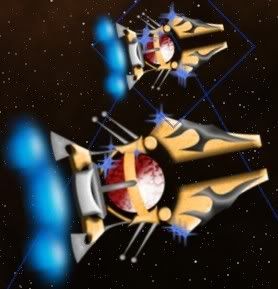
Apparently not, I just think too much haha.
RE: Quick Tip for Ship Modders
Posted: Tue Jul 27, 2010 5:21 pm
by Igard
I don't use photoshop myself, slyke. I use GIMP which has a colour select tool.
I do remember having 1 or 2 ship images in my Star Trek mod that I couldn't get rid of the lights. I think one of them appeared in a spot without a hint of yellow in it, so it was quite puzzling.
My solution was rather severe. I completely deleted the part of the ship that was causing problems and copied another part of the ship into its place.
RE: Quick Tip for Ship Modders
Posted: Tue Jul 27, 2010 5:27 pm
by Slyke57
Hmm kinda annoying that is, I suppose I'm just going to avoid yellow colors in my ships from now on. At least that will take away most of the issue.
RE: Quick Tip for Ship Modders
Posted: Tue Jul 27, 2010 5:40 pm
by Igard
Yes, I know. Didn't think you'd like that TBH. That looks far worse than anything I ever encountered. I had only 1 anomolous running light each time.
The trouble is, you're ship isn't yellow. I had this problem with a Star Trek Federation ship and the area with extra running lights was a blend of white and grey.
You could try using GIMP. I don't think it will make any difference though.[:(] Having said that, I've added dozens of ships to Distant Worlds using GIMP and only a couple of occurances of this.
GIMP is free BTW.[;)]
It has been posted, IIRC, on the tech support forum, so the powers that be should be aware of this bug.
Don't let this deter you, slyke. Keep up the good work!
RE: Quick Tip for Ship Modders
Posted: Tue Jul 27, 2010 5:45 pm
by WoodMan
Post a link so I can DL your ship Slyke, I will see if I can get the lights fixed for you.
RE: Quick Tip for Ship Modders
Posted: Tue Jul 27, 2010 6:01 pm
by Igard
WoodMan, you can dl slykes ships here,
tm.asp?m=2532427&mpage=1�
Right click on the image and save as.