Page 1 of 1
TOE: Authorized vs Actual Strength
Posted: Mon Dec 27, 2010 4:03 am
by bcgames
On what .csv file is the Authorized Strength for a TOE listed? IOW, where can I find the "how many" for a unit at 100% TOE strength?
RE: TOE: Authorized vs Actual Strength
Posted: Mon Dec 27, 2010 7:21 am
by Helpless
TOE(OB) shows that - _ob.csv. But it is not that easy to look in the csv file.
RE: TOE: Authorized vs Actual Strength
Posted: Mon Dec 27, 2010 3:24 pm
by bcgames
O.K. I see how it works now. Columns M thru AR on the _ob.csv show the ID numbers (from _ground.csv) and columns AS thru BX are the Authorized Strengths.
I am going to use the Authorized Strength as the base number for calculating "pre-game attrition" for the Korsun-Cherkassy scenario. The only numbers I've found so far indicate the infantry divisions in the pocket were at 55% strength. So Authorized Strength x .55 = Actual Strength. At least until I can find some better numbers.
Thanks!
RE: TOE: Authorized vs Actual Strength
Posted: Mon Dec 27, 2010 3:33 pm
by Great_Ajax
You don't have to edit those CSVs unless you want to. You can edit a unit's strength directly from the UNITs tab. You can set a unit's available %, ready %, and experience directly although the CSV is better for mass changes.
Trey
RE: TOE: Authorized vs Actual Strength
Posted: Mon Dec 27, 2010 3:46 pm
by bcgames
ORIGINAL: el hefe
You can edit a unit's strength directly from the UNITs tab. You can set a unit's available %, ready %, and experience directly although the CSV is better for mass changes.
DOH! If it was a snake it would have bit me. Thanks!
RE: TOE: Authorized vs Actual Strength
Posted: Mon Dec 27, 2010 3:49 pm
by Helpless
Even better for mass change is CR (Commanders Report).
RE: TOE: Authorized vs Actual Strength
Posted: Mon Dec 27, 2010 4:26 pm
by bcgames
Nice.
RE: TOE: Authorized vs Actual Strength
Posted: Tue Dec 28, 2010 2:43 am
by bcgames
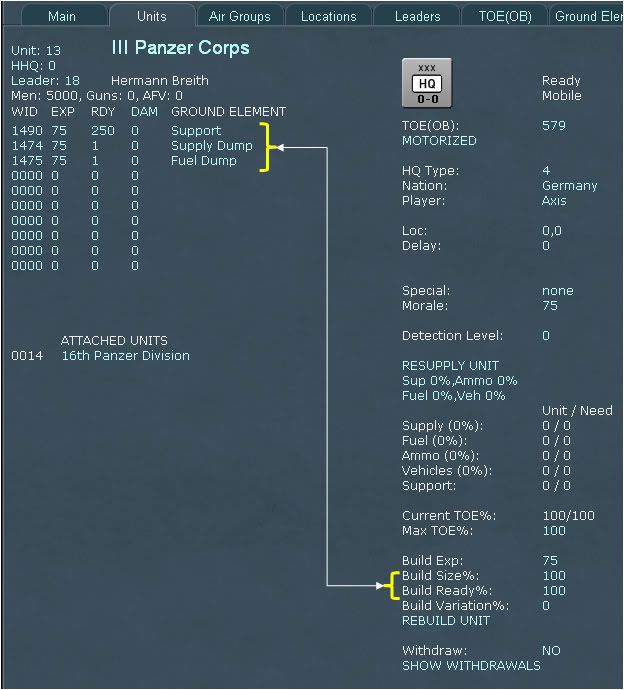
IOW...
To set a unit to 100%
Authorized TOE Strength, set
Build Size%: to 100.
To set
Actual Strength set
Build Ready%: to 100 or to whatever percentage historical documents indicate...
Then click on
REBUILD UNIT. If you set both settings to 100 then your unit might look like this--100% Ready, 0 Damaged: