Page 1 of 2
Font size?
Posted: Fri May 23, 2014 10:20 pm
by rich12545
I've been looking at this game since it came out and now I might be ready to buy. The main thing holding me back is being able to comfortably read what's on the screen. Too many game designers think everybody has superb vision and make the font small on a 1920x1080 screen (which is probably the most popular around). I've looked at a few screenies and think I'd have a tough time.
So I'm wondering if the font size is adjustable? Or are there mods that increase it?
RE: Font size?
Posted: Fri May 23, 2014 10:23 pm
by elliotg
We've attempted to improve this in several areas: The Selection Panel at bottom-left can be enlarged, the Research screen has larger text, the Empire Summary screen is clearer, etc.
Admittedly some of the text might still be small for some.
We're willing to try and improve this further though, if there's specific places where players feel the need for bigger text.
Thanks
Elliot
RE: Font size?
Posted: Fri May 23, 2014 10:42 pm
by PaulWRoberts
ORIGINAL: rich12545
I've been looking at this game since it came out and now I might be ready to buy. The main thing holding me back is being able to comfortably read what's on the screen. Too many game designers think everybody has superb vision and make the font small on a 1920x1080 screen (which is probably the most popular around). I've looked at a few screenies and think I'd have a tough time.
So I'm wondering if the font size is adjustable? Or are there mods that increase it?
+1
RE: Font size?
Posted: Fri May 23, 2014 11:35 pm
by OzoneGrif_slith
if there's specific places where players feel the need for bigger text.
The log on top of the screen could use some enlargement maybe.
It's one of the most important part of the interface, because you have to check everything that's going on, especially since the "popups" on the right of the screen are often overrided by another popup appearing at the same moment.
RE: Font size?
Posted: Sat May 24, 2014 12:04 am
by FireLion1983
ORIGINAL: OzoneGrif
if there's specific places where players feel the need for bigger text.
The log on top of the screen could use some enlargement maybe.
It's one of the most important part of the interface, because you have to check everything that's going on, especially since the "popups" on the right of the screen are often overrided by another popup appearing at the same moment.
One of the amazingly great features of Universe is the ability to now tailor the popups. Sooo useful for really seeing what you WANT and NEED to see.
RE: Font size?
Posted: Sat May 24, 2014 3:23 am
by Breet
Could a solution to this be some type of UI Scale slider
RE: Font size?
Posted: Sat May 24, 2014 3:30 am
by Gelatinous Cube
ORIGINAL: Breet
Could a solution to this be some type of UI Scale slider
Yes, something. Anything. In order to get it to the point where I can play without giving myself a headache or needing some kind of magnifying glass I have to really screw with my display settings. All of it just needs to be way bigger.
RE: Font size?
Posted: Sat May 24, 2014 4:08 am
by Spidey
I, for one, can simply not read much of anything in 1920 by 1080 resolution. So I use 12noon Display Changer to run the game in 1360 by 768 and while it does make the screen a bit small to work with, it also means I can read absolutely everything without straining my eyes.
RE: Font size?
Posted: Sat May 24, 2014 7:05 am
by Osito
My eyesight is not great, and I have been critical of the fonts in the past, but I honestly think it's ok at 1920x1200 and at 1920x1080. The sidebar on the left could still be improved, as could the messages at the top of the screen, but that is not a gamebreaking flaw. I think everything else is pretty much ok at those resolutions.
Obviously this is going to vary from person to person, as Spidey has a different experience (and also a solution).
Osito
RE: Font size?
Posted: Sat May 24, 2014 7:35 am
by Spidey
To be honest, I don't think it's the size of the font as much as the lack of clarity. The anti-aliasing makes it grey on black and the font itself is a bit gnarly to begin with. At 1920x1080 on what I recall to be a 22" monitor, I can read the text if I want to, but I really do have to want to read it and it will cause a headache within 20-30 minutes.
Fortunately, everything displays just fine at down-scaled low res and then I can in fact read stuff casually, without the splitting headaches.
RE: Font size?
Posted: Sat May 24, 2014 8:09 am
by gldavis
My eye sight is horrible (I have a genetic eye disease) and I play this game all the time. Since it starts in full screen windowed, I can use the windows built-in magnifier, set to full screen mode (on windows 7 hot key is windows button and the +(keypad). I only need to do this when reading certain windows and pause the game while doing so. The expander button for the info box on the lower right was a welcome addition sometime back, it made that element a whole lot easier to read.
RE: Font size?
Posted: Sat May 24, 2014 8:18 am
by Locarnus
If you dont want to change your resolution on your normal desktop, just create a new user, call it DW Timesink and have a different resolution on that profile.
Consider the time to switch users before playing to be an extended loading time for a great niche game...
RE: Font size?
Posted: Sat May 24, 2014 8:46 am
by towerbooks3192
Not sure if it is a font size issue and I posted this months back in the technical forum. Any way to fix display in windows 8.1? I am having these problems where screens would not display at times despite disabling DPS scaling like on the research tab above would not show % when the percentage is on 2 digits and some words overlap on that tiny screen on the side and I have to expand it.
RE: Font size?
Posted: Sat May 24, 2014 8:57 am
by mbar
ORIGINAL: Locarnus
If you dont want to change your resolution on your normal desktop, just create a new user, call it DW Timesink and have a different resolution on that profile.
Consider the time to switch users before playing to be an extended loading time for a great niche game...
Nice tip, thanks! But +1 for larger text. I was playing the
pre-warp tutorial wishing the text was bigger.
RE: Font size?
Posted: Sat May 24, 2014 9:31 am
by Spidey
Another way to fix the resolution is 12noon Display Changer, which is very non-invasive and temporarily changes resolution off a shortcut without messing up the desktop. And once you quit DW, the resolution goes back to what it used to be automatically. I'm not sure it's "better" than a new user account, but at least it lets you keep having full access to everything else on your system with minimal issues.
RE: Font size?
Posted: Sat May 24, 2014 9:42 am
by PaulWRoberts
ORIGINAL: Spidey
Another way to fix the resolution is 12noon Display Changer, which is very non-invasive and temporarily changes resolution off a shortcut without messing up the desktop. And once you quit DW, the resolution goes back to what it used to be automatically. I'm not sure it's "better" than a new user account, but at least it lets you keep having full access to everything else on your system with minimal issues.
Can you tell me how this works? I downloaded but I'm afraid it's not intuitive.
EDIT: Ah, I found some documentation online. Unfortunately, it won't change DPI, which is what I really want to do.
RE: Font size?
Posted: Sat May 24, 2014 11:31 am
by OzoneGrif_slith
One of the amazingly great features of Universe is the ability to now tailor the popups.
The popup system is flawed though, because when two popups appear at the same time, the first one is removed. The game should stack popups. Unless that's done, popups will remain dangerous to trust.
RE: Font size?
Posted: Sat May 24, 2014 5:13 pm
by CyclopsSlayer
@1920x1080 I have to lean into the screen to see some features. But even with my nose on the screen it is hard to clearly make out the Tech completion percentages.
RE: Font size?
Posted: Sat May 24, 2014 7:07 pm
by Darkspire
I run a program called Magnifier on a second monitor, works fine with DW and makes reading things a lot easier, you can scale the size of the magnified screen, scale the zoom etc. Just move the mouse pointer over the magnifier to bring up the options.
Magnifier
Darkspire
Main screen with zoom
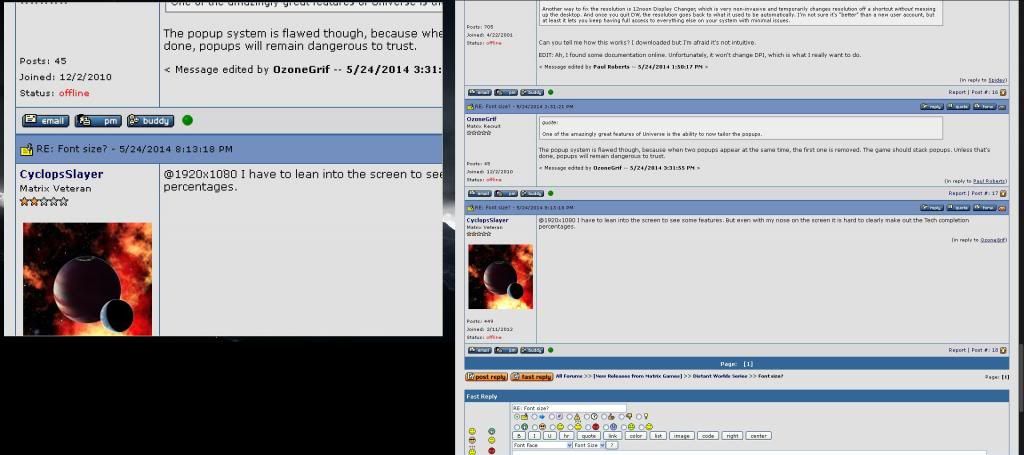
Main screen with zoom options brought up on the second
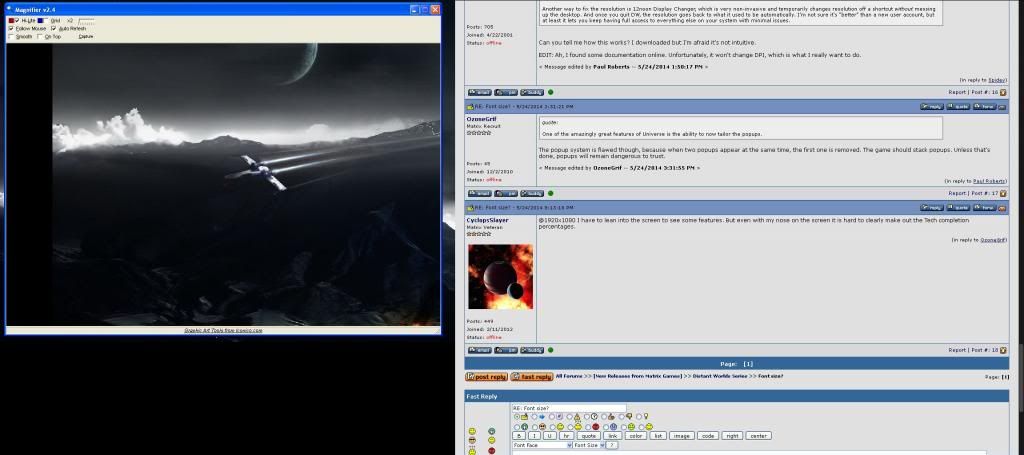
RE: Font size?
Posted: Sat May 24, 2014 7:20 pm
by PaulWRoberts
I do think gray-on-black is part of the problem.
If the game is much more moddable now, does that include fonts and display colors?