Page 1 of 4
Crashes after 1 turn
Posted: Sun Sep 04, 2016 9:27 pm
by Evander Law
have tried playing 10 times today but always crashes after 1st turn. very frustrating. Ive attached the event log.
I'm computer illiterate (mostly). Any suggestions.
RE: Crashes after 1 turn
Posted: Sun Sep 04, 2016 11:35 pm
by Korvar
Try
reinstalling Windows Media Player.
There doesn't seem to be a direct connection at 1st glance, but it wouldn't hurt to also
reinstall DirectX.
Try these and we can go from there.
RE: Crashes after 1 turn
Posted: Mon Sep 05, 2016 6:09 am
by BBfanboy
ORIGINAL: Evander Law
have tried playing 10 times today but always crashes after 1st turn. very frustrating. Ive attached the event log.
I'm computer illiterate (mostly). Any suggestions.
You have not provided enough information.
Did you:
1. Purchase and download the original game program
2. Install it
3. Download and install the last official patch
4. If desired, download and install the last unofficial patch (AKP Beta)
What are the specs on your computer?
What message do you see when the game "crashes"?
Try reading some of the other threads on this part of the forum - you will begin to understand more about the computer technical stuff you must look at to figure the problem out.
EDIT: I didn't notice your attachment with the log picture - maybe you are not so computer illiterate as you said! [:)]
There is likely someone here who can get a lead on the problem from your attachment (which could have been posted as a picture right on screen to make it more visible). If no one responds I can suggest a bunch of possibilities but no definite fix yet.
RE: Crashes after 1 turn
Posted: Mon Sep 05, 2016 1:38 pm
by Korvar
BBfanboy,
The error log references wmvcore, which is a part of Windows Media Player.
Re-installing Media Player is a relatively easy "uncheck / check the box" type procedure - that's why I thought it was a good 1st step.
Evander,
Two follow up questions:
What version of Windows are you using (based on the Media Player version you are using 7, 8, or 10).
Are you using the -dd_sw switch with WitPAE?
RE: Crashes after 1 turn
Posted: Mon Sep 05, 2016 3:35 pm
by Evander Law
Guys, thanks for the quick replies. I'll answer ya'lls questions from the top down and provide some more info.
1. I tried reinstalling Windows Media Player. It was easy like you said, but that didn't work.

2. I tried reinstalling DirectX with the link you provided and received the message, "DirectX setup has determined that a newer or equivalent version of DirectX has been installed already. No installation is necessary. I checked and DirectX 11 is currently installed.
BBfanboy's questions:
3. Yes, I purchased and downloaded the game from Matrix.
4. Yes, I installed it.
5. Yes, I installed the last patch v1124
6. My Specs are: Win 7, SP1, i5, 12GB, 64-bit
7. Here's the message I get when it crashes, always on turn 2. I don't have to click any buttons, it just crashes on its own.
Korvar's f/u questions:
8. I'm running Win 7 Home Edition
9. yes, I using the -dd_switch. This is what my Quick Start Target line shows: "C:\Matrix Games\War in the Pacific Admiral's Edition\War in the Pacific Admiral Edition.exe" -wd -altFont -cpu4 -multiaudio -dd_sw
Thanks guys for the help and any ideas.
Evander

RE: Crashes after 1 turn
Posted: Mon Sep 05, 2016 4:04 pm
by Bullwinkle58
I don't think it will matter, but I play on Win 7 Home without either the -wd or the -fd. Works great.
Wonder if you got a corrupted install and Media Player registry entries aren't being seen. Might try a wipe and re-install.
RE: Crashes after 1 turn
Posted: Mon Sep 05, 2016 4:40 pm
by BillBrown
In what directory do you have WitPAe installed? If you have it in programs(86) folder, it might have a problem with the daily save ( the -wd switch )
RE: Crashes after 1 turn
Posted: Mon Sep 05, 2016 6:11 pm
by Bullwinkle58
ORIGINAL: BillBrown
In what directory do you have WitPAe installed? If you have it in programs(86) folder, it might have a problem with the daily save ( the -wd switch )
I'll take your word on the second part, but yeah, I have a Matrix Games folder right under c:\. Not in either Program Files hierarchy.
RE: Crashes after 1 turn
Posted: Mon Sep 05, 2016 6:40 pm
by Korvar
That's a good point, Bill. I have my copy installed on a secondary drive, so I haven't tested how well the game fares from within the Windows-protected Program Files folders...
I agree removing the -wd switch would be an excellent next step to try.
RE: Crashes after 1 turn
Posted: Mon Sep 05, 2016 7:11 pm
by Evander Law
Thanks all for your replies.
I removed the -wd but no luck. Still C.T.D.
I don't have the game in the programs(86) folder. It's in C:\Matrix Games\War in the Pacific Admiral's Edition
Wonder if you got a corrupted install and Media Player registry entries aren't being seen. Might try a wipe and re-install.
Are you suggesting to wipe and reinstall WITPAE or the Media Player?
thx
RE: Crashes after 1 turn
Posted: Mon Sep 05, 2016 7:38 pm
by Korvar
Ok, I've thought of a couple more things to try.
Right-click the shortcut to the game, click 'Properties'. Under the 'Compatibility' tab, set the compatibility mode drop-down menu to 'Windows XP Service Pack 3'. Also check the 'Run this program as administrator' box down below.
It should look similar to the picture below (ignore the 'settings' check boxes, I'm borrowing this image as I'm not on my desktop to make my own):
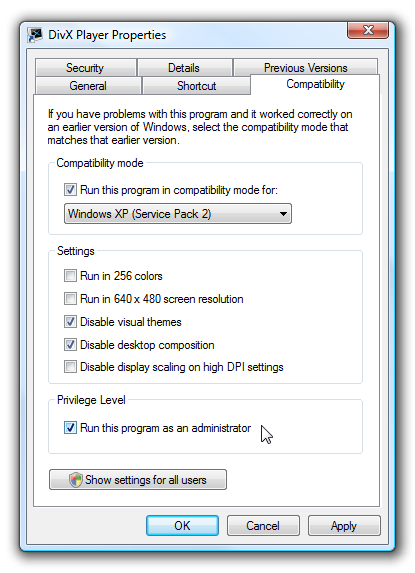
Edit: the 'run as admin' setting is the most important, I believe, given the information reported in the error log.
RE: Crashes after 1 turn
Posted: Mon Sep 05, 2016 8:17 pm
by Evander Law
No luck running it in Compatibility mode for Win XP SP 3 and Run as administrator. Still the same. "Faulting module path: C:\Windows\system32\wmvcore.dll
Just guessing, but is there a way to reinstall DirectX 11? When I run DxDiag it says there's No problems, but I thought it might be worth a try to reinstall DirectX.
thx again
RE: Crashes after 1 turn
Posted: Mon Sep 05, 2016 8:31 pm
by Korvar
DirectX is integrated into Windows, so it can be checked by performing a system files integrity scan.
Open a command prompt in administrator mode (by right clicking the shortcut in the start menu). Type 'sfc /scannow' without the quotes and let it run.
RE: Crashes after 1 turn
Posted: Mon Sep 05, 2016 9:42 pm
by Bullwinkle58
ORIGINAL: Evander Law
Thanks all for your replies.
I removed the -wd but no luck. Still C.T.D.
I don't have the game in the programs(86) folder. It's in C:\Matrix Games\War in the Pacific Admiral's Edition
Wonder if you got a corrupted install and Media Player registry entries aren't being seen. Might try a wipe and re-install.
Are you suggesting to wipe and reinstall WITPAE or the Media Player?
thx
That's the same path I'm installed in down to the letter.
I meant the game, not Media Player. But Korvar looks to be more on top of this than me, so I'll butt out.
RE: Crashes after 1 turn
Posted: Mon Sep 05, 2016 9:51 pm
by Evander Law
Okay, does it have to be at the C: prompt? I ran it at C:\Users\myname and after running said "Windows Resource Protection did not find any integrity violations".
[&:]
RE: Crashes after 1 turn
Posted: Mon Sep 05, 2016 9:56 pm
by Korvar
It does not have to be at the root of the C drive. It scans all the system files regardless from what directory you are in when executing it.
RE: Crashes after 1 turn
Posted: Mon Sep 05, 2016 10:04 pm
by Korvar
If you check the error logs, there should be an entry for each time the game crashed. Do they always report the faulting module path file as wmvcore.dll or does it change at all?
RE: Crashes after 1 turn
Posted: Mon Sep 05, 2016 10:30 pm
by Korvar
While I have access to a keyboard, I'll type out my thoughts so far.
The error is an 'access violation' - meaning that it is typically a permissions issue, a missing file, a corrupted file, or even bad memory.
So, here's the next steps...
Information:
1) When exactly does the error occur? Is it always at the same point or does it vary even by a little?
2) Confirm that the file wmvcore.dll actually exists in the Windows\System32 folder.
Permissions:
3) Are you running anti-virus or anti-malware software? If so, try disabling it and running the turn.
Memory:
4) Download the free Memtest86 from the
PassMark website. You can use either the USB or CD version. If you use a USB drive, make sure to back up any data you have on it as the Memtest install will wipe it clean. You'll have to boot from the USB or CD drive in order to run Memtest. It will run your RAM memory through its paces to ensure that it doesn't have any errors.
We can proceed from there.
RE: Crashes after 1 turn
Posted: Tue Sep 06, 2016 12:27 pm
by Evander Law
Hi Korvar,
1. Its always the wmvcore.dll error. Never changes.
2. The timing of the error varies slightly. Its always after the second time I push the advance turn button (red triangle). I watch to see what phase it is in when it crashes and its always different. One time yesterday I actually got to the third turn (clicked red triangle 3x). I've tried about 5 different scenarios and it crashed in all of them.
3. The wmvcore.dll file does exist. Could mine be corrupted? Can I copy and paste a new copy of it from Microsoft?
4. I am running Avast Free Anti-Virus. I turned it off a couple times and played a scenario, but it still crashed. I will check for anti-malware software that is running. Haven't tried that yet.
5. Will try the Memtest86 in a bit.
thanks again...

RE: Crashes after 1 turn
Posted: Tue Sep 06, 2016 12:34 pm
by BBfanboy
ORIGINAL: Evander Law
Hi Korvar,
1. Its always the wmvcore.dll error. Never changes.
2. The timing of the error varies slightly. Its always after the second time I push the advance turn button (red triangle). I watch to see what phase it is in when it crashes and its always different. One time yesterday I actually got to the third turn (clicked red triangle 3x). I've tried about 5 different scenarios and it crashed in all of them.
3. The wmvcore.dll file does exist. Could mine be corrupted? Can I copy and paste a new copy of it from Microsoft?
4. I am running Avast Free Anti-Virus. I turned it off a couple times and played a scenario, but it still crashed. I will check for anti-malware software that is running. Haven't tried that yet.
5. Will try the Memtest86 in a bit.
thanks again...
Windows 10 uses DirectX 12 and I think you said you use DirectX 11. If WMP uses DirectX the version might make a difference. I presume that the Win10 version also changed the WMP version - i.e. the new OS requires the new WMP and the new DirectX.