Page 1 of 1
Logistics gap at the capital
Posted: Tue Jun 23, 2020 5:22 pm
by Ekaton
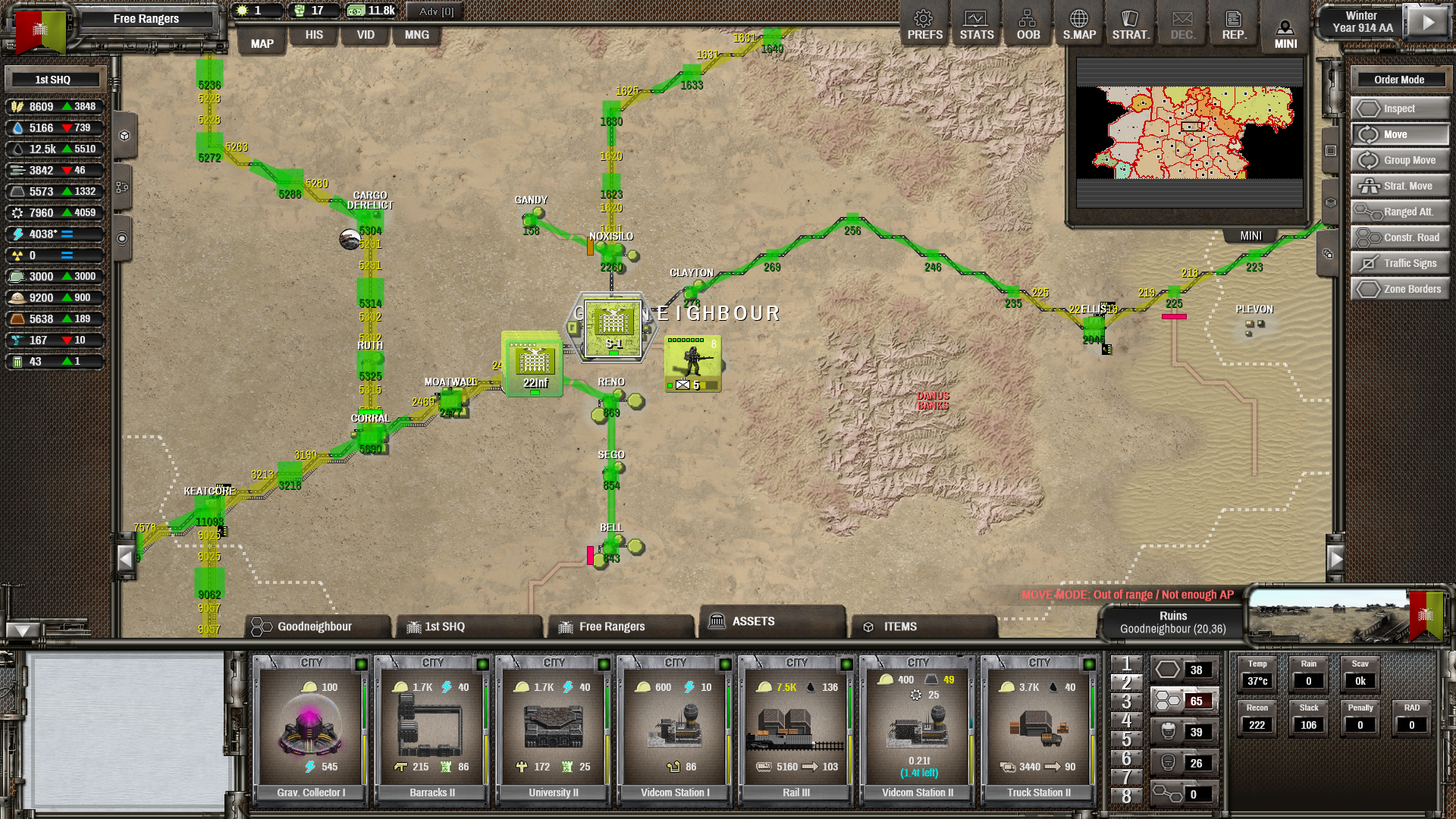
I have problems at my capital - I have no LIS despite having great LIS in all the surrounding hexes. Does it mean that supplies flow well until they reach the capital? Why such a sudden stop? I keep building larger train stations and truck depots but all for naught.
RE: Logistics gap at the capital
Posted: Tue Jun 23, 2020 5:25 pm
by zgrssd
Did you put in a bunch of 100% blocks again?
RE: Logistics gap at the capital
Posted: Tue Jun 23, 2020 5:31 pm
by Ekaton
ORIGINAL: zgrssd
Did you put in a bunch of 100% blocks again?
No, there are no blocks there.
RE: Logistics gap at the capital
Posted: Tue Jun 23, 2020 5:34 pm
by Jdane
When posting such a screen capture, I find it most useful when one selects the SHQ and more specifically its Supply stats.
I'm puzzled by the lack of any displayed data on the hexes next to the capital though. Is it, as I assume, the Bottlenecks map filter?
RE: Logistics gap at the capital
Posted: Tue Jun 23, 2020 5:41 pm
by Journier
So I had the same thing happen to me in my game during a economic catastrophe with a 2 front war and expanding too aggressively/ capturing too many cities.
I ended up having to build railroad stations and truck stations around my capital every hex to get the gluttony of products to move through, took 10 turns of no troops getting reinforcements before the mass of freight moving finally caught up to what needed to be done.
RE: Logistics gap at the capital
Posted: Tue Jun 23, 2020 5:43 pm
by Ekaton
It is, looks like the capital is the bottleneck. SHQ is completely swamped, it does not send or receive as much as requested. Is that the issue? I'm still not 100% how logistics work, I don't know why there are so many points on hexes next to the capital and 0 in the capital itself.
RE: Logistics gap at the capital
Posted: Tue Jun 23, 2020 5:54 pm
by Jdane
What puzzles me most is that those hexes should show black, as far as I know.
I still haven't entirely figured out the Bottlenecks filter, but the Initial and Used Pts filters should provide you some more insight. I doubt there were 0 logistics points in the capital when the turn calculations started.
Could you post a picture of the SHQ's Supply stats? You could also investigate under the STATS tab to try and figure out what is depleting the logistics there (i.e. moving resources between zones and SHQ or trying and supply the troops).
RE: Logistics gap at the capital
Posted: Tue Jun 23, 2020 5:57 pm
by Falke
1 key is your friend. The units are covering any possible information that may help in this case
It is also helpful to know which overlay the screenshot represents
RE: Logistics gap at the capital
Posted: Tue Jun 23, 2020 6:10 pm
by Ekaton
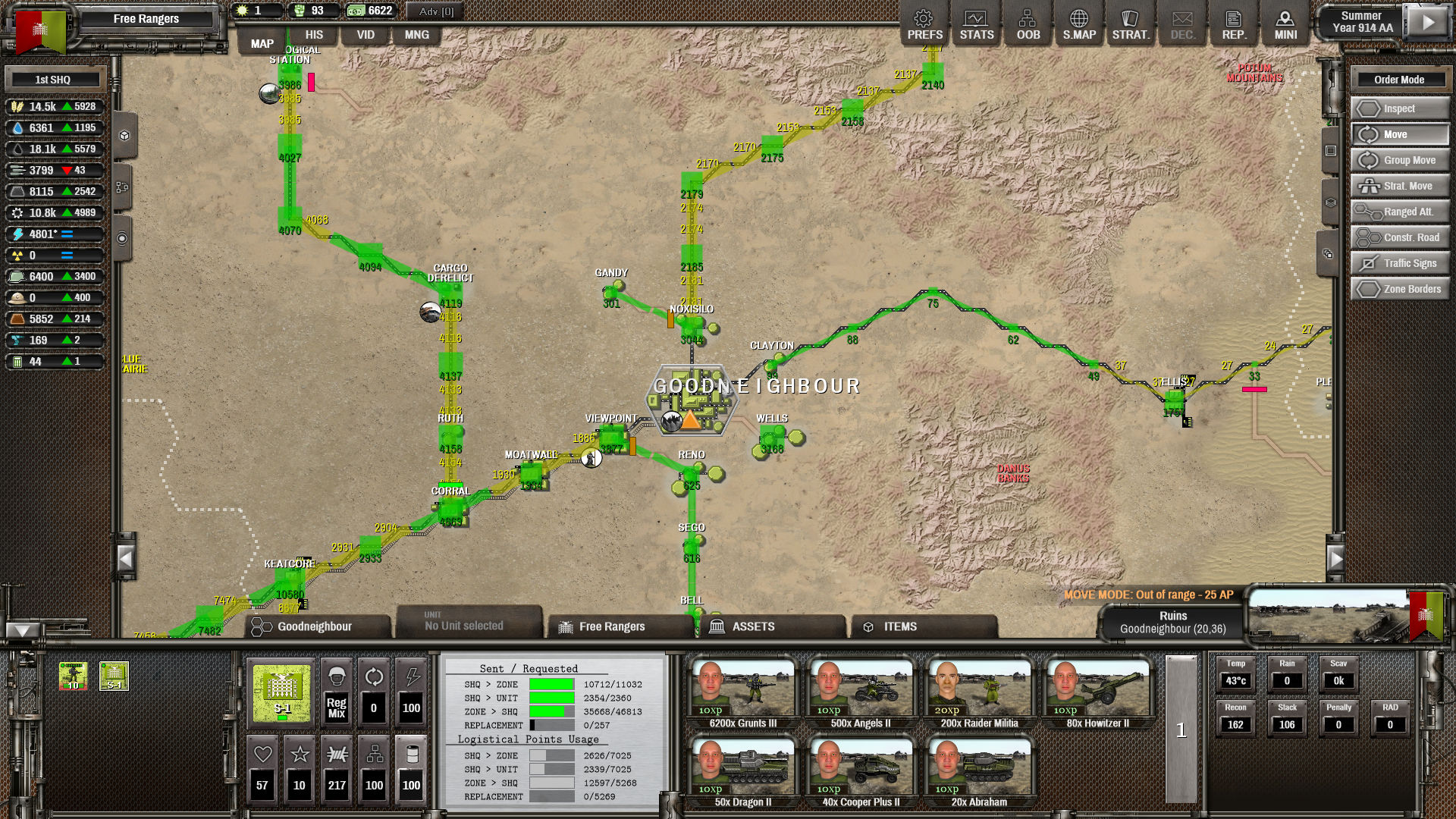
Here's the SHQ:
RE: Logistics gap at the capital
Posted: Tue Jun 23, 2020 6:13 pm
by Jdane
What the « ZONE > SHQ » stats are telling me is that your zones cannot send all the Items they would want to the SHQ because the percentage of logistics points allowed to be used for this stage is insufficient - the zones would need 12,597 points but the SHQ only allows 5,268 to be used.
You could fix this by modifying the allowance in the Unit Admin screen of the SHQ.
It will probably take a couple turns to sort itself out because your zones might have accumulated Items in their inventory for a while and will try to send those out until their stocks are where they want them to be.
RE: Logistics gap at the capital
Posted: Tue Jun 23, 2020 6:22 pm
by zgrssd
ORIGINAL: Jdane
What puzzles me most is that those hexes should show black, as far as I know.
I still haven't entirely figured out the Bottlenecks filter, but the Initial and Used Pts filters should provide you some more insight. I doubt there were 0 logistics points in the capital when the turn calculations started.
Could you post a picture of the SHQ's Supply stats? You could also investigate under the STATS tab to try and figure out what is depleting the logistics there (i.e. moving resources between zones and SHQ or trying and supply the troops).
It is possible for the things to become so bad, the Graphics overflow into nothing being shown. It is so bad, it became so black it became transparent [:)]
RE: Logistics gap at the capital
Posted: Tue Jun 23, 2020 6:29 pm
by Jdane
I am tempted to believe you were joking, but equally inclined to deem it possible. [:D]
At any rate, I've found just using the Bottlenecks filter as a rough overview of the stress on logistics and not trying to grok all its quirks works better for me, and I would rather try and find more usable data elsewhere.
RE: Logistics gap at the capital
Posted: Tue Jun 23, 2020 6:36 pm
by zgrssd
ORIGINAL: Ekaton
Here's the SHQ:
Asuming those are the normal 40/40/30/30 Logistics Limit split, you have ~17562,5 Logistics total. Fits the total deliveries being 17562. So that is how much logistics capacity you got outgoing from the SHQ total.
SHQ>Zone
The SHQ needed to send over 11k Units of stuff towards the zones. Only used about 2626 Logistics however. Keep in in mind that Water, Fuel, Electricity, IP and Emergency Food travel for free, so that is the discrepancy.
Still, not
everything could be delivered to every zone that requested something. Sounds like there is a bottleneck further afield. Hopefully it is just during construction.
SHQ > Units
was not a lot. 2354 send, 2339 Logistics used. Still a small amount did not get out. Some some units seem to be at the limit for hte supply connection.
Zone > SHQ
The invariably biggest part, was retrieving stuff from zones. 46813 were sitting there marked with "ready for Pickup by HQ". After the alloted 5268 Logistics were used, no replacements could be send and the 2 before also could not use any more outgoing logistics, all remaining logistics was spend to get
even more stuff out of zones.
Replacement
Worrisome. Apparently 257 units requested replacements. 0 were delivered. My guess is that all the other Items used up so much Logistics on the only avalible connection, nothing else could be send or retrieved.
That Goodneightbour does not show a Number or Node, is propably because numbes got beyond what Vic expected. That part alone may be worth a bug report. I guess a simple overflow bug.
17562 is slightly abovee the upperl limit for 16 bit signed intigers, so propably that old bug.
RE: Logistics gap at the capital
Posted: Tue Jun 23, 2020 7:03 pm
by Destragon
You should show a screenshot of the initial points overlay or the bottleneck overlay.
If this is a display bug, because of an overflow, I think the bottleneck overlay should still work.
ORIGINAL: Jdane
Is it, as I assume, the Bottlenecks map filter?
It's the current points overlay. Bottlenecks overlay displays percentages, not the point numbers.
RE: Logistics gap at the capital
Posted: Tue Jun 23, 2020 7:09 pm
by zgrssd
I reported the bug I asume happened here. Propably a good old "signed int overflowing into negative". Not the first time we had those:
https://www.matrixgames.com/forums/tm.asp?m=4840798
RE: Logistics gap at the capital
Posted: Tue Jun 23, 2020 10:02 pm
by lloydster4
You all are making this far more complicated than it is. The overlay you're seeing is "current points." aka currently available points
Your SHQ is trying to receive more material than the logistics network can handle. Therefore, that hex has 0 available points. They've already been used. If you want to see how many points you had the beginning of the turn, use the "initial points" overlay.
RE: Logistics gap at the capital
Posted: Wed Jun 24, 2020 2:54 am
by Zyphtan
I have run into something similar. Might be that you dont have enough logistics from other zones to your SHQ that is what the yellow in the current points shows. Can we see a bottleneck view? You can try the mng window too and in assets use the expand on the right to see what is being produced consumed sent to SHQ and store locally. I run into the problem with stuff not getting to the SHQ from the zone.
I tend to make sure there is enough LIS from the cap to every city. The cities can meet up with the LIS from the cap again that is what the yellow means it shows that one truck station along that road doesnt have enough capacity to meet the same amount for what the cap is sending.
You can also try limiting LIS to assets on off roads they only need the LIS points to pass them. An assurance that they have supplies I guess.
RE: Logistics gap at the capital
Posted: Wed Jun 24, 2020 4:32 am
by Vic
Also if seeing weird behaviour, please make sure you are on the latest version and even preferably the latest Open Beta version.
Best wishes,
Vic
RE: Logistics gap at the capital
Posted: Wed Jun 24, 2020 7:21 am
by Ekaton
It's fine now, the logistics overlay is a bit confusing and doesn't explain why you have so many points all around but not in the capital itself. The problem was that with three new cities conquered within a few turns, my logistics system collapsed and couldn't handle the traffic. Raising the percentage of points used to transport stuff from zones to SHQ fixed the problem.