Page 1 of 1
How to Make Custom Scenario Icons and Symbols?
Posted: Mon Feb 01, 2021 1:00 am
by UnionWarDog
It is still possible to make a custom Unit file and customize the symbols on that file and place it in the Graphics Override folder? I know the new .col file allows the change of the 2D icon colors but can the symbols be custom per Icon color still or is that no longer possible?
I tried to place some custom icon unit files in random Waterloo and Antietam unit files but they don't seem to load. Not sure if I'm doing something wrong but I'm not able to change a unit Color file and have it load from the override folders anymore.
BRD
RE: How to Make Custom Scenario Icons and Symbols?
Posted: Mon Feb 01, 2021 12:13 pm
by sPzAbt653
TOAW IV restricts you to one counter sheet, it is called CounterUnits [there is one for each zoom level]. You can modify that one, and it is used by both sides in all situations [:@]

RE: How to Make Custom Scenario Icons and Symbols?
Posted: Mon Feb 01, 2021 2:36 pm
by 76mm
Also note that changing the icon graphic will not change certain unit characteristics, which are "baked into" the icons. For instance, air mobile units will remain air mobile even if you change their icons, although I suppose you could keep them from flying by keeping the air transport capacity at zero.
RE: How to Make Custom Scenario Icons and Symbols?
Posted: Mon Feb 01, 2021 4:00 pm
by Zovs
I created a custom set for all my scenarios and scenario mods.
https://www.matrixgames.com/forums/tm.asp?m=4905259
RE: How to Make Custom Scenario Icons and Symbols?
Posted: Mon Feb 01, 2021 11:06 pm
by UnionWarDog
Hi Zovs,
You did a great job on this custom set but with the latest change that only allows color changes and limits the symbols to a single update sheet, we can't do crazy stuff like this anymore....
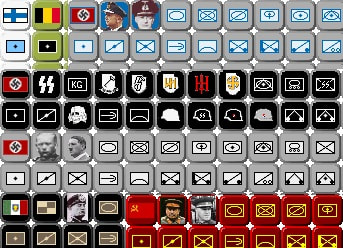
With no leaders currently in the game, I used the icons to customize special units or leaders into a scenario. With my ACW design I was hoping to use it for leaders, special Corps flags or state flags. All that looks to be whipped out with the migration to a single symbols sheet now. Oh well! Too late now. The update and change is programmed in so I don't think we are going back to the single sheets again.
BRD!