Page 1 of 1
Breakdown Units Hotkey "B"
Posted: Mon Apr 04, 2022 6:58 pm
by kevinkins
Congrats on the release of your new product. Enjoying learning the mechanics of the game. One thing, I can use the B key to build bridges but can't seem to figure out the sequence to split battalions down to companies. I think all the restrictions laid out on page 41 of the manual are avoided. The tutorial scenario is being used. The diary from March 8 mentions breaking down Regiments and Brigades, but not battalions. If someone can, please respond with the sequence to split battalions using the B key if indeed it has been implemented for battalions. Thanks.
Re: Breakdown Units Hotkey "B"
Posted: Tue Apr 05, 2022 7:28 pm
by Saint Ruth
Hi, thanks!
Only some types units can be broken down, and you cannot break down something already broken down (broken down units end in a dash and a number, xx-1, xx-2, xx-3).
If you start the 6th Army Strikes for example, and in the Setup phase, press B over the Axis units, you'll see them breakdown immediately (in the game, it takes a turn to breakdown).
HQs, Combat Engineers, and Bridging Engineers cannot breakdown.
If you still have a problem, tell me the scenario you're playing, and the units you can't get to break down!
Cheers,
Brian
Re: Breakdown Units Hotkey "B"
Posted: Tue Apr 05, 2022 7:51 pm
by kevinkins
Hi
As mentioned, I am using the tutorial scenario. Try breaking down the German tank battalions. I do not see any dash coding on the chits so they should break. Will give the scenario you recommended a try.
Thanks.
Re: Breakdown Units Hotkey "B"
Posted: Tue Apr 05, 2022 8:07 pm
by Saint Ruth
Ah, sorry, speed reading!
Breakdown rules are configurable per scenario, and in this case, it's turned off. So you can't breakdown units in the Tutorial. Which is an oversight!
I'll change that and it'll be patched.
Cheers,
Brian
Re: Breakdown Units Hotkey "B"
Posted: Tue Apr 05, 2022 8:22 pm
by kevinkins
Ok, maybe give the designer a type of on-off switch in the editor. And yes, it works like a charm in 6th Army Strikes.
Kevin
Re: Breakdown Units Hotkey "B"
Posted: Tue Apr 05, 2022 8:32 pm
by Saint Ruth
kevinkins wrote: Tue Apr 05, 2022 8:22 pm
Ok, maybe give the designer a type of on off switch in the editor interface.
Kevin
Hi Kevin,
That's already in the Editor:
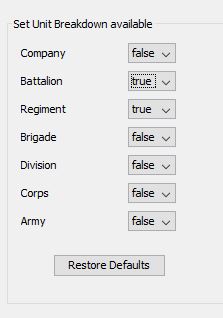
You can choose which units can breakdown. You can change a lot of things in the Editor, (like stacking points of units and the max stacking per hex, turns per day etc). You can also change things like the Combat Results Tables too, but that is done via configuration files.
Cheers,
Brian
Re: Breakdown Units Hotkey "B"
Posted: Thu Apr 07, 2022 8:34 am
by kevinkins
Just saw that tonight, Thanks. And it works fine. Now I have to figure out the AI coding. BTW, is there a way to remove features from maps like woods, roads etc.? I can only add them but not erase them.
Re: Breakdown Units Hotkey "B"
Posted: Thu Apr 07, 2022 3:54 pm
by Saint Ruth
kevinkins wrote: Thu Apr 07, 2022 8:34 am
Just saw that tonight, Thanks. And it works fine. Now I have to figure out the AI coding. BTW, is there a way to remove features from maps like woods, roads etc.? I can only add them but not erase them.
No, but it's on the list!
Will patch it in.
Cheers,
Brian
Re: Breakdown Units Hotkey "B"
Posted: Thu Apr 07, 2022 4:07 pm
by governato
Any chance you can post a pdf of the editor manual before the first patch comes out? Many games post their manuals on the forum to help the community

.