Page 1 of 2
Can not scroll
Posted: Sat Apr 09, 2022 11:23 am
by Stamb
Sometimes scroll with mouse wheel stops working, as a result it is impossible to change zoom on map with it any more so i have to use "+" or "-"
But most importantly - i can not scroll reserve TBs.
So i have to save and load a game.
Its pretty annoying.
I have no steps to reproduce, unfortunately.
Re: Can not scroll
Posted: Sat Apr 09, 2022 12:18 pm
by Zovs
The keyboard arrow keys always work, temp work around until you fix your mouse.
Re: Can not scroll
Posted: Sat Apr 09, 2022 4:51 pm
by tiger111
I have had this problem (wheel map zoom in/out) since release.
Changing the mouse does not fix the problem. tried several. This problem does not happen with WITW and WITE.
It is as though there is a memory leak and cannot "buffer" the change
Any thoughts............
Re: Can not scroll
Posted: Sat Apr 09, 2022 7:12 pm
by Stamb
Zovs wrote: Sat Apr 09, 2022 12:18 pm
The keyboard arrow keys always work, temp work around until you fix your mouse.
It is not my mouse. When i save & load game - it works again for some time.
With arrow keys i can not scroll TBs.
Re: Can not scroll
Posted: Sun Apr 10, 2022 4:39 pm
by tiger111
We definitely have the same problem.
Shame no one has suggested a proper fix or acknowledged the problem .
Re: Can not scroll
Posted: Wed Apr 13, 2022 9:37 pm
by Stamb
Again this bug, I can not scroll in other TBs, but far east works ok...
Re: Can not scroll
Posted: Wed Apr 13, 2022 10:15 pm
by Zovs
I don't think this is a bug (if it was its fixed in beta 26).
I can click on any Axis TB and use the arrow keys or the mouse to scroll. With no issues.
Will check the Soviets tomorrow.
Re: Can not scroll
Posted: Sat Apr 23, 2022 10:01 pm
by Joel Billings
If you are over a TB that has a scroll bar activated, then the mouse wheel will move the scroll bar. If you are over the map or a TB without a scroll bar active, then the mouse wheel zooms in/out (in this case I have to use the + and - keys to zoom in/out). This part is all WAD. Is it not working that way for you?
Re: Can not scroll
Posted: Sun Apr 24, 2022 8:13 am
by Stamb
yep, sometimes, when there is a scrollbar active in a TBs it is not possible to scroll down or up with a mouse wheel
save and load helps or sometimes problem is gone by itself
as i wrote, i have no steps to reproduce
but it happens pretty often
Re: Can not scroll
Posted: Tue Apr 26, 2022 8:09 pm
by DarkHorse2
tiger111 wrote: Sat Apr 09, 2022 4:51 pm
I have had this problem (wheel map zoom in/out) since release.
Changing the mouse does not fix the problem. tried several. This problem does not happen with WITW and WITE.
It is as though there is a memory leak and cannot "buffer" the change
Any thoughts............
I have had some issues involving right-mouse clicking failing to bring up pop-up menus used in air-transport missions.
Once they start failing, they no longer work from that point on.
Only work-around I have found is to do a quick save and reload.
At that point, they start working again.
I have long suspected a memory leak or Windows user object resource leak in WiTE2.
User objects are described in the following table, with the associated "creator" and "destroyer" functions:
https://docs.microsoft.com/en-us/window ... er-objects
It just feels like there is not a one-for-one correspondence between these two sets of functions, resulting in a leak.
Re: Can not scroll
Posted: Tue Apr 26, 2022 8:20 pm
by Joel Billings
Have you tried to press the Esc key when the interface stops working as expected? I've noticed the Esc has some recovery features in the Wit... series games.
Re: Can not scroll
Posted: Tue Apr 26, 2022 10:40 pm
by DarkHorse2
When this happens on my end, I've tried everything, to include 'esc' key.
There is a development tool I have used from System Internals, "Process Explorer", that has a setting you can configure that allows you to display the number of "gdi objects" and "user objects" a process currently has allocated.
Next time it happens, I will get a current listing and screen shot of it. At least try to identify if this is the case or not.
Re: Can not scroll
Posted: Tue Apr 26, 2022 10:52 pm
by DarkHorse2
There is a definite leak.
It is like the popup menu is not getting destroyed.
I did an xfer of 3 ac, before air transfer WiTE2 had 54 User Objects allocated.
WiTE2 has 57 User Object allocated now.
There is a Windows function "CreatePopupMenu" used to create a popup menu, usually in response to a right-mouse-click.
After the menu item is selected, there should be a call to destroy it, specifically "DestroyMenu".
I seriously suspect it is not getting called.
The OS will allow you to continue creating these User Objects until you reach a limit. At that point, it just doesn't create them anymore and thus no more Popup Menus.
----
You can also enable this display in Windows TaskManager, it is just now more hidden than what it used to be.
Select the "Details" tab, then right-click in the listview column header bar. Then "Select Columns" and that should bring up a Dialog Box that allows you to select all the columns available. Scroll down/up until you find "User Objects" and "GDI Objects". Once you select those, you will now see them for each process under the Windows TaskManager Details Tab.
----
Also suspect you are not checking the returned HMENU from CreatePopupMenu. If it fails, it should return a NULL.
Type: HMENU
If the function succeeds, the return value is a handle to the newly created menu.
If the function fails, the return value is NULL. To get extended error information, call GetLastError.
----
Played around some more, xferred 6 more AC, upto 62 User Objects.
I may have tool somewhere that allows me to interrogate a running process for current list of User Objects.
Re: Can not scroll
Posted: Wed Apr 27, 2022 2:25 am
by Joel Billings
I asked Pavel to look at your post and he replied that we aren't using Createpopupmenu.
Re: Can not scroll
Posted: Wed Apr 27, 2022 8:07 am
by DarkHorse2
Are you sure? Because it looks like somebody is calling it.
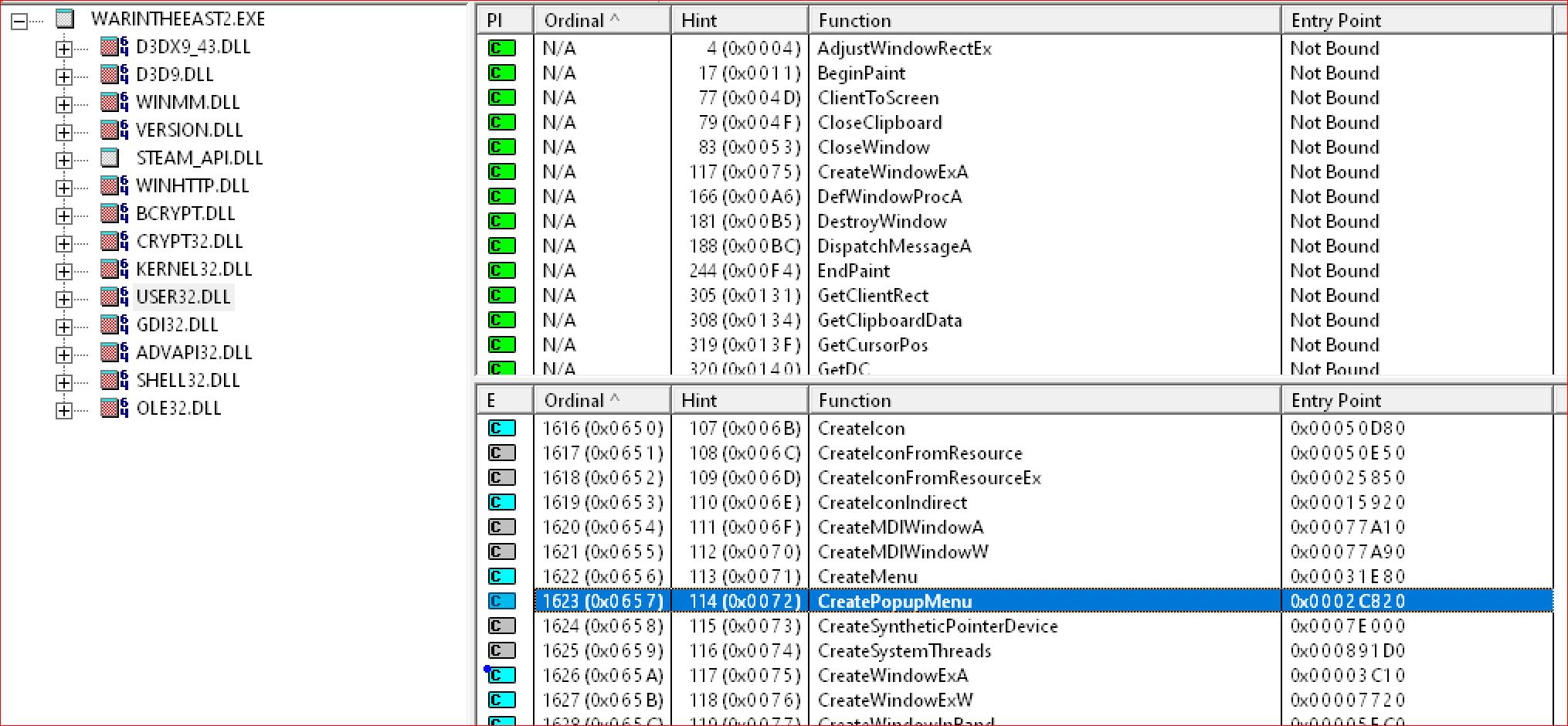
- CreatePopupMenu.JPG (316.47 KiB) Viewed 1340 times
I am not 100% sure this is where the resource leak is, because I don't have access to the source code.
But I do know there is one. It could be any one of:
It is also possible you are using something to emulate the popupmenu functionality by using any of the previous user objects.
I am not able to tell exactly which user objects are not getting cleaned up. But this should be easy enough to track from within the source code.
I can tell:
- your source code is native C++. Most likely using Visual Studio as your IDE.
- using the Visual C++ CRT.
- using STL - standard template library.
- using lambdas, a modern C++ language feature.
- using the CAMThread class from the DirectShow API - most likely the WxUtil.h implementation.
- That would explain the dependency on the quartz.dll (direct show runtime library)
- using XMLLite (i typically use that one as well)
- using the Parallel Patterns Library (PPL) (can't speak to this as I have never used myself, typically using what was provided via the STL concurrency library)
- PPL appears to be a Microsoft extension to STL? interesting...
Parallel Patterns Library
EDIT:
- _Ref_count_obj? Let me guess, someone went crazy with smart pointers? If using these for object lifetime management, you may never find a resource leak. I feel for you....
Re: Can not scroll
Posted: Wed Apr 27, 2022 8:45 am
by Stamb
Looks like someone made a really deep dive into a problem.
Thanks for your investigation DarkHorse2!
Re: Can not scroll
Posted: Mon May 02, 2022 4:37 pm
by Stamb
Joel Billings wrote: Tue Apr 26, 2022 8:20 pm
Have you tried to press the Esc key when the interface stops working as expected? I've noticed the Esc has some recovery features in the Wit... series games.
ESC does not help
the funny thing is that Far East is still working fine, while zoom on a map is working very bad and other TBs are not scrollable at all
Re: Can not scroll
Posted: Fri May 06, 2022 6:57 pm
by tiger111
Got the latest beta and still cannot scroll the map after 1 turn - no odd windows selected. esc doesn`t help. If i save and reload then I can scroll fine for only 1 turn
Re: Can not scroll
Posted: Tue May 10, 2022 12:54 am
by Joel Billings
Are you talking about scrolling around the map, or zooming in using the mouse wheel, or scrolling the TB boxes? There are several different things mentioned in the thread.
Re: Can not scroll
Posted: Tue May 10, 2022 6:44 am
by Stamb
initially when you just open a game - everything works fine
then if scroll in TBs fails to work properly
it means that zoom on map with mouse wheel will also fail to work normally, it will still work but instead of responding to each mouse wheel move, it will make 1 zoom in or out in few mouse wheel moves
navigation (left, right, top, bottom) always works
as well as +- to change zoom on a map
at least for me
same in last few game versions