Page 1 of 1
[1.0.3.6] Badges are blurry; Solved:[1.0.3.5] Basic Badges not really working
Posted: Thu Apr 14, 2022 10:21 pm
by rxnnxs
One Problem solved, other still there. See please the 4th post.
As good as the idea is, when clicking on them (Basic Badges), they are most of the time not correct selected. What is selected are other systems.
In the now Extended and Detailed Badge, there is no difference, and no resources are shown. But the selection is correct.
Re: [1.0.3.5] Basic Badges not really working
Posted: Fri Apr 15, 2022 2:16 am
by Spidey
Can confirm. Experiencing the same thing with basic badges. Except it's not just the basic badges that have pointing issues. I can provoke those with badges off as well.
Edit: Tried to return to 1.0.3.3 but that didn't fix the pointing issue. Verified files, rebooted, verified files again, and that fixed the pointing issue. Then I tried adding the beta patch and then verify files afterwards. And so far, I have not seen more of the misaligned mouse position.
Re: [1.0.3.5] Basic Badges not really working
Posted: Tue Apr 19, 2022 3:23 pm
by Erik Rutins
This should be fixed in the new 1.0.3.6 beta, please give it a try.
Re: [1.0.3.5] Basic Badges not really working
Posted: Wed Apr 20, 2022 9:20 pm
by rxnnxs
Thank you for fixing this.
Selecting the Basic Badges works now in 1.0.3.6.
I am sorry to say that but the blurry text should be solved also.
The text is only sharp when hovering over them. Without pointing at the Badge,
at Basic it is the most blurred, then the other two states are a bit blurred, and hovering over them is sharp and crystal clear.
Basic:

- basic.jpg (2.56 KiB) Viewed 465 times
Normal:
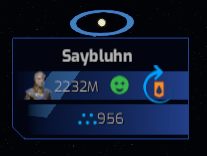
- standard.jpg (5.35 KiB) Viewed 465 times
Hoverin over:
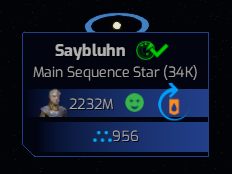
- hovering over.jpg (7.09 KiB) Viewed 465 times
Solution: Keep the Font size at the normal/best/made-for dpi-solution and do not scale it down to.. 99%?

It does not give us more space to view, it just gets blurry.
And for the icon.. give it a different one or a tiny one that also has a correct dpi for that size.
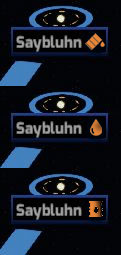
- oil-sharpen.jpg (8.93 KiB) Viewed 455 times
Or again, the easiest way: Remove the encircling arrow from your oil barrel, then it is bigger and sharper, when in correct dpi.