Page 1 of 1
Unable to Control Unit Altitude
Posted: Fri Jul 01, 2022 11:45 am
by tmoilanen
Good morning - I just updated to 1260.1 and am unable to adjust aircraft altitudes.
Please see image below, save file attached.
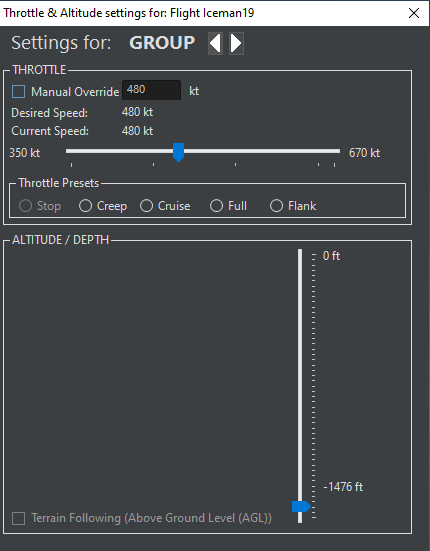
- Command - No Altitude Control.PNG (14.82 KiB) Viewed 565 times
Re: Unable to Control Unit Altitude
Posted: Fri Jul 01, 2022 12:31 pm
by Deserere
Hi tmoilanen,
is this happening to you with every scenario or just with the one you posted?
Is it happening anytime you open the scenario?
I'm asking this because when testing the issue with the scenario you posted I'm able to see everything as it should.
Re: Unable to Control Unit Altitude
Posted: Fri Jul 01, 2022 12:38 pm
by Nikel
Why the altitude is below 0?
And if I may ask, what scenario is this?
Re: Unable to Control Unit Altitude
Posted: Fri Jul 01, 2022 12:51 pm
by tmoilanen
Deserere wrote: Fri Jul 01, 2022 12:31 pm
Hi tmoilanen,
is this happening to you with every scenario or just with the one you posted?
Is it happening anytime you open the scenario?
I'm asking this because when testing the issue with the scenario you posted I'm able to see everything as it should.
Hi Deserere - I'm also seeing it in the Border Skirmish scenario from Kashmir Fire.
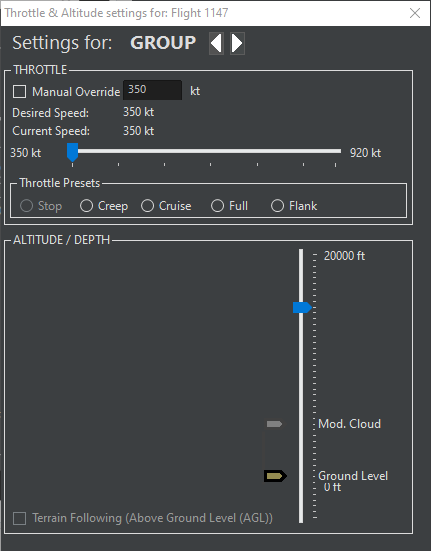
- Command - No Altitude Control_BorderSkirmish.PNG (13.68 KiB) Viewed 539 times
Re: Unable to Control Unit Altitude
Posted: Fri Jul 01, 2022 1:14 pm
by tmoilanen
Nikel wrote: Fri Jul 01, 2022 12:38 pm
Why the altitude is below 0?
AN if I may ask, what scenario is this?
Hi Nikel - it's one of my personal scenarios. I use it to try out different LUA scripts.
Re: Unable to Control Unit Altitude
Posted: Fri Jul 01, 2022 1:19 pm
by DWReese
It happens with my scenarios as well. Any of them. I have been reporting on this for a while.
The problem, as I pointed out, is that if I exit the program, and then come back to it, then the data returns. That's why you probably won't see it. The savs that I sent are probably just like this, because after they are opened, they appear as normal.
Re: Unable to Control Unit Altitude
Posted: Fri Jul 01, 2022 1:28 pm
by Nikel
tmoilanen wrote: Fri Jul 01, 2022 1:14 pm
Hi Nikel - it's one of my personal scenarios. I use it to try out different LUA scripts.
OK, thanks.
I hope you will release one or two of those

Re: Unable to Control Unit Altitude
Posted: Fri Jul 01, 2022 1:40 pm
by Deserere
tmoilanen wrote: Fri Jul 01, 2022 12:51 pm
Deserere wrote: Fri Jul 01, 2022 12:31 pm
Hi tmoilanen,
is this happening to you with every scenario or just with the one you posted?
Is it happening anytime you open the scenario?
I'm asking this because when testing the issue with the scenario you posted I'm able to see everything as it should.
Hi Deserere - I'm also seeing it in the Border Skirmish scenario from Kashmir Fire.
Command - No Altitude Control_BorderSkirmish.PNG
Hi tmoilanen,
Is this happening specifically/more frequently when you are trying to set the throttle or altitude to a group rather then to a specific unit?
Re: Unable to Control Unit Altitude
Posted: Fri Jul 01, 2022 3:05 pm
by tmoilanen
Hi Deserere - it doesn't appear to matter whether it's a group or a single unit.
I can duplicate it several times in the attached scenario (just an airbase and a single aircraft). I can launch the aircraft and open the Throttle-Altitude dialog and nothing is there.
If I plot a course for the aircraft (F3) and then reopen the Throttle-Altitude dialog the usual altitude options are available.
This could be a memory issue on my PC. I have other programs running in the background which are fairly memory intensive. I will try to reproduce the issue after a PC reboot with no other programs running.
Re: Unable to Control Unit Altitude
Posted: Fri Jul 01, 2022 11:02 pm
by tmoilanen
tmoilanen wrote: Fri Jul 01, 2022 3:05 pm
Hi Deserere - it doesn't appear to matter whether it's a group or a single unit.
I can duplicate it several times in the attached scenario (just an airbase and a single aircraft). I can launch the aircraft and open the Throttle-Altitude dialog and nothing is there.
If I plot a course for the aircraft (F3) and then reopen the Throttle-Altitude dialog the usual altitude options are available.
This could be a memory issue on my PC. I have other programs running in the background which are fairly memory intensive. I will try to reproduce the issue after a PC reboot with no other programs running.
Hi Deserere - I rebooted my PC and was able to recreate this issue with no other programs running and plenty of memory available.
Re: Unable to Control Unit Altitude
Posted: Mon Jul 04, 2022 5:18 am
by Deserere
Hi tmoilanen,
thanks for delving into this one. Can you replicate it again and post the exception log just in case it contains some useful issue on this one?
Thanks