Page 1 of 1
Importing map changes via CVS
Posted: Sat Aug 13, 2022 2:10 pm
by Teo41_ITA
Hi everyone,
I am trying to implement the latest map changes into my OOB mod. The real question is: is this even possible? I exported all the files of the updated 1941GC and mine one (but the unit file, of course!), opened one by one and replaced the modded CVS files with the data taken from the official ones.
The problem is that it does not seem to work, as once I import the new CVS files in my OOB mod scenario the map is still the original one.
I also tried to import the unit file into the official one but it's a big mess, as I lose all the renaming connections to the unit I have separately added.
Thank you for your help and I apologize for my bad phrasing. I hope you can understand what I did!

Re: Importing map changes via CVS
Posted: Sun Aug 14, 2022 8:06 am
by jlbhung
Teo41_ITA wrote: Sat Aug 13, 2022 2:10 pm
Hi everyone,
I am trying to implement the latest map changes into my OOB mod. The real question is: is this even possible? I exported all the files of the updated 1941GC and mine one (but the unit file, of course!), opened one by one and replaced the modded CVS files with the data taken from the official ones.
The problem is that it does not seem to work, as once I import the new CVS files in my OOB mod scenario the map is still the original one.
When I made changes to map by importing from csv files, sometimes I found that I need to save, exit and reload the scenario to see the changes. I am not sure if this works in your case, you may try.
I also tried to import the unit file into the official one but it's a big mess, as I lose all the renaming connections to the unit I have separately added.
Thank you for your help and I apologize for my bad phrasing. I hope you can understand what I did!
Are the renaming connections in your mod still present when open under the new patch? If not, then may be its the problem with the new patch. If still present, my experience in creating my own mod in WitE1 is that sometimes it may be easier to manually input the new patch's changes in units in one's own mod than vice versa.
Re: Importing map changes via CVS
Posted: Sun Aug 14, 2022 10:47 am
by jlbhung
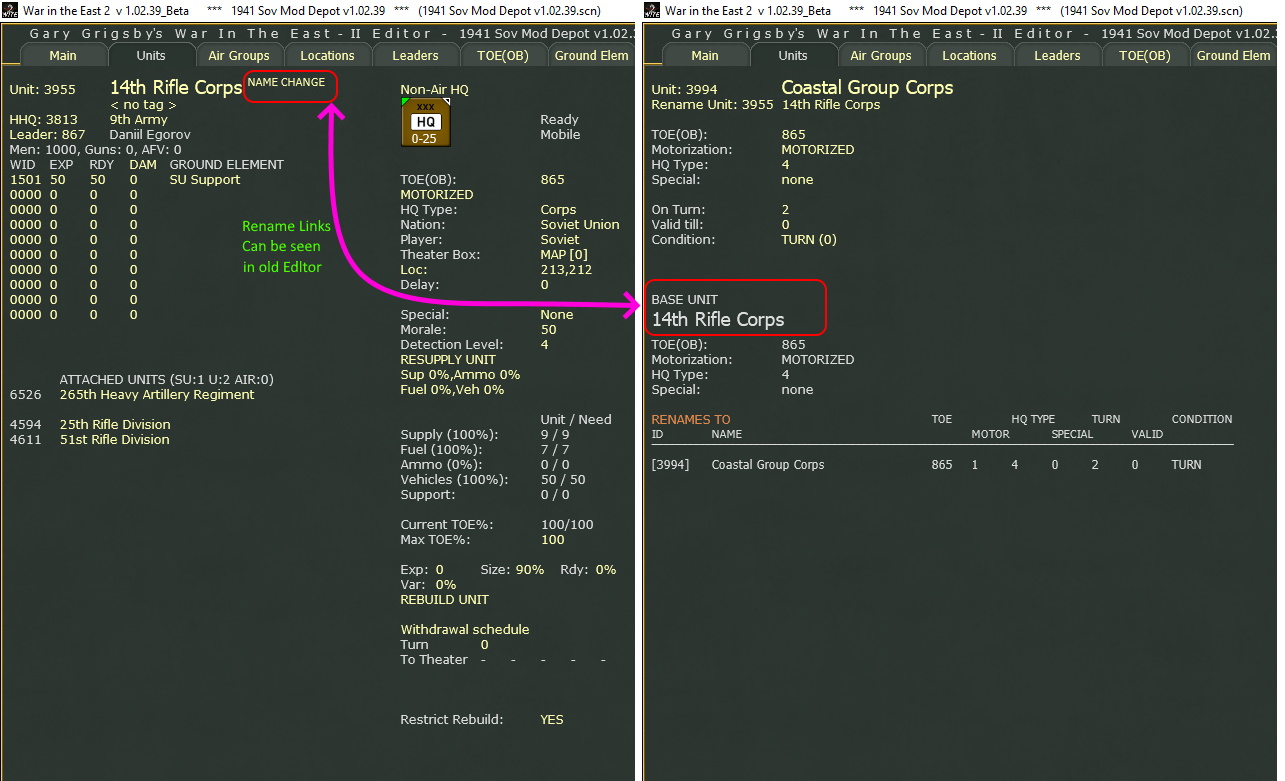
Further played with the Editor under the v.1.02.39 patch using a modded scenario and had the following observations -
a) for mods of unit renames in scenario created in older ver, the links cannot be seen using the old Editor, but can be seen if switched to the new Editor (see pic below). I do not know if these rename mod still work in games. However, if I export an unit.csv of this mod under v.1.02.39, the data is problematic because the modded rename information is missing. Import of this unit.csv will lose rename mods.
.

- RenameMod1.jpg (341.93 KiB) Viewed 730 times
.
b) I happen to have a unit.csv created under v1.02.32. Importing this unit.csv using v.1.02.39 Editor, the rename mods are imported and the links can be seen the old Editor now (see pic below). Further import and export of unit.csv appears to have no problem with the modded unit rename info now.
.
- RenameMod2.jpg (268.85 KiB) Viewed 730 times
.
I guess it may be a problem with the conversion of data in scenarios created in older version, or a problem with the work in progress Editor.
[Edit: pics added subsequently to better illustrate the situation]
Re: Importing map changes via CVS
Posted: Sun Aug 14, 2022 1:02 pm
by Teo41_ITA
So, I found an additional bug when using import/export of CVS files.
If the user is manually moving entire rows (i.e. to remove additional empty slots), any unit with the "rename" function in it will lose the renaming chain, as the "renamed" target does not move with the parental unit. The only workaround is to use the "cut" and "paste" functions within the editor (which are a pain in the hand if done for multiple consecutive hours

)
Re: Importing map changes via CVS
Posted: Sun Aug 14, 2022 4:09 pm
by Teo41_ITA
I tried to do as you told me but it does not work. I guess I will wait until the editor will be more "functional" before adding the on-map changes to my OOB scenario.
Re: Importing map changes via CVS
Posted: Sun Aug 14, 2022 4:14 pm
by Denniss
as a general rule never delete or insert lines as that has a high potential to screw something up.
Re: Importing map changes via CVS
Posted: Sun Aug 14, 2022 4:21 pm
by Joel Billings
When an old scenario is loaded with the latest version, it takes all the renames from their rename slots and moves that info to the slot of the original unit. So everything having to do with renames must be done in the new editor. That part should work ok. It sounds like some functionality was lost with the CSV import/export for units that you used to have. I'll add that to our bug list. I can't say how soon the csv import/export will be worked on as there's still a lot of the new editor that needs to be hooked up.
Re: Importing map changes via CVS
Posted: Sun Aug 14, 2022 6:43 pm
by Teo41_ITA
Thanks to both Dennis and Joel for your response.
I have actually found a solution for the map changes: I copy-pasted the GenData folder from the Steam game to my non-steam game (in which I have the OOB mod). I also removed the "Lock Generic Data" option and now I do have all the map changes in my custom scenario.