Page 1 of 4
Wishlist
Posted: Thu Nov 17, 2022 8:43 pm
by nukkxx5058
Hi guys, I'm really impressed by the game ! Looks fab and a great evolution from Red Storm. Brilliant.
So far, just two little QoL things bother me:
1) I'd love to be able to close the active window with ESC key
2) I'd like the zoom to center the map on where the cursor is.
See, not much to compalin about

Re: Wishlist
Posted: Sat Nov 19, 2022 2:36 am
by IronMikeGolf
"See, not much to complain about"
Agreed. Adding to the queue for consideration for scheduling.
Re: Wishlist
Posted: Sat Nov 19, 2022 6:14 pm
by theWombat
Might not be feasible, and it's minor, but the ability to use the mouse wheel to scroll long lists within windows, like the stuff in the spotlights and briefings.
Re: Wishlist
Posted: Sat Nov 19, 2022 9:23 pm
by CapnDarwin
Wombat, My mouse wheel, scrolls the OB tree in the Spotlight and also any of the Staff reports. What dialogs are you seeing a problem with? Can you get us a screenshot?
Re: Wishlist
Posted: Sat Nov 19, 2022 11:48 pm
by MTAMounties
Enjoying the Canadian scenario as I was 8CH myself. Would like to see a larger "unit already moved/ordered" marker, maybe a larger icon arrow or an outline of some kind. Cheers!
Re: Wishlist
Posted: Sun Nov 20, 2022 1:30 am
by budd
When you use the Shift F10 split view you can't double click or right click on the unit counter to bring up the subunit inspector or the menu by right clicking the counter. you can how ever to both of those things by double clicking or right clicking the entry in the OOB list. As soon as i split the box i was double clicking on the unit counter expecting it to open the subunit inspector. Not a huge deal, but it would be nice if the unit counter in the split box had the same functionality as the unit listing in the OOB list.
I did just notice the menu under the counter, so even less of a big deal now. Think I'm just used to Red Storm where i believe any counter you could double click on to open the subunit inspector.
Another request if possible. To be able to use other overlays on top of the MCOO overlay. I was using the MCOO overlay and thought I'd like to see the Elevations while using the MCOO during planning.
Re: Wishlist
Posted: Sun Nov 20, 2022 2:58 am
by IronMikeGolf
"Another request if possible. To be able to use other overlays on top of the MCOO overlay. I was using the MCOO overlay and thought I'd like to see the Elevations while using the MCOO during planning"
You mean something like this?
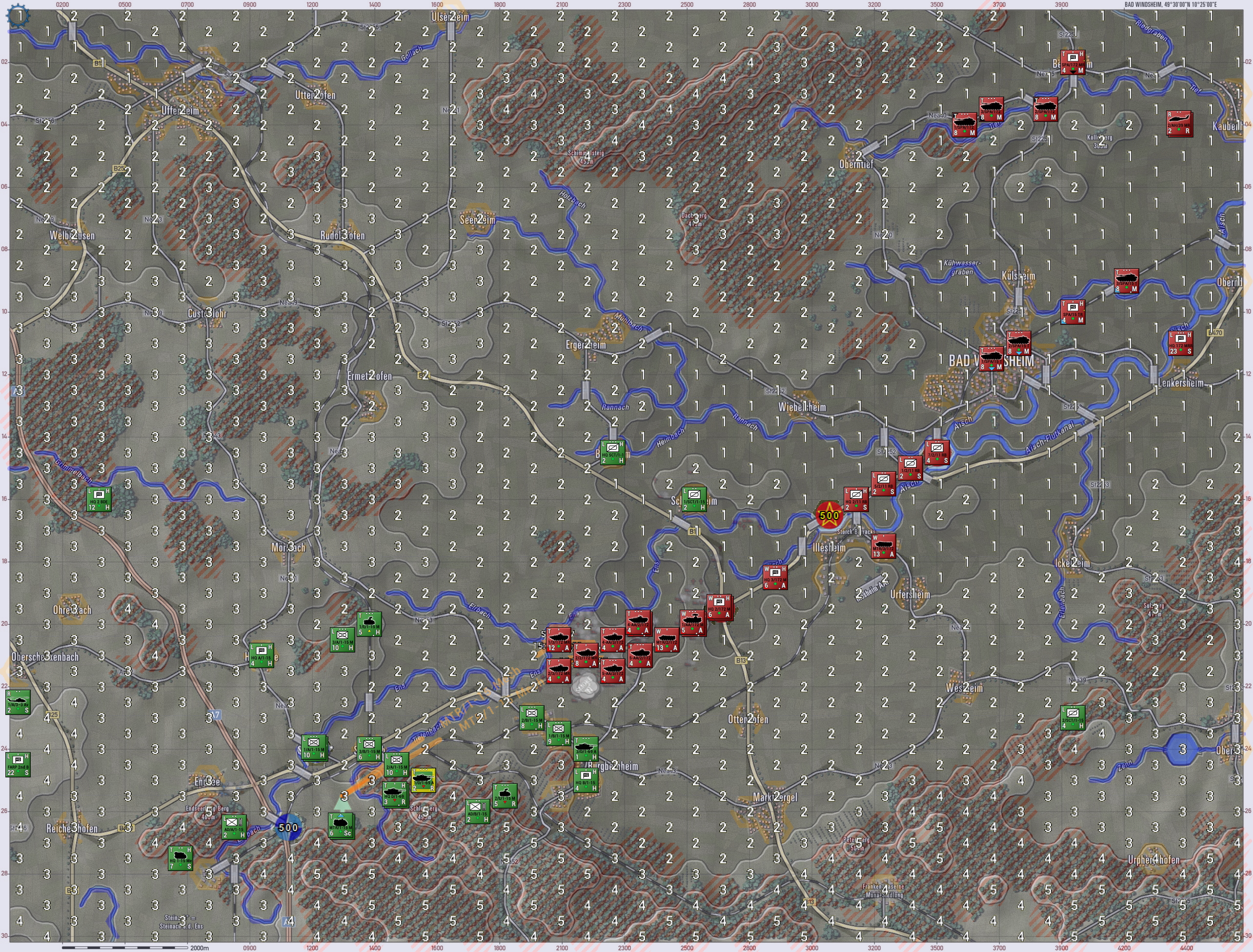
- experiment.jpg (5.4 MiB) Viewed 2272 times
Re: Wishlist
Posted: Sun Nov 20, 2022 6:01 am
by budd
Yes sir, is that currently in the game? Every time I was using MCOO and went to another overlay, the MCOO overlay turned off automatically. I tried several overlays with MCOO and none would work concurrently with the MCOO overlay.
Re: Wishlist
Posted: Sun Nov 20, 2022 6:09 am
by overkill01
+1 on center zoom on mouse.
- it would be nice to be able to revert zoom direction also
Re: Wishlist
Posted: Sun Nov 20, 2022 3:07 pm
by IronMikeGolf
"Yes sir, is that currently in the game?"
Not directly. Here's the workflow I did to make that:
1. Display the MCOO in game
2. Staff/Copy Map to Clipboard for Mission Graphics
3. Paste it in Paint.Net (what I use for image editing)
4. Select all and copy to clipboard
5. Staff/Import Mission Graphics from Clipboard
6. Terrain Overlay/Elevation Values
Re: Wishlist
Posted: Sun Nov 20, 2022 3:59 pm
by CapnDarwin
overkill01 - The zoom can be reversed in the game preferences settings. Centered on the mouse is a bigger issue based on our graphics engine. I would like that as well and we will take a look at that when we can.
Re: Wishlist
Posted: Wed Nov 23, 2022 3:44 pm
by HobbesACW
overkill01 wrote: Sun Nov 20, 2022 6:09 am
+1 on center zoom on mouse.
- it would be nice to be able to revert zoom direction also
I would also like both of these options.
Also edge of screen scrolling. It works left and right but not up and down?
Re: Wishlist
Posted: Wed Nov 23, 2022 9:26 pm
by CapnDarwin
Hobbes,
There is an option in the User Prefs to reverse mouse wheel zoom. Edge scrolling should work on all four sides. Check your Scrolling and Sound parameters in the Prefs and see that all four direction have a value and the Map checkbox is checked.
Re: Wishlist
Posted: Thu Nov 24, 2022 2:41 pm
by theWombat
CapnDarwin wrote: Sat Nov 19, 2022 9:23 pm
Wombat, My mouse wheel, scrolls the OB tree in the Spotlight and also any of the Staff reports. What dialogs are you seeing a problem with? Can you get us a screenshot?
Doh, it seems to be working fine now. Have no idea why I thought it wasn't working earlier. Operator error, nothing to see here! Well, except for in the subunit-inspector. With the default window size I can't use the wheel to scroll through the subunits. Not at all a big deal though.
Re: Wishlist
Posted: Sat Nov 26, 2022 2:49 pm
by HobbesACW
CapnDarwin wrote: Wed Nov 23, 2022 9:26 pm
Hobbes,
There is an option in the User Prefs to reverse mouse wheel zoom. Edge scrolling should work on all four sides. Check your Scrolling and Sound parameters in the Prefs and see that all four direction have a value and the Map checkbox is checked.
Thanks I have changed the zoom. I don't get the scrolling though.
At the moment neither map or program modes allow me to scroll the map by moving the cursor to the extreme edge of the PC screen in windowed mode. When I try and select a menu option at the top of the screen I often get unwanted scrolling. It should be possible to prevent scrolling unless the cursor is actually above the menu options? It works in program mode to the left and right but not top or bottom.
Chris
Re: Wishlist
Posted: Sat Nov 26, 2022 3:31 pm
by CapnDarwin
Chris, what is your OS and screen resolution? I can window my game and still have the map scroll settings working fine in all four directions.
Re: Wishlist
Posted: Sun Nov 27, 2022 6:56 pm
by HobbesACW
Windows 10 1920 x 1080. I can scroll in all 4 directions but only with the cursor at the top of the map, not at edge of the PC screen.
Cheers,
Chris
Re: Wishlist
Posted: Sun Nov 27, 2022 9:38 pm
by JacquesDeLalaing
My current list:
1. Fog of War: Option to disable the white dot on units that are spotted by the enemy. Why should I know whether my unit is spotted or not?
2. Fog of War: Option to disable display of explosions and enemy losses on the map when firing artillery on an unspotted hex. Why should I know if my artillery fire is effective if I can't see the enemy?
3. Fog of War: Don't show enemy artillery (in particular smoke) missions if I have no eyes on the targeted hex.
4. Orders: Enable h-hour settings for orders (don't start order before time x). This is the most important point on the list by far.
5. Fix order delay exploit: Update order delay when players retroactively change movement order type.
6. Background image for nighttime that is shown in the weather information window needs to be brighter. You can't read the text as it is too dark (lack of contrast).
7. SOP-addition: Allow mot./mech. units to stay mounted on their APCs with a stationary order.
8. Allow several stationary orders. Right now, you can queue several movement orders but only one stationary order.
9. Improve documentation.
Re: Wishlist
Posted: Mon Nov 28, 2022 12:04 am
by CapnDarwin
Jacques, many good points. Let me hit each one:
#1. Agree, and something I have already brought up to the team. It should be something we can change to a has been engaged dot once shot at by something.
#2 We will have to see what we can do here regarding spotting and limitation on the game engine, but I think we can get it working.
#3 This one will take some thinking on the team's part as markers and spotting getting linked up in an active fashion is a non-trivial issue.
#4 Any movement order can be delayed by "X" minutes in the Dashboard. Are you looking to have a game time option to set?
#5 This is in work and hopefully be in the January update.
#6 We will check this out. Do you have a screenshot for this one?
#7 Not sure about the actual doctrinal use for this one, but I am checking with our experts on the team.
#8 This is something that has been discussed in the past two weeks, but it will require time to design, code, and test if we can do it without breaking everything. This one will take some time if possible.
#9 More docs on Content and Modding are in the works. We will also make corrections and add new items as new features or changes in game use are made.
Thanks for the listing.
Re: Wishlist
Posted: Wed Nov 30, 2022 6:48 am
by JacquesDeLalaing
CapnDarwin wrote: Mon Nov 28, 2022 12:04 am
#4 Any movement order can be delayed by "X" minutes in the Dashboard. Are you looking to have a game time option to set?
#5 This is in work and hopefully be in the January update.
#6 We will check this out. Do you have a screenshot for this one?
#7 Not sure about the actual doctrinal use for this one, but I am checking with our experts on the team.
#8 This is something that has been discussed in the past two weeks, but it will require time to design, code, and test if we can do it without breaking everything. This one will take some time if possible.
#9 More docs on Content and Modding are in the works. We will also make corrections and add new items as new features or changes in game use are made.
Thanks for the listing.
Thank you for your answer! For me personally, the fog-of-war inconsistencies (1-3), h-hour trigger (4) and the exploit (5) are the points that affect gameplay the most.
@4: Yes, I was refering to a trigger that can be set for an absolute point in time (don't start order before time x) rather than a relative point in time (start order x minutes after completion of previous order). The delay is much too unreliable (often order finish earlier or later) and it can lead to infuriatingly frustrating and unrealistic situations (units moving out of cover before artillery/smoke has set in, etc). Plus it somewhat defeats the main novelty of this new release (increased number of waypoints -> we also need some basic options to coordinate units!).
@6 here is a screenshot:
https://ibb.co/RhS35hD