Page 1 of 1
Editor.ini error
Posted: Sun Feb 05, 2023 12:56 am
by Platoonist
I'm getting this prompt when I try to start up the editor lately. Clicking okay just gets you back to the desktop.
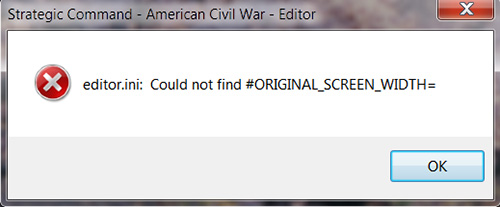
- Editor error.jpg (41.36 KiB) Viewed 2044 times
Re: Editor.ini error
Posted: Mon Feb 06, 2023 4:05 pm
by Hubert Cater
That would be odd if it is a sudden issue, what I would recommend is to navigate to the following folder on your PC and then deleting the Editor.ini file found there. It will be rebuilt the next time you launch the Editor.
\Users\<username>\Documents\My Games\Strategic Command - American Civil War
Re: Editor.ini error
Posted: Mon Feb 06, 2023 4:07 pm
by Hubert Cater
The other issue is that perhaps the Editor is not pointing to the correct folder, which could be a permissions issue and anti-virus software related.
e.g. if the anti virus software is preventing you from reading the USER documents folder. That could be a new setting, e.g. a new protective setting, and something worth looking into on your end as well.
Re: Editor.ini error
Posted: Mon Feb 06, 2023 11:18 pm
by Platoonist
Hubert Cater wrote: Mon Feb 06, 2023 4:05 pm
That would be odd if it is a sudden issue, what I would recommend is to navigate to the following folder on your PC and then deleting the Editor.ini file found there. It will be rebuilt the next time you launch the Editor.
\Users\<username>\Documents\My Games\Strategic Command - American Civil War
That seems to have resolved the issue. Thanks!

I got a new monitor a few weeks ago. Maybe, that was a factor although I seem to recall being able to open the editor since.
Re: Editor.ini error
Posted: Tue Feb 07, 2023 4:36 pm
by Hubert Cater
Great
