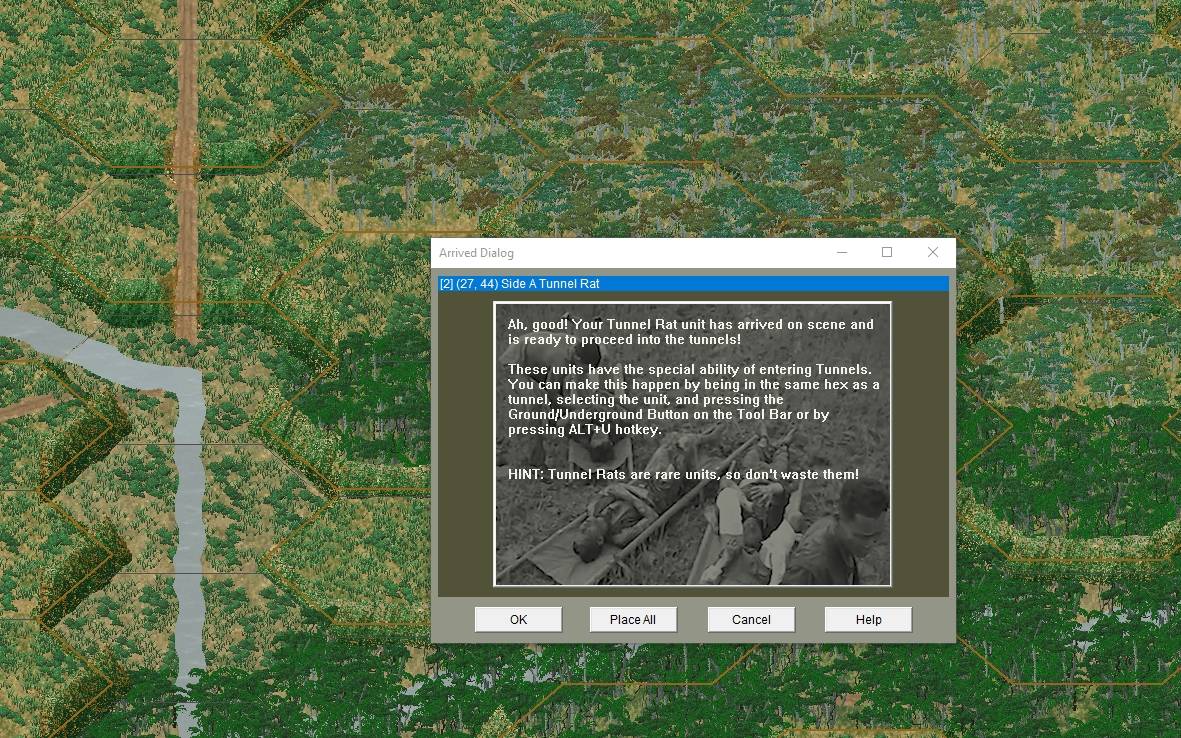
I don't think this is a bug so much as maybe some confusion how to work the UI.
Before I proceed, please note that there are three ways to place reinforcements on map. In the Arrived Dialog
- Single click a listed item, then press the OK button. The unit is placed, the dialog goes away because of the OK press.
- Double click a listed item. The unit is placed, the dialog goes away automatically, no OK button press necessary.
- Click the Place All button. The units are placed, the dialog goes away automatically, no OK button press necessary.
I can recreate the situation locally here:

- CSEE_Bug7.JPG (52.63 KiB) Viewed 2669 times
Note that the message dialog only appears if I double click the listed item, "[2] (27,44) Side A Tunnel Rat". Note that such a click in and of itself places the Tunnel Rats on map. Ordinarily the Arrived Dialog would go away automatically, but the CSEE has intercepted and displayed a message dialog.
If I then attempt to click any of the
Arrived Dialog buttons, OK, Place All, etc., nothing happens. The game appears to be frozen.
Not so! At least not for me.
Here's the thing: The message dialog has the program "focus". Unless and until you click anywhere in that message dialog, nothing else happens.
But if you click on the message dialog (anywhere within the image), this retires the dialog.
And retires the underlying Arrived Dialog also.
In other words, when I click the image, both dialogs go away, the Tunnel Rats are placed on map, and I have complete control of the game once again. No freeze.
Try it. I am pretty sure this explains your issue.