Page 1 of 1
Daze, confused and befuddled getting the game running
Posted: Thu Oct 26, 2023 6:32 pm
by Lawless1
The following was post to the Tech Support Forum on 17 Oct 23 (note edit for clarification)
Had trouble getting the game to download and after finally getting the game down loaded kept getting "unable to load PW data"
First time I down loaded the game, the folders were spread all over my C drive added the game icon to the C drive. I now have all the folders in on file.
(note: the Matrix folder was not present and the shortcut posted to the desktop would bring up the Editor with data)
After combining all the files into one folder I only had the following PW files:
pwhexe.dat
pwsdll.dll
pwsdl7l.dll
Following the advise of bdt64, I deleted all file/folders and removed the short cut from the desktop. I also emptied the Recycle Bin, then did a computer restart.
Downloaded [PC] Update v1.01.26a and [PC] Installer v1.00.79 WarinthePacificAdmiralsEdition-SetupRelease-v10079DR.zip. I did not download the Installer the
first time.
The download created the Matrix folder and all related files/folders as best as I can tell. The short cut brings up the Game Menu, while I can play the game my
problem now is that when I go to the Editor there are no scenarios listed.
How can I access the information in the Editor. What did I do incorrectly and how can I correct it?
As a side note, I am running Window 7 and had to install a new hard drive after my old one crashed hard and lost of the data on it.
My thanks
Howard
Re: Daze, confused and befuddled getting the game running
Posted: Thu Oct 26, 2023 6:38 pm
by Nikel
When you run the editor.
File, open scenario, browse to the Scen folder and load the scenario you want.
Re: Daze, confused and befuddled getting the game running
Posted: Thu Oct 26, 2023 7:13 pm
by Lawless1
The problem is that no matter what Scen I selected the files shows "none" for all the Scen.
Getting following error: File open failed in Scenario::Read File (edit)
Having issues getting a photo to show that there is nothing there to select.
Re: Daze, confused and befuddled getting the game running
Posted: Thu Oct 26, 2023 7:25 pm
by btd64
If you're in windowed mode, use snippet tool to grab a picture....GP
Re: Daze, confused and befuddled getting the game running
Posted: Thu Oct 26, 2023 8:12 pm
by Nikel
"None" are empty slots, but you should see the used slots with the names of the scenarios, browsing to the scen folder of the game.
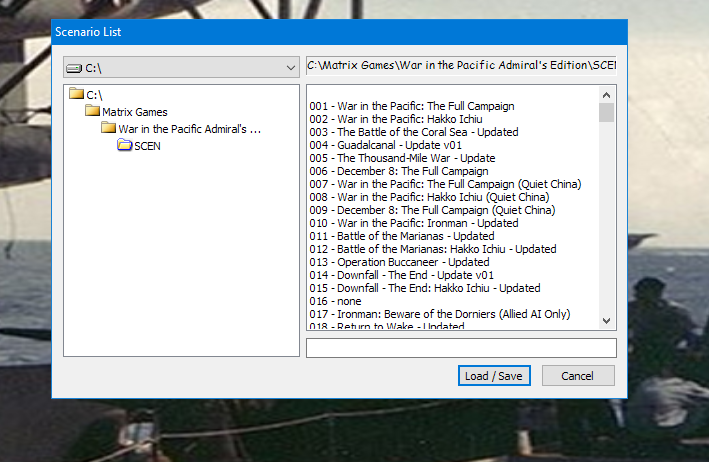
- AEE.png (149.5 KiB) Viewed 1215 times
Re: Daze, confused and befuddled getting the game running
Posted: Thu Oct 26, 2023 9:01 pm
by btd64
Lawless1, Did the above post help?....GP
Thank you Nikel.

....GP
Re: Daze, confused and befuddled getting the game running
Posted: Thu Oct 26, 2023 9:05 pm
by btd64
One thing. After you load a scenario save it to an empty slot above 025. then do your work saving to the new slot that you choose....GP
Re: Daze, confused and befuddled getting the game running
Posted: Thu Oct 26, 2023 9:21 pm
by Lawless1
I did use the Snipping Tool, forgot how to post it in the message
Anyway using the image above, my display shows the Scen but “None” is listed for where Scen
1-199 should list the names of the Scen. Getting the error I listed above for any Scen I wish to edit.
On my crash hard drive I had four different Scen created
Re: Daze, confused and befuddled getting the game running
Posted: Fri Oct 27, 2023 6:40 am
by Chris21wen
I'm slightly confused.
Are you saying that although you can see the official scenarios you cannot open them or are you saying you can but not any you have created?
Re: Daze, confused and befuddled getting the game running
Posted: Fri Oct 27, 2023 2:04 pm
by BBfanboy
Chris21wen wrote: Fri Oct 27, 2023 6:40 am
I'm slightly confused.
Are you saying that although you can see the official scenarios you cannot open them or are you saying you can but not any you have created?
You cannot make and save any changes to scenario slots 1-25. You can load them in the editor and make changes but you will not be able to save them in any of those slots. You
can save your modified scenario in a slot higher than 25.
Re: Daze, confused and befuddled getting the game running
Posted: Fri Oct 27, 2023 10:26 pm
by Lawless1
Yes I can play the game. I want to create my own Scen and save to slot or Scen 25. What I cannot is Edit Scen 2.
The main Editor menu will display but every Scen is listed as none
for the data. If I select a Scen I get the error listed above. Something about a read file missing
I have already had the shortcut for the Editor on my desktop
Re: Daze, confused and befuddled getting the game running
Posted: Fri Oct 27, 2023 10:36 pm
by RangerJoe
Lawless1 wrote: Fri Oct 27, 2023 10:26 pm
Yes I can play the game. I want to create my own Scen and save to slot or Scen 25. What I cannot is Edit Scen 2.
The main Editor menu will display but every Scen is listed as none
for the data. If I select a Scen I get the error listed above. Something about a read file missing
I have already had the shortcut for the Editor on my desktop
With the editor you should be able to open any scenario, save it to another number (try 51+) and then edit that one. You can NOT edit any supplied scenario and then save it in the same slot.
Re: Daze, confused and befuddled getting the game running
Posted: Sat Oct 28, 2023 4:58 am
by BBfanboy
Lawless1 wrote: Fri Oct 27, 2023 10:26 pm
Yes I can play the game. I want to create my own Scen and save to slot or Scen 25. What I cannot is Edit Scen 2.
The main Editor menu will display but every Scen is listed as none
for the data. If I select a Scen I get the error listed above. Something about a read file missing
I have already had the shortcut for the Editor on my desktop
After the Editor opens, you have to "Open" an existing scenario and wait for the data to load into the editor. That can take about 15 seconds. If you are able to play the game but the Editor is unable to find the data, you need to get them both in the same folders, or if it gives you the option,
browse to the folder that has the official scenarios. After the scenario loads, save it as Ranger Joe suggested and give it a name that will describe it for future searches - like Scenario 2 Mod, Oct 2023. You can rename it each time you save.
While doing your changes to the database, save them frequently. It only takes a couple of seconds to update the file.
Re: Daze, confused and befuddled getting the game running
Posted: Sat Oct 28, 2023 6:36 am
by Chris21wen
Lawless1 wrote: Fri Oct 27, 2023 10:26 pm
Yes I can play the game. I want to create my own Scen and save to slot or Scen 25. What I cannot is Edit Scen 2.
The main Editor menu will display but every Scen is listed as none
for the data. If I select a Scen I get the error listed above. Something about a read file missing
I have already had the shortcut for the Editor on my desktop
I still do not understand the problem with the editor?
From this post I think you are saying there's no scenarios listed but from a different post the shot shows the official scenarios. This is conflicting info.
If you trying to open something that's not there,e.g. 'none', then you will get a read error.
There are a number of possible errors that can cause missing or appearently files:
Incorrect install. Ruled out as you can play the game.
Editor not pointing to the scenario folder. Ruled out according to the sceen shot
Shortcut screwed up somehow. Try creating a new one or running it directly from the scenario folder. My bet if you had the game installed before and did not delete any existing shortcuts
Corrupt editor. Not a likely option.
Windows has somehow 'read protected' the folders concerned. You can check this by right clicking folder, select security tab and look see if you have tick against allow for read.
Re: Daze, confused and befuddled getting the game running
Posted: Sat Oct 28, 2023 7:11 pm
by BBfanboy
My guess is that he did not yet select "File" and "Open Scenario" to load the data.
Re: Daze, confused and befuddled getting the game running
Posted: Sun Oct 29, 2023 2:23 am
by Lawless1
First, I want to thank everyone for their help.
Second, the image above is not what my computer is showing, it was posted by Nikel to show what the Scen page would look like.
When RL ease up, I will try many of the wonderful suggestions.
Once again my thanks
Re: Daze, confused and befuddled getting the game running
Posted: Sun Oct 29, 2023 2:38 am
by RangerJoe
Lawless1 wrote: Sun Oct 29, 2023 2:23 am
First, I want to thank everyone for their help.
Second, the image above is not what my computer is showing, it was posted by Nikel to show what the Scen page would look like.
When RL ease up, I will try many of the wonderful suggestions.
Once again my thanks
I will give you one last suggestion to try now, use SeaBee to install the game switches.