Page 1 of 1
Custom Environment Zones - LUA
Posted: Sun Nov 19, 2023 9:49 pm
by gcommie
Is there a way of setting the weather in a Custom Environment Zone (CEZ) using LUA?
I can readily create a CEZ using ScenEdit_AddZone({...}) and then view the .weatherprofile, i.e. local CEZ = ScenEdit_AddZone({...}) and then print CEZ.weatherprofile.[temp | rainfall | undercloud | seastate], but not worked out how to alter the default values of 15, 0, 0, 0 respectively.
This is probably quite simple, but I'm new to using LUA.
TIA.
Re: Custom Environment Zones - LUA
Posted: Sun Nov 19, 2023 10:58 pm
by thewood1
There is a lua subforum in the mods section where someone might point you in the right direction.
Re: Custom Environment Zones - LUA
Posted: Sun Nov 19, 2023 11:35 pm
by thewood1
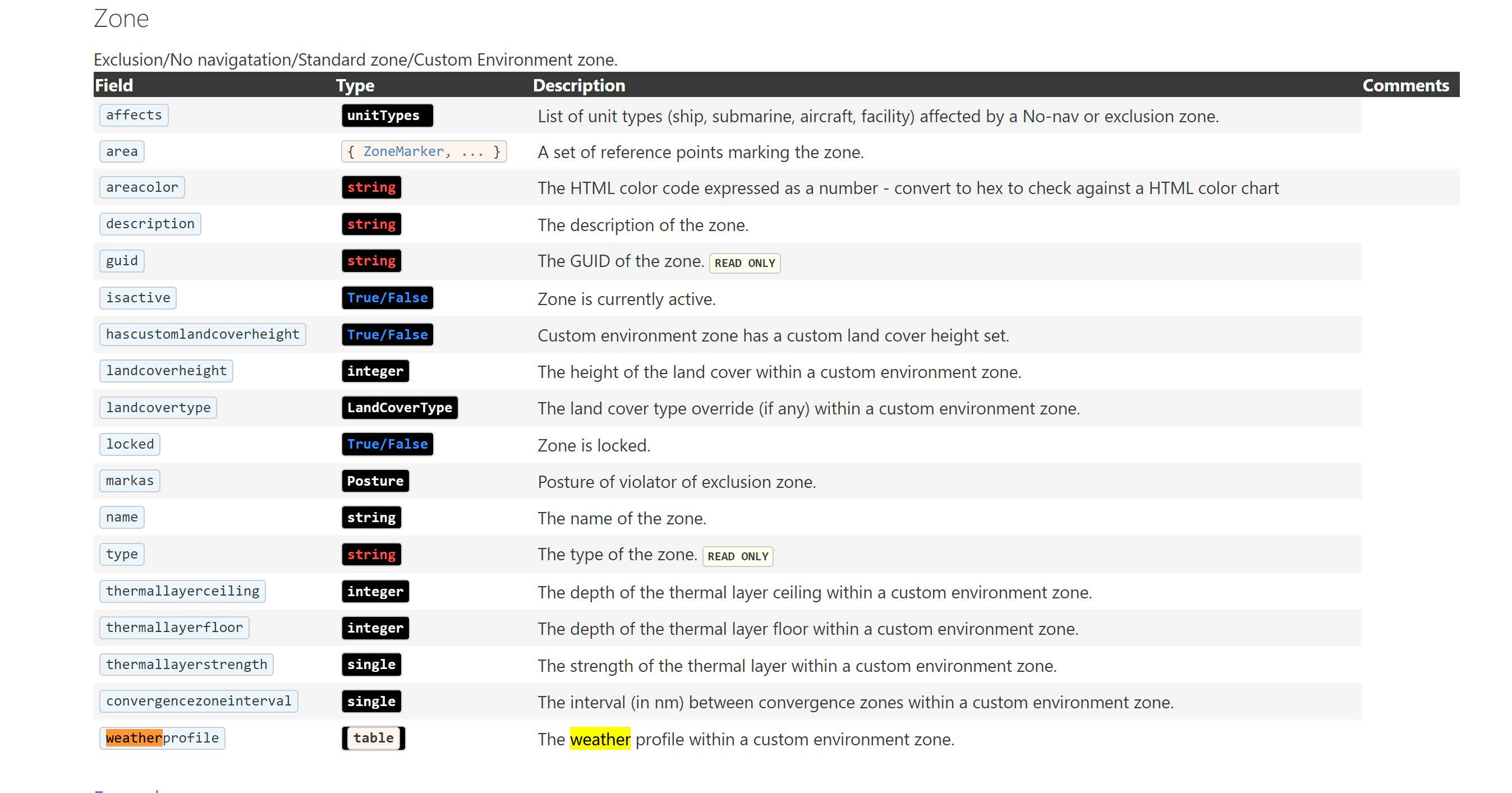
https://commandlua.github.io/assets/Wrappers.html
Use the "zone" wrapper to set the weatherprofile for a zone you add.
- Screenshot 2023-11-19 183425.jpg (450.75 KiB) Viewed 2045 times
I have never used it but, again, check the lua section in mods.
Re: Custom Environment Zones - LUA
Posted: Mon Nov 20, 2023 12:09 am
by lumiere
Note that new weather profile must be entered as whole table, like this one:
local cez = VP_GetSide({name="Nature"}):getcustomenvironmentzone("CEZ")
print(cez)
cez.weatherprofile = { rainfall = 5, seastate = 2, undercloud = 3, temp = 20 }
print(cez.weatherprofile)
Unlike ScenEdit_SetWeather(), setting parameters separately will not work.
--they won't work
cez.weatherprofile.rainfall = 5
cez.weatherprofile.seastate = 2
cez.undercloud = 3
cez.temp = 20
Re: Custom Environment Zones - LUA
Posted: Mon Nov 20, 2023 2:21 pm
by gcommie
Thanks for the feedback.
thewood1, will try to remember to use the Command: Modern Operations series > Mods and Scenarios > Lua Legion subforum in future. Thanks for pointing it out.
lumiere, thanks for highlighting the syntax for using the wrapper. Don't think this is particularly well documented, but at least I now know how to change the values.
That said, FYI, I have found that running a simple script to create and then set a CEZ results in a error if I then select Missions + Ref. Points > Area / Reference Points Manager > Cust Env Zones > Edit CEZ Data and not all the values are set, though in the console all appears good
Re: Custom Environment Zones - LUA
Posted: Tue Apr 01, 2025 5:16 pm
by Orion Omega
Thanks lumiere! I too got down to read the data but could not change it. "cez.temp = 20" all the time but nothing happend
