Page 1 of 1
game does not recognize my GPU GTX 1650 (CMANO)
Posted: Mon Apr 08, 2024 10:12 pm
by herickviana18
From version 1.05 and 1.06 the game simply does not recognize my gtx1650 GPU, it only uses the integrated GPU (Intel UHD Graphics), and because of this, I have constant lags and low fps. I tried to access the Nvidia control panel and assign CMANO to High Performance, but without success. Can someone help me?
Re: game does not recognize my GPU GTX 1650
Posted: Mon Apr 08, 2024 10:35 pm
by Platoonist
herickviana18 wrote: Mon Apr 08, 2024 10:12 pm
Can someone help me?
You'll have to state which of the many Slitherine/Matrix games you are having the issue with. This is the General Discussion forum where we discuss no one game in particular.
(With the possible exception of the ever-anticipated Steel Tigers)
Re: game does not recognize my GPU GTX 1650
Posted: Mon Apr 08, 2024 10:39 pm
by herickviana18
Platoonist wrote: Mon Apr 08, 2024 10:35 pm
herickviana18 wrote: Mon Apr 08, 2024 10:12 pm
Can someone help me?
You'll have to state which of the many Slitherine/Matrix games you are having the issue with. This is the General Discussion forum where we discuss no one game in particular.
It's Command Modern Operations.
Re: game does not recognize my GPU GTX 1650
Posted: Mon Apr 08, 2024 10:42 pm
by Platoonist
herickviana18 wrote: Mon Apr 08, 2024 10:39 pm
It's Command Modern Operations.
Good. You may get an answer here. But you can also post in their forum too. You'll likely get a quicker response there.
Here's the link...
https://www.matrixgames.com/forums/view ... hp?f=10201
Good luck!
Re: game does not recognize my GPU GTX 1650 (CMANO)
Posted: Tue Apr 09, 2024 12:41 am
by OldSarge
What O/S are you using? For Windows 10/11 you can go to Settings > System > Display > Graphics Go down to Custom options and locate the Find app search box and use that to add CMANO to the list.
Once CMANO is on the list select it and click on options and select the card you want to use. That should be it and you can do the same for other games that have the same issue.
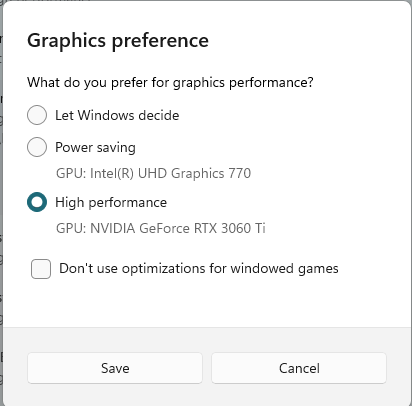
- GfxOptions.png (19.25 KiB) Viewed 770 times
HTH
Re: game does not recognize my GPU GTX 1650 (CMANO)
Posted: Tue Apr 09, 2024 1:12 am
by herickviana18
OldSarge wrote: Tue Apr 09, 2024 12:41 am
What O/S are you using? For Windows 10/11 you can go to Settings > System > Display > Graphics Go down to Custom options and locate the Find app search box and use that to add CMANO to the list.
Once CMANO is on the list select it and click on options and select the card you want to use. That should be it and you can do the same for other games that have the same issue.
GfxOptions.png
HTH
I tried doing something similar and it didn't work. I'll try to follow these exact steps and get back to you.
Re: game does not recognize my GPU GTX 1650 (CMANO)
Posted: Tue Apr 09, 2024 2:19 am
by herickviana18
OldSarge wrote: Tue Apr 09, 2024 12:41 am
What O/S are you using? For Windows 10/11 you can go to Settings > System > Display > Graphics Go down to Custom options and locate the Find app search box and use that to add CMANO to the list.
Once CMANO is on the list select it and click on options and select the card you want to use. That should be it and you can do the same for other games that have the same issue.
GfxOptions.png
HTH

 https://uploaddeimagens.com.br/imagens/cvX3gEk
https://uploaddeimagens.com.br/imagens/jMdDDSI
https://uploaddeimagens.com.br/imagens/cvX3gEk
https://uploaddeimagens.com.br/imagens/jMdDDSI
unsuccessfully