Page 1 of 1
CMANO does not recognize my gpu GTX 1650
Posted: Mon Apr 08, 2024 10:52 pm
by herickviana18
From version 1.05 and 1.06 the game simply does not recognize my gtx1650 GPU, it only uses the integrated GPU (Intel UHD Graphics), and because of this, I have constant lags and low fps. I tried to access the Nvidia control panel and assign CMANO to High Performance, but without success. Can someone help me?
Re: CMANO does not recognize my gpu GTX 1650
Posted: Tue Apr 09, 2024 12:03 am
by thewood1
First off, I assume you mean CMO, not CMNAO. CMNAO's latest version is 1.15.
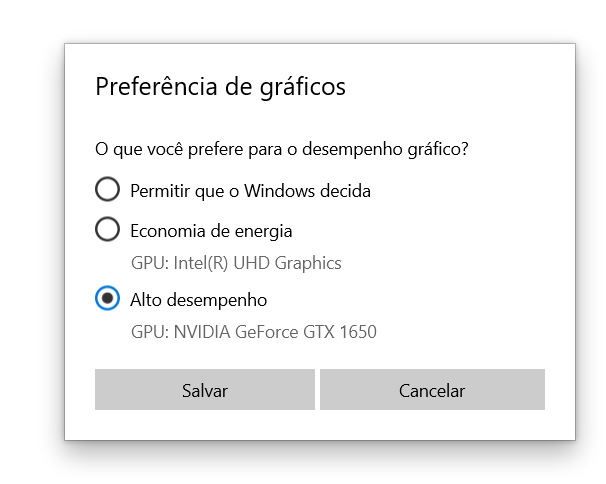
MS made a change a while ago that you have to use Windows display graphics settings and change CMO to High Performance.
Re: CMANO does not recognize my gpu GTX 1650
Posted: Tue Apr 09, 2024 12:48 am
by herickviana18
thewood1 wrote: Tue Apr 09, 2024 12:03 am
First off, I assume you mean CMO, not CMNAO. CMNAO's latest version is 1.15.
MS made a change a while ago that you have to use Windows display graphics settings and change CMO to High Performance.
I don't understand the acronyms well because I'm new, but I'm referring to Command Modern Operations.
Well, I did this procedure of assigning it to High Performance in Config > System > Display > Graphics Configuration, but it didn't work
Re: CMANO does not recognize my gpu GTX 1650
Posted: Tue Apr 09, 2024 4:48 am
by Dimitris
Can you completely disable the iGPU, so that the dGPU is the only choice available ?
Re: CMANO does not recognize my gpu GTX 1650
Posted: Tue Apr 09, 2024 7:39 am
by Nikel
Double post.
Re: CMANO does not recognize my gpu GTX 1650
Posted: Tue Apr 09, 2024 7:41 am
by Nikel
Perhaps you are closing the graphics settings window without clicking on save?
"Salvar", pic from the other thread you created.
Re: CMANO does not recognize my gpu GTX 1650
Posted: Tue Apr 09, 2024 7:13 pm
by herickviana18
Dimitris wrote: Tue Apr 09, 2024 4:48 am
Can you completely disable the iGPU, so that the dGPU is the only choice available ?
How do I do that?
Re: CMANO does not recognize my gpu GTX 1650
Posted: Tue Apr 09, 2024 7:14 pm
by herickviana18
Nikel wrote: Tue Apr 09, 2024 7:41 am
Perhaps you are closing the graphics settings window without clicking on save?
"Salvar", pic from the other thread you created.
No, I clicked save
Re: CMANO does not recognize my gpu GTX 1650
Posted: Tue Apr 09, 2024 7:19 pm
by Nikel
And the nVidia control panel settings recommended in the link below?
https://www.minitool.com/news/game-not-using-gpu.html
Re: CMANO does not recognize my gpu GTX 1650
Posted: Tue Apr 09, 2024 8:47 pm
by herickviana18
Yes, I tried that. My GTX GPU is up to date. When I accessed the nvidia control panel and PhysX configuration, it was already on GTX 1650. There are no updates available on my Windows 10, and I have already tried to set the game to High Performance in the graphics settings, but without success
Re: CMANO does not recognize my gpu GTX 1650
Posted: Tue Apr 09, 2024 10:51 pm
by OldSarge
I didn't see it mentioned elsewhere, are you running on a desktop or a laptop?
Silly question but needs to be asked, is the monitor plugged into the NVida card's port or the iGPU port on the motherboard? It may not be the issue, but since Windows sees the card and CMO doesn't that would be another place I'd look.
HTH
Re: CMANO does not recognize my gpu GTX 1650
Posted: Wed Apr 10, 2024 2:19 am
by herickviana18
OldSarge wrote: Tue Apr 09, 2024 10:51 pm
I didn't see it mentioned elsewhere, are you running on a desktop or a laptop?
Silly question but needs to be asked, is the monitor plugged into the NVida card's port or the iGPU port on the motherboard? It may not be the issue, but since Windows sees the card and CMO doesn't that would be another place I'd look.
HTH
My PC : Notebook Lenovo Gaming 3. Well, I don't think it's a problem with the cards, as all other games run normally.
Re: CMANO does not recognize my gpu GTX 1650
Posted: Thu Apr 11, 2024 5:34 am
by Dimitris
herickviana18 wrote: Tue Apr 09, 2024 7:13 pm
Dimitris wrote: Tue Apr 09, 2024 4:48 am
Can you completely disable the iGPU, so that the dGPU is the only choice available ?
How do I do that?
This can differ from one laptop to the other, but this is a couple of general guides:
https://www.cgdirector.com/how-to-disab ... hics-igpu/
https://www.makeuseof.com/disable-integ ... s-windows/
DISCLAIMER: Your hardware & OS is your own, and we take absolutely no responsibility for anything you do to it. If you are unsure about things, ask for local expert assistance.