Performance Issues (Solved)
Posted: Tue Nov 26, 2024 10:44 am
This topic is not so much about a problem but rather advice from a .NET developer on how to improve game performance. Unfortunately, I don't have the English localization of the operating system, so the screenshots are provided in Cyrillic.
Essence:
In the late stages of the game, the process (OS) performs a large number of computations on the CPU. Our task is to allocate more CPU time to the game's process (more time quanta). I won't delve into the internal workings of the operating system's thread scheduler; instead, I'll simply demonstrate the configuration steps.
Obvious steps:
1. Close as many background processes as possible (messengers, browsers, etc.)
2. In the game settings, adjust the sliders—set Maximum FPS to the minimum and System Load Target to the maximum

Less obvious steps:
3. Set a high priority for the game's process, but not to real-time priority!
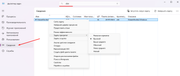
4. Change the processor scheduling mode to "server" mode. When you switch this setting, you might notice input lag from peripheral devices; this is normal. There's no need to restart the computer. To do this:
Essence:
In the late stages of the game, the process (OS) performs a large number of computations on the CPU. Our task is to allocate more CPU time to the game's process (more time quanta). I won't delve into the internal workings of the operating system's thread scheduler; instead, I'll simply demonstrate the configuration steps.
Obvious steps:
1. Close as many background processes as possible (messengers, browsers, etc.)
2. In the game settings, adjust the sliders—set Maximum FPS to the minimum and System Load Target to the maximum
Less obvious steps:
3. Set a high priority for the game's process, but not to real-time priority!
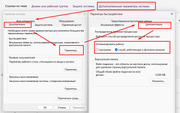
4. Change the processor scheduling mode to "server" mode. When you switch this setting, you might notice input lag from peripheral devices; this is normal. There's no need to restart the computer. To do this:
- Go to "My Computer".
- Right-click on an empty area and select "Properties".
- Click on "Advanced System Settings".
- Navigate to the "Advanced" tab.
- Under the "Performance" section, click on "Settings".
- Go to the "Advanced" tab.
- In the "Processor Scheduling" section, select "Adjust for best performance of: Background services".
- Click OK on all windows to apply the changes.