Page 1 of 1
[FIXED][1544] Area & Reference Points Manager broken?
Posted: Sun Feb 09, 2025 8:15 pm
by stolowski
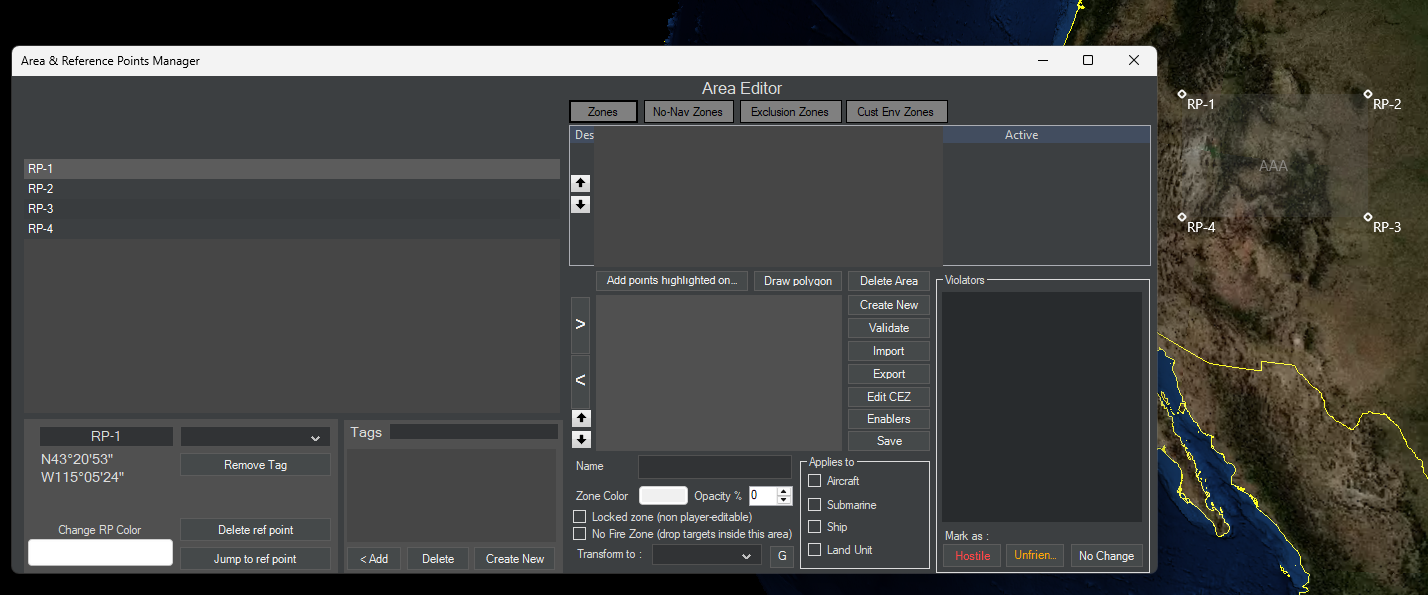
The "Area & Reference Points Manager" appears broken in 1544, at least in the Editor. See the screenshot - this is what I get after creating a simple area and then opening the manager - there is a grey box covering part of the widget. I quickly checked this in build 1527 and it's ok there.
- Screenshot 2025-02-09 211057.png (406.66 KiB) Viewed 1207 times
Re: [1544] Area & Reference Points Manager broken?
Posted: Sun Feb 09, 2025 9:10 pm
by thewood1
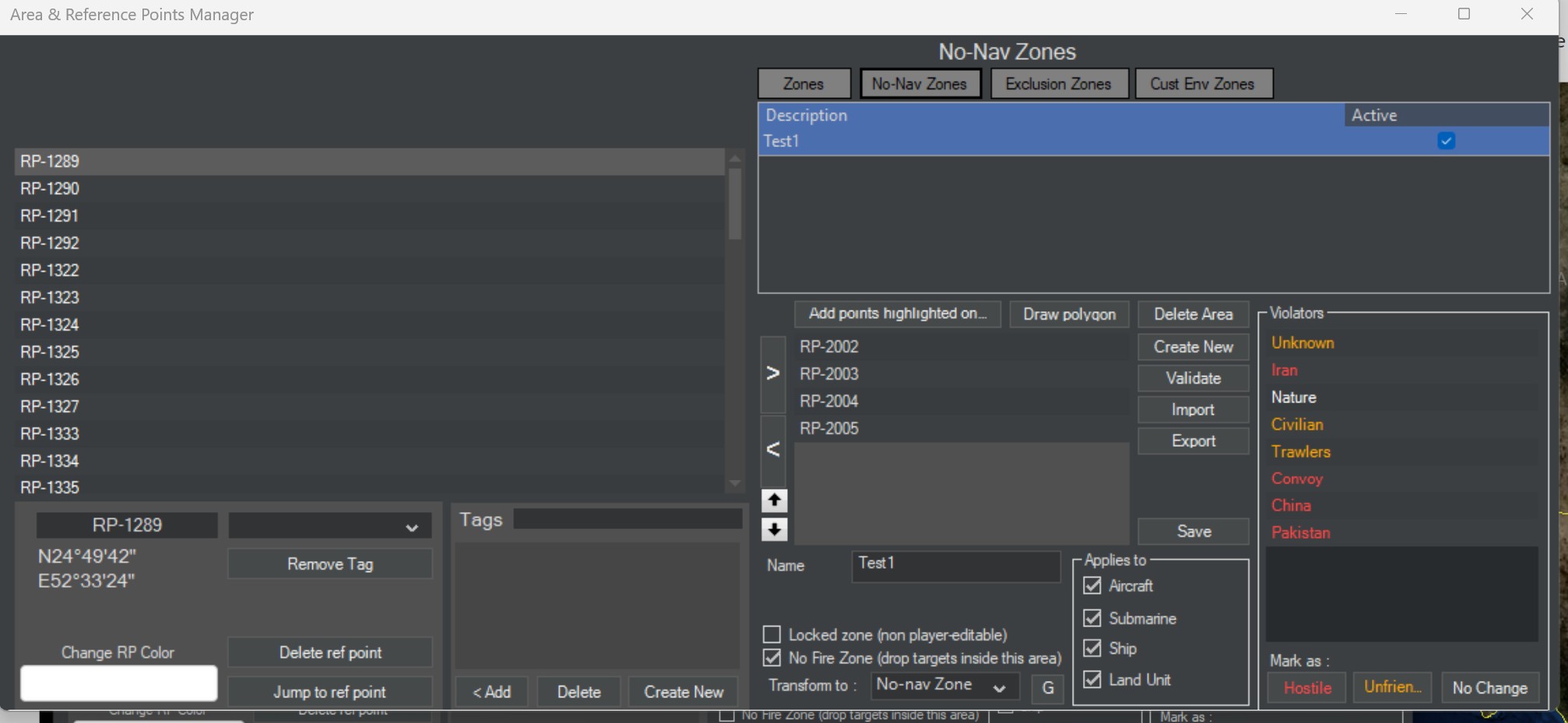
I tried everything I could think of to get what you see and can't get it. This is what I see:
- Screenshot 2025-02-09 155811.jpg (176.56 KiB) Viewed 1200 times
I have never noticed the "Area Editor" before.
Re: [1544] Area & Reference Points Manager broken?
Posted: Sun Feb 09, 2025 9:57 pm
by stolowski
Ok, I'm sorry, I should have provided the steps... Here is what I do:
1. Launch CMO, from the main game menu select "Create New Scenario"
2. Select Editor > Add/Edit Sides
3. Add two sides
4. Select Missions+Ref.Points > Define Area[Rectangle], mouse-drag to create an area
5. On "Do you want to create a zone entity from this defined area" - answer Yes.
6. Give it a name, click OK.
7. Select Missions+Ref Points > Area/Reference Points Manager
and that's it, that reproduces it for me with 1544 but not with 1527.
Re: [1544] Area & Reference Points Manager broken?
Posted: Sat Mar 01, 2025 1:21 pm
by pgatcomb
I can confirm this in 1567 as well, and it does an additional trick where it hides itself. Here is a short video showing off what it looks like and the steps to reproduce:
https://youtu.be/FpjPwBjIErw
Re: [1544] Area & Reference Points Manager broken?
Posted: Mon Mar 03, 2025 8:28 am
by blu3s
Thanks for the report,
Logged 0016561
Re: [1544] Area & Reference Points Manager broken?
Posted: Mon Mar 03, 2025 9:57 am
by Dimitris
pgatcomb wrote: Sat Mar 01, 2025 1:21 pm
I can confirm this in 1567 as well, and it does an additional trick where it hides itself. Here is a short video showing off what it looks like and the steps to reproduce:
https://youtu.be/FpjPwBjIErw
I think I know what is happening there, and this is probably my fault.
When I was adding the ability to override
side-enabler settings at the area level, I repeatedly came across the problem that, when you clicked on the "Enablers" button on the Area-manager window, this window (Area manager) would stay "on top", completely hiding the smaller "Enablers" window. Very frustrating, as you can imagine.
I dug into why this was happening and discovered that the Area-manager window was explicitly set to always remain "on top", even when the user clicked anywhere on the map (which would normally bring the main map window forward, ahead of any other window).
So, I changed this setting so that now the Area-manager window obeys the same "last-clicked window comes forward" logic as all other secondary windows. Inevitably, this means that if you accidentally click on the map while the area-manager window is visible, the main map window will come forward, "hiding" everything else. (The area-manager window remains visible and selectable on the taskbar).
So, what is the lesser evil ?
Re: [1544] Area & Reference Points Manager broken?
Posted: Wed May 07, 2025 12:23 pm
by DelaneyTodd
Great catch! Hopefully, they'll resolve it quickly in the update!
Re: [1544] Area & Reference Points Manager broken?
Posted: Sat May 10, 2025 9:13 am
by Dimitris
Any update on this? Is this still a problem ?
Re: [1544] Area & Reference Points Manager broken?
Posted: Thu Jun 19, 2025 11:16 am
by stolowski
Dimitris wrote: Sat May 10, 2025 9:13 am
Any update on this? Is this still a problem ?
Yes. Still reproducible with build 1674.
Re: [1544] Area & Reference Points Manager broken?
Posted: Tue Aug 26, 2025 2:41 pm
by Dimitris
This has probably been fixed for the next update.