Page 1 of 1
Screen resolution
Posted: Fri Mar 07, 2025 7:45 pm
by NJ
Hi,
I just reloaded TOAW IV onto my new laptop. However, the screen resolution is far too small for me to read any text prior to and then when playing a game. I thought it would be easy to change but I can't find any relevant settings button to change.
Laptop specs;
Device name Pc
Processor Intel(R) Core(TM) Ultra 9 185H 2.30 GHz
Installed RAM 32.0 GB (31.6 GB usable)
Device ID
Product ID
System type 64-bit operating system, x64-based processor
Pen and touch Touch support with 10 touch points
Edition Windows 11 Home
Version 24H2
Installed on
OS build 26100.3194
Serial number
Experience
Any ideas?
Thanks
NJ
Re: Screen resolution
Posted: Fri Mar 07, 2025 9:18 pm
by Curtis Lemay
NJ wrote: Fri Mar 07, 2025 7:45 pm
Hi,
I just reloaded TOAW IV onto my new laptop. However, the screen resolution is far too small for me to read any text prior to and then when playing a game. I thought it would be easy to change but I can't find any relevant settings button to change.
Laptop specs;
Device name Pc
Processor Intel(R) Core(TM) Ultra 9 185H 2.30 GHz
Installed RAM 32.0 GB (31.6 GB usable)
Device ID
Product ID
System type 64-bit operating system, x64-based processor
Pen and touch Touch support with 10 touch points
Edition Windows 11 Home
Version 24H2
Installed on
OS build 26100.3194
Serial number
Experience
Any ideas?
Thanks
NJ
https://www.matrixgames.com/forums/view ... 7&t=317507
Re: Screen resolution
Posted: Sat Mar 08, 2025 3:26 am
by OttoHarkaman
Right click Opart4.exe, in application folder, choose properties in the menu, in properties panel choose compatibility tab, click change high DPI settings, where it says Override high DPI scaling behavior. Scaling performed by: choose System
Re: Screen resolution
Posted: Sat Mar 08, 2025 8:46 am
by NJ
I'm glad it's not just me! I'll play around with this - the system enhanced bypass didn't seem to make any difference unfortunately. I can always go to Plan B - use my glasses!
Thanks for your help anyhow.
Re: Screen resolution
Posted: Sat Mar 08, 2025 4:41 pm
by rhinobones
NJ wrote: Sat Mar 08, 2025 8:46 am
I'm glad it's not just me! I'll play around with this - the system enhanced bypass didn't seem to make any difference unfortunately. I can always go to Plan B - use my glasses!
Thanks for your help anyhow.
Try setting the Display Resolution.
Regards
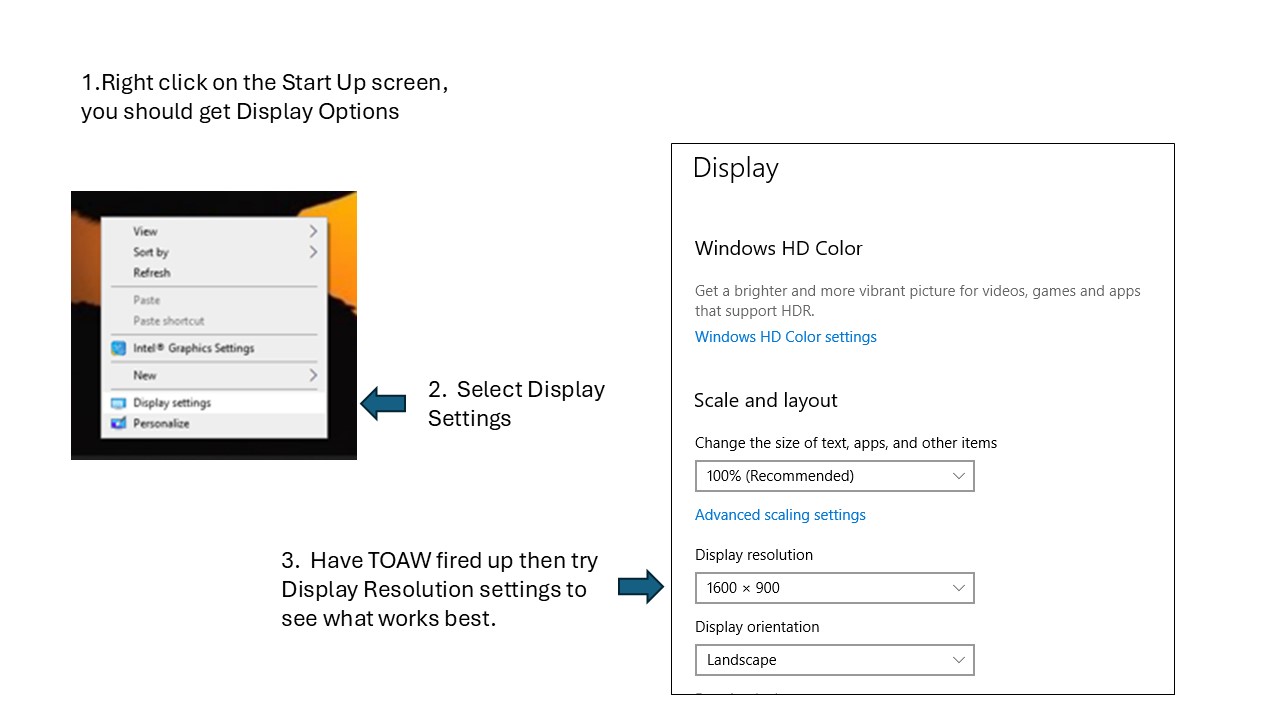
- Display Options.jpg (86.53 KiB) Viewed 970 times
Re: Screen resolution
Posted: Sun Mar 09, 2025 3:37 am
by sPzAbt653
Re: Screen resolution
Posted: Sun Mar 09, 2025 10:13 am
by NJ
All - many thanks for the tips. I've found the way to alter the resolution, but even though the fonts sometime increase in size slightly, there is a lot of blurring.
The good news is that I have tried on my glasses (which I try not to wear normally) - and the game looks perfect!
Huge thanks once again for your offers of help - much appreciated.