Page 1 of 1
[WAD] Grouping units gives different results.
Posted: Sat Mar 08, 2025 3:08 pm
by Blast33
I am working on a scenario with many sub-units and like to group them. Not only because of the visibility but also to show the hierarchy.
When I start with the leader (the SA-2 unit) and select the surrounding units sometimes the result is beautiful and still shows it is a SAM unit (without showing all the AAA and manpads)and the name is the same as the leader.
Like this:
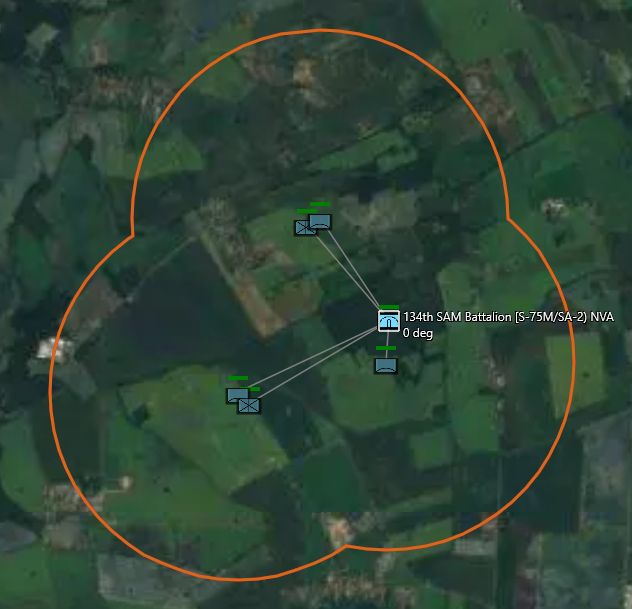
- Group-1.jpg (40.52 KiB) Viewed 664 times
This one is nice.
But often I follow the same sequence and get a box symbol and the name changes in group with a number. Now the symbol does not point to the original occupation of a SAM site and it could be any unit. Now you have to click every unit to see what the function is. Like this one.

- Group-2.jpg (29.45 KiB) Viewed 664 times
Can anybody assist me in how to get the result of the first example where the icon stays the same in GROUP VIEW?
What can I do different?
Any experience?
Re: Grouping units gives different results.
Posted: Sat Mar 08, 2025 9:46 pm
by PN79
I think that sequence in which these units were placed on map has effect on this.
Thus when I plan to create group the first placed unit on map needs to be the one I want to be "leader" of the group.
I think also that there is way around it. If I have for example five units and I want one of them to be "leader" of new group I can at first create that new group with just two units instead of all five. That is one unit I want as a group and another one which I know for sure that I have added it later. And then I merge other three units to this already existing group as this will not change "leader".
Re: Grouping units gives different results.
Posted: Sun Mar 09, 2025 5:18 pm
by Mark352
If I understand correctly you want to rename the group. Select the group, press R and you can change the name. Additionally you can use the Formation Editor with ground units/facilities to change the leader/center point of the group. Hope this helps.
Cheers
Re: Grouping units gives different results.
Posted: Sun Mar 09, 2025 9:36 pm
by Blast33
Thank you for your replies.
I tried the method of PN79 (hi, by the way

) but unfortunately it did not change the visuals.
Thanks Mark352, I did not know you could change the leader in the formation. I always saw this as something different from Grouping units.
But according to the manual making a leader only makes this unit the centerpoint.
Manual:The lead platform is the center of the formation, usually a HVU (high value unit). When forming groups, the game will try and pick the best possible candidate but players can change if they desire to do so.
The Group Lead is shown in the editor window with “[LEAD]” in front of its listing
When grouping a few units the result can be three different symbols with the same method.
1. The original (leader's) icon;
2. a facility icon;
3. or a "M".
Is this alright?

- Group mixed.jpg (48.19 KiB) Viewed 596 times
What does not seem to work is the button: Members use Leader's icon! That does not change anything. Is this correct?
I attached a part of the scenario so you can try.
Built 1567
Database V510
Re: Grouping units gives different results.
Posted: Mon Mar 10, 2025 12:20 am
by Mark352
I'm not familiar with how to change the appearance of the group icon; as far as I know that's not possible. As you know, selecting the group icon when in Group View shows the ghosted view of the other units in the group. I'm uncertain how you ended up with a SAM icon for the group icon in Group-1.jpg. Group icons with ghosted components appear as you have depicted in Group-2.jpg. That's all I have for now.
Re: Grouping units gives different results.
Posted: Mon Mar 10, 2025 7:19 pm
by PN79
I misunderstood. Sorry I don't know how to do that with icon for group. Though that would be really nice feature if it could be done reliably.
Re: Grouping units gives different results.
Posted: Tue Mar 11, 2025 6:25 pm
by Blast33
Thanks Guys.
Re: Grouping units gives different results.
Posted: Wed Mar 12, 2025 5:50 am
by Dimitris
Marking as WAD.
Re: [WAD] Grouping units gives different results.
Posted: Wed Mar 12, 2025 5:19 pm
by Knightpawn
A tangential question:
What is the function of the "Remove" button on the Group formation window, and how is it different from "Detach" in the Unit Orders / Group Operations menu?
Re: [WAD] Grouping units gives different results.
Posted: Wed Mar 12, 2025 9:45 pm
by Blast33
Is it possible to explain a bit more Dimitris about Working As Designed?
When we group units in CMO, we can get three different symbols,in the same workflow. And it was not explainable why this happened.
And secondly there is a pushbutton for using the same symbol as the leader and that does not change anything boxed or unboxed (see image below)

- uno.jpg (5.58 KiB) Viewed 440 times
What is categorised in this post/workflow as WAD?
Genuinely curieus.