Page 1 of 1
Recoloring Counters and “Old Color”
Posted: Wed May 14, 2025 3:12 am
by Wannabe
Rookie question- I want to recolor formations so I can more easily tell them apart. But to do so, it looks like I have to first choose the “old” (current?) color, then choose the new one. Is there a reliable way to tell which is the “old color”? I can narrow it down to a few but sometimes I guess wrong. Is there a trick?
Re: Recoloring Counters and “Old Color”
Posted: Thu May 15, 2025 6:44 pm
by Cpl GAC
In case you missed it;
https://www.matrixgames.com/forums/view ... 6&t=318021
Do you mean this:
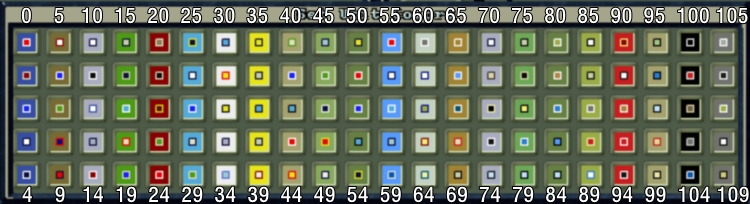
- SetUnitColors3.jpg (145.9 KiB) Viewed 1650 times
Some of it is a best guess and try again when it comes to close colors like ID5 versus ID68. I found one case where a scenario designer forgot they were using ID70 and made one unit ID10 - those pop up when you see the results.
Re: Recoloring Counters and “Old Color”
Posted: Sat Jun 14, 2025 3:40 am
by Wannabe
I don't mean modifying files or changing code or anything fancy. I mean using the colors provided, but trying to find the one that is currently in use, so I can select it in order to change to a preferred color for an entire formation.
Re: Recoloring Counters and “Old Color”
Posted: Sat Jun 14, 2025 3:56 am
by Curtis Lemay
Wannabe wrote: Sat Jun 14, 2025 3:40 am
I don't mean modifying files or changing code or anything fancy. I mean using the colors provided, but trying to find the one that is currently in use, so I can select it in order to change to a preferred color for an entire formation.
Whether using the Unit Report or the Force Editor, just click on the color icon shown:
Re: Recoloring Counters and “Old Color”
Posted: Sat Jun 14, 2025 2:21 pm
by Cpl GAC
As I said - it's a bit of a guess at times. You won't know if you picked the right one until you save.
I build a sheet tracking the designer's selected color IDs and then test to see what recolored combinations will look like.
However, for your purposes, designers have a repeating pattern and logic for color selection, either by unit type, formation, or a combination. You just have to figure it out.
In this example they used ID10 for the Infanctry & supporting units, ID11 for the panzer/motorized, ID12 for the Luftwaffe Infantry, ID106 for the bombers, etc etc;
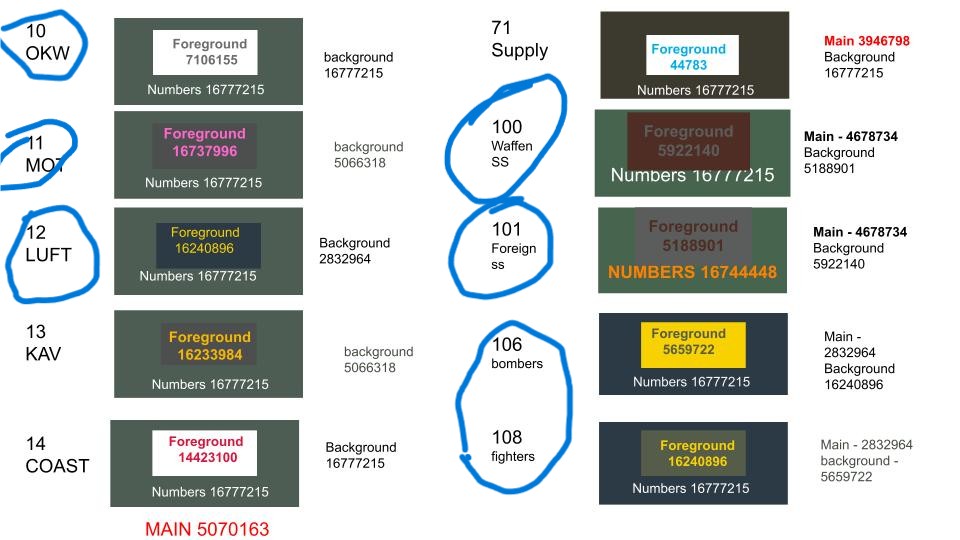
- RGW unit colors.jpg (100.33 KiB) Viewed 1198 times
That's why this is so important to have handy;
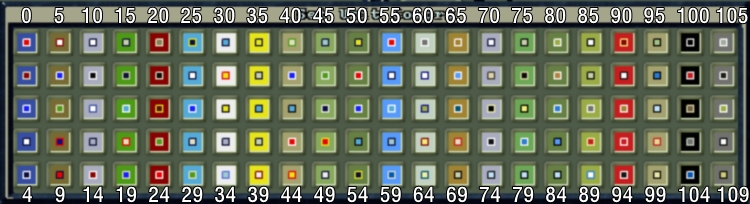
- SetUnitColors3.jpg (145.9 KiB) Viewed 1198 times
Re: Recoloring Counters and “Old Color”
Posted: Sat Jun 14, 2025 2:42 pm
by Cpl GAC
One other note - colors and the column of colors affect co-operation. It's a visual for us, but the program reads color ID and color column numbers.
Example: if all the infantry are color ID40, but you want to make the "Northern Army" infantry color ID80 so you can tell them apart, but the designer has all formations set on Army Support, then changing the Northern Army infantry from ID40 to ID80 means the Northern infantry no longer cooperate with the rest of the infantry.
Be careful not to break the designer's intentions of unit and formation co-operation.