Page 1 of 1
[WAD]Build 1674: Filter On check Box Missing from Sensor window
Posted: Thu Jun 05, 2025 5:26 pm
by BDukes
Hi All
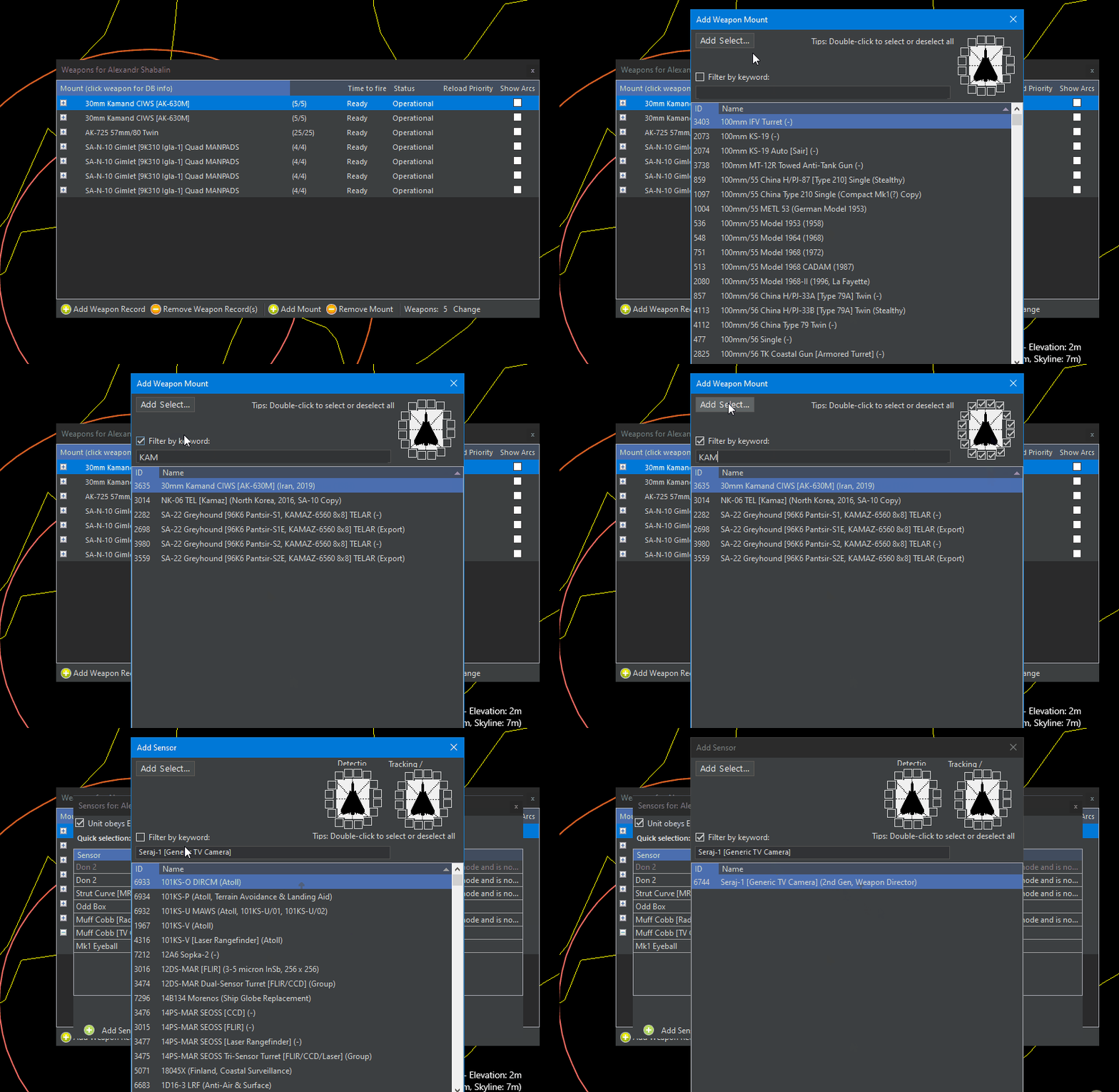
There used to be a checkbox in the sensor window that, if checked, would filter to the needed sensor. Doesn't appear to be there now.
This matters during the super helpful add a director to sensor procedure. It correctly fills in the matching name but doesn't filter to it. It used to do it.
M

- MissingFilteringControls.jpg (83.07 KiB) Viewed 636 times
Re: Build 1674: Filter On check Box Missing from Sensor window
Posted: Thu Jun 05, 2025 5:43 pm
by blu3s
That checkbox just allowed you to use the filter search, now if you don't wanna use the filter just don't place any text in the textfield.
What's the issue?

Re: Build 1674: Filter On check Box Missing from Sensor window
Posted: Thu Jun 05, 2025 5:45 pm
by Nikel
They filter by default now by typing in the box.
Besides sensors they were also present in magazines, comms, weapons.
Re: Build 1674: Filter On check Box Missing from Sensor window
Posted: Thu Jun 05, 2025 5:50 pm
by blu3s
BTW, we added a placeholder text (will be in the next update) to indicate that you can search just typing
Re: Build 1674: Filter On check Box Missing from Sensor window
Posted: Thu Jun 05, 2025 5:55 pm
by BDukes
blu3s wrote: Thu Jun 05, 2025 5:43 pm
That checkbox just allowed you to use the filter search, now if you don't wanna use the filter just don't place any text in the textfield.
What's the issue?
I want to use the filter. When it had the checkbox, it would also select the actual entry in the table below (highlighting it in blue) rather than only filling the textbox at the top. Now I have to manually navigate through that table.
Not the end of the world, but it would be nice if it worked like it did. Less clicks and errors.
Thanks!
Mike
Re: Build 1674: Filter On check Box Missing from Sensor window
Posted: Thu Jun 05, 2025 5:57 pm
by BDukes
blu3s wrote: Thu Jun 05, 2025 5:50 pm
BTW, we added a placeholder text (will be in the next update) to indicate that you can search just typing
Awesome. Could you do the same when the match-find code runs when adding the mount as well?
Thanks!
M
Re: [WAD]Build 1674: Filter On check Box Missing from Sensor window
Posted: Fri Jun 06, 2025 12:03 pm
by blu3s
BDukes wrote: Thu Jun 05, 2025 5:55 pm
When it had the checkbox, it would also select the actual entry in the table below (highlighting it in blue) rather than only filling the textbox at the top. Now I have to manually navigate through that table.
This works exactly in the same way as before, recheck the image I shared, the first row is highlighted in blue and you can add the sensor without needing to select it from the table
Re: [WAD]Build 1674: Filter On check Box Missing from Sensor window
Posted: Fri Jun 06, 2025 8:10 pm
by BDukes
blu3s wrote: Fri Jun 06, 2025 12:03 pm
BDukes wrote: Thu Jun 05, 2025 5:55 pm
When it had the checkbox, it would also select the actual entry in the table below (highlighting it in blue) rather than only filling the textbox at the top. Now I have to manually navigate through that table.
This works exactly in the same way as before, recheck the image I shared, the first row is highlighted in blue and you can add the sensor without needing to select it from the table
Try with the Kamand CIWS mount. If you think its ok, then I trust your judgement.
Mike
Re: [WAD]Build 1674: Filter On check Box Missing from Sensor window
Posted: Sat Jun 07, 2025 5:11 am
by blu3s
Ok, so it's not the search itself, it's when you add a mount and you are asked about adding the DL of the mount, then the Comms window opens, and that search is not done automatically, right now just deleting one letter and you'll have the Comm there.

That's a different issue that just the checkbox itself
Re: [WAD]Build 1674: Filter On check Box Missing from Sensor window
Posted: Sat Jun 07, 2025 7:00 am
by Nikel
OK, one of the last silent builds, 1544

- F.gif (288.15 KiB) Viewed 497 times
Re: [WAD]Build 1674: Filter On check Box Missing from Sensor window
Posted: Sat Jun 07, 2025 8:04 am
by blu3s
Yes, now you don't need to click the box just delete a letter on the searchbox, but the issue on the search will be fixed.
Anyways it was incredibly tedious to have to use the checkbox every time you wanted to search for something. And now even with that minor issue you do a few less clicks
Re: [WAD]Build 1674: Filter On check Box Missing from Sensor window
Posted: Sat Jun 07, 2025 8:11 am
by Nikel
Yes, I always checked that box.
But perhaps should be also by default in the new window created with the text added without typing/deleting, no idea if this is possible.
Re: [WAD]Build 1674: Filter On check Box Missing from Sensor window
Posted: Sat Jun 07, 2025 2:39 pm
by BDukes
blu3s wrote: Sat Jun 07, 2025 8:04 am
Yes, now you don't need to click the box just delete a letter on the searchbox, but the issue on the search will be fixed.
Anyways it was incredibly tedious to have to use the checkbox every time you wanted to search for something. And now even with that minor issue you do a few less clicks
Thanks for digging into this a bit more and finding a solution. Very much appreciated.
Mike