Page 1 of 1
[FIXED] No unit image (build 1.08 1728.2)
Posted: Thu Sep 18, 2025 6:14 pm
by foxid259
I have beta version 1.08 1728.2, but since the launch of the circles in version 1.08, the unit image does not have (screenshot 1).
This problem is definitely not related to the new beta version of the game
Steps I took to fix the problem:
1) I downloaded new unit images in the format - .webp (the type of files is visible in the screenshot 2)
2) I set the settings in the game to receive images. (screenshot 3)
3) The unit images are present in the database (visible in the screenshot 4)
I have a question - is this how it should be, or am I doing something wrong?
The game is launched through the Steam client.
I would be grateful for your help.
Re: No unit image (build 1.08 1728.2)
Posted: Thu Sep 18, 2025 6:55 pm
by Nikel
It is working here.

- I.png (63.75 KiB) Viewed 992 times
In the Command.ini file, config folder. This line is set to true?
UnitStatusImage = True
Re: No unit image (build 1.08 1728.2)
Posted: Thu Sep 18, 2025 7:12 pm
by foxid259
Thanks for the answer
In my configuration file, it is set that way, but it doesn't help.
Re: No unit image (build 1.08 1728.2)
Posted: Thu Sep 18, 2025 7:18 pm
by Nikel
It is also described in the steam forum.
https://steamcommunity.com/app/1076160/ ... 7473724746
No idea how, but can it be related to Windows language, not latin alphabet?
Re: No unit image (build 1.08 1728.2)
Posted: Thu Sep 18, 2025 7:28 pm
by foxid259
I can't say if this is related to the language.
The fact is that I have Windows 11 - in Ukrainian, and Steam is also in Ukrainian
Re: No unit image (build 1.08 1728.2)
Posted: Thu Sep 18, 2025 7:30 pm
by Nikel
Yes I know, I wrote that because besides you, in the steam thread, one of the posters is chinese, and the other perhaps chinese/japanese, or at least is using an anime avatar

Re: No unit image (build 1.08 1728.2)
Posted: Thu Sep 18, 2025 7:35 pm
by foxid259
Only an experiment will help.

However, the game is set in the Latin alphabet.
In addition, I reinstalled the game today, downloaded images from the site, the latest ones are from June 2025
Re: No unit image (build 1.08 1728.2)
Posted: Thu Sep 18, 2025 8:31 pm
by Nikel
What is the path to the images folder? Here is:
C:\Matrix Games\Command Modern Operations\DB\Images\
Re: No unit image (build 1.08 1728.2)
Posted: Thu Sep 18, 2025 8:35 pm
by foxid259
The experiment failed, changed the Windows interface language, Steam language - didn't help.
The configuration file specifies the image source - MS1=
https://warfaresims.slitherine.com/DBImages/
Unfortunately, the unit does not have an image.

Re: No unit image (build 1.08 1728.2)
Posted: Thu Sep 18, 2025 8:48 pm
by Nikel
The unit image is this.
https://warfaresims.slitherine.com/DBIm ... _6725.webp
I do not know in the package, but it is downloaded from the server.
I meant the path to the images folder in your system, not the source.
Re: No unit image (build 1.08 1728.2)
Posted: Thu Sep 18, 2025 8:50 pm
by foxid259
Nikel wrote: Thu Sep 18, 2025 8:31 pm
What is the path to the images folder? Here is:
C:\Matrix Games\Command Modern Operations\DB\Images\
I have path to image folder:
E:\SteamLibrary\steamapps\common\Command - Modern Operations\DB\Images
Re: No unit image (build 1.08 1728.2)
Posted: Fri Sep 19, 2025 9:19 am
by Nikel
No more ideas, sorry

Re: No unit image (build 1.08 1728.2)
Posted: Fri Sep 19, 2025 11:20 am
by foxid259
Nikel wrote: Fri Sep 19, 2025 9:19 am
No more ideas, sorry
Thanks for the help, sorry we couldn't fix the problem.
Re: No unit image (build 1.08 1728.2)
Posted: Fri Sep 19, 2025 10:33 pm
by foxid259
Dear Matrix Games Support,
I'm experiencing a persistent issue in Command Modern Operations v1.08 Build 1728.2 related to unit image rendering in the sidebar panel.
Issue Summary:
• Local ".webp" images are present in "DB\images" and correctly named according to unit DBIDs.
• The "ExternalURLs" file has been removed to force local image usage.
• Unit images display correctly in the Database Viewer.
• However, the unit status sidebar panel does not render any images, regardless of unit type.
• Windows 11 display scaling is set to 100% (recommended).
• Regional and language settings have been tested (including switching to English), with no effect.
• DBIDs have been manually verified — all match the corresponding ".webp" filenames.
Installation Details:
• Steam version of CMO
• Installed at: E:\SteamLibrary\steamapps\common\Command - Modern Operations
Request: Could you confirm whether this is a known UI bug in Build 1728.2? Is there a workaround or upcoming patch that addresses sidebar image rendering? Any guidance would be appreciated.
Re: No unit image (build 1.08 1728.2)
Posted: Sat Sep 20, 2025 11:48 am
by blu3s
Hello,
there's a known UI bug related to the sidebar display, logging this one as well,
Logged as 0016936
Thank you for the report
Re: No unit image (build 1.08 1728.2)
Posted: Sat Sep 20, 2025 6:55 pm
by foxid259
blu3s wrote: Sat Sep 20, 2025 11:48 am
Hello,
there's a known UI bug related to the sidebar display, logging this one as well,
Logged as 0016936
Thank you for the report
Ok thanks for the info !!!
Re: No unit image (build 1.08 1728.2)
Posted: Tue Sep 23, 2025 7:53 am
by Nikel
Happening here and reproducible, both in the editor or not. In the db the pic is always displayed.
Load Surface tutorial 1.4.
Select the thai frigate.
The pic is displayed (in my case after been downloaded from the server).

- P1.png (69.71 KiB) Viewed 683 times
Advance in the scenario until the sub contact appears.
Select the sub, no pic because is classified by type only.
Now select the frigate again and the pic in the unit panel is not displayed.
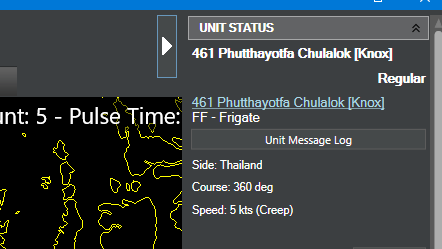
- P2.png (14.04 KiB) Viewed 683 times
When the sub is identified, a pic is displayed, and the frigate recovers the unit panel pic.
Re: No unit image (build 1.08 1728.2)
Posted: Sat Sep 27, 2025 5:22 am
by Dimitris
This has been fixed for the next update release.
