Page 1 of 1
Screen issues
Posted: Mon Nov 10, 2025 9:49 pm
by Przemcio251
Hi i have some screen issues with the game. When the replay runs the combat animation box starts to jump up and down relocating horizontally on the screen. Also skip button dosn't work. Some times them map scroling is acting wierd jumping. And ship information box also has the issue where the silhuette of the ship jumps horrizontaly from the ship window.
Some times pop up windows can't be clicked like when i click disband TF and i can't choose either yes or now in the box...
Re: Screen issues
Posted: Tue Nov 11, 2025 6:26 am
by Chris21wen
Don't know the specific problem but check your switches against ones mostly used.
Re: Screen issues
Posted: Tue Nov 11, 2025 8:47 am
by Przemcio251
I have the following
-w -pxf1920 -pyf1010 -deepColor -skipVideo -altFont -dd_sw -multiaudio -fixedArt -cpu3 -singleCpuOrders
any advice which one to change or add??
Re: Screen issues
Posted: Tue Nov 11, 2025 8:56 am
by Przemcio251
and here is the file showing the graphic error in the ship screen
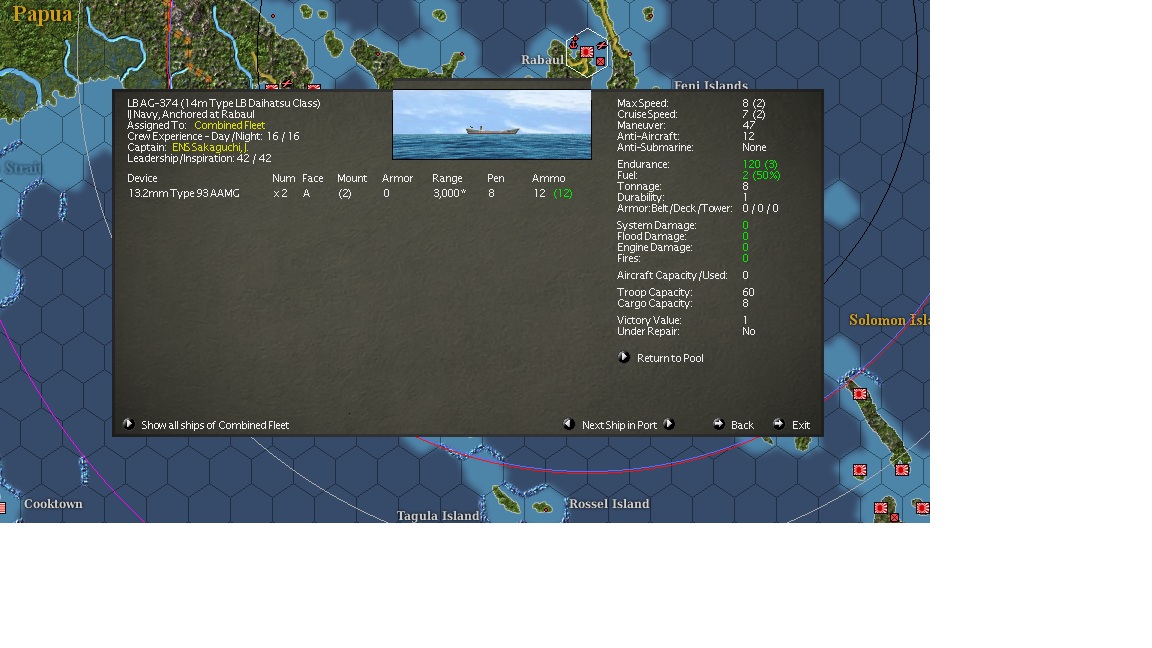
- error.jpg (174.98 KiB) Viewed 452 times
Re: Screen issues
Posted: Wed Nov 12, 2025 7:03 am
by Chris21wen
Can't see anything odd, like mine below.
-pxf1900 -pyf1000 -cpu4 -dd_sw -altFont -multiaudio -deepColor -skipVideo -archive -w
Only thing I can possibly see is the res. Your may overlap the taskbar and it's that that is causing it. You could try deleting and re-typing or copy mine.
Re: Screen issues
Posted: Wed Nov 12, 2025 7:40 am
by BBfanboy
The switch formatting is not exactly right. There should be a space between your -pxf & -pyf and the numbers. Also, check that you used the hyphen at the top of the keyboard and not the minus sign on the numeric keypad. Then check that your switches are in the shortcut Target box, not the Start In box. Then confirm the path directs the switches to the location of the game .exe file and has quote marks around it. It should look like this:
"C:\Matrix Games\War in the Pacific Admiral's Edition\War in the Pacific Admiral Edition.exe" -altFont -archive -dd_sw -deepColor -px1680 -py1050 -w -fixedArt -skipVideo -multiaudio -SingleCpuOrders -cpu3
Re: Screen issues
Posted: Wed Nov 12, 2025 7:07 pm
by Przemcio251
Thanks for the tips