Page 1 of 1
Scaling/Text Scaling?
Posted: Tue Nov 25, 2025 3:51 pm
by sirfulcrum
Hi, is there any way to scale the text? Or perhaps that's something to consider for whatever's next? But a lot of us, well, are aging and the eyes are no longer 20/20.
Re: Scaling/Text Scaling?
Posted: Tue Nov 25, 2025 6:03 pm
by CapnDarwin
How big is your monitor? What is your Windows Text Scaling % set to?
Re: Scaling/Text Scaling?
Posted: Tue Nov 25, 2025 9:11 pm
by Talon_XBMCX
I think it's more screen resolution.
I have the same issue ... it's difficult to read text. I'm running a 27in monitor at 2560X1440 which is the recommended setting. Scale is 100% which is also recommended setting.
When I push it to my other monitor - also 27in but at 1920 X 1080 (recommended setting) - it's much easier to read.
Re: Scaling/Text Scaling?
Posted: Wed Nov 26, 2025 6:48 pm
by sirfulcrum
CapnDarwin wrote: Tue Nov 25, 2025 6:03 pm
How big is your monitor? What is your Windows Text Scaling % set to?
49-inch, 32:9. 5120x1440. The recommended scaling in Windows is 100%.
Re: Scaling/Text Scaling?
Posted: Sat Nov 29, 2025 3:23 pm
by zakblood
im using a iiyama G Master G4380UHSU 43"" VA Gaming Monitor with UHD Resolution, 144Hz Refresh Rate and 0.3ms MPRT
with windows 11pro on latest build 25H2 clean install with 3840×2160 resolution with a windows default recommended scale of 300%
using the steam version on latest beta, also tried none beta before and game scale doesn't work, changed to 200% and it worked perfectly, but that's not the windows default for the resolution and not comfortable either for the eyes as too small

flashpoint campaigns southern storm and red storm both work perfectly in steam on the same settings btw.
Just for information as like i said, both other games work flawlessly in steam on the same test pc on the same settings with no issue on resolution or scale and while changing the screen size isn't an issue, then the small scale of the txt just gives eye strain, so not ideal

Re: Scaling/Text Scaling?
Posted: Sat Nov 29, 2025 3:31 pm
by zakblood
Re: Scaling/Text Scaling?
Posted: Sat Nov 29, 2025 3:34 pm
by zakblood
but if you go into any of the buttons like preferences etc it does work, but others don't

- 1.jpg (218.43 KiB) Viewed 1730 times
Re: Scaling/Text Scaling?
Posted: Sat Nov 29, 2025 3:35 pm
by zakblood
and apart from steam overlays, no other installed or ever used, discord is browser only for me
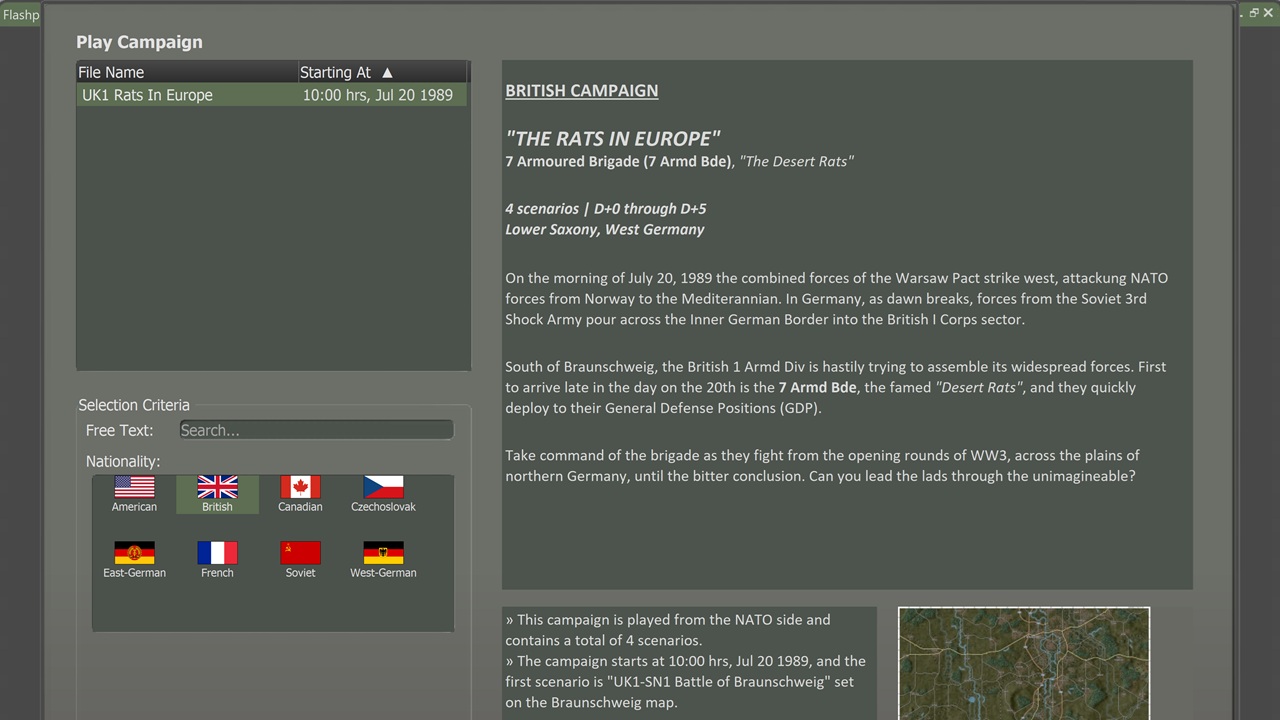
- 1.jpg (164.79 KiB) Viewed 1728 times
so play buttons are missing, or anything below which isn't shown on the screen shots
Re: Scaling/Text Scaling?
Posted: Sat Nov 29, 2025 4:00 pm
by zakblood
game works on 250%, which doesn't hurt the eyes and does look better than 200% tbh

- 1.jpg (580.32 KiB) Viewed 1720 times
takes all of 2 seconds to change, and works well with windows 11 and steam in changing but doesn't work out of the box by default, something some members will have to manually change on a given screen res and scaling size like i've done and have shown
Re: Scaling/Text Scaling?
Posted: Thu Dec 04, 2025 4:37 pm
by Shadrach
I'm also on a 27" screen, running 1440p at 150% DPI scaling. It looks great and no problems reading the text. If anything, some of the dialog fonts are kind of too large. But at least I won't have to struggle with these old eyes

So DPI scaling is the way to go for us old(er) wargamers

Another thing to note is that the docs state a min resolution of 1920 x 1080. For 1440 at 150% it means a vertical res of 960 which per the docs is not supported (but works for me). 1440 at 200% = 720 vertical (half). I believe developers should aim to make their game work on 720.
Changing "resolution" doesn't really make sense for this game. It's a Windows application, so it just uses the screen resolution. I seem to remember the old game(s) had an option to actually run at lower resolutions, can't find that here. It would make everything blurry as heck though.
I also recommend people go into the EXE properties and set scaling override to "Application" in case the OS tries to use system scaling, to get crisper graphics.

Re: Scaling/Text Scaling?
Posted: Thu Dec 04, 2025 8:43 pm
by zakblood
must admit that does work a treat
Re: Scaling/Text Scaling?
Posted: Thu Dec 04, 2025 8:53 pm
by zakblood

- e.jpg (179.93 KiB) Viewed 1602 times

- 1.jpg (386.1 KiB) Viewed 1602 times

- 2.jpg (140.69 KiB) Viewed 1602 times
Re: Scaling/Text Scaling?
Posted: Thu Dec 04, 2025 9:23 pm
by Shadrach
For some context, "Application" scaling means to tell Windows to not attempt its own (blurry) System scaling but let the application handle it (if it's able to). Doesn't always work, might lead to weird UI elements or cropped text etc. In FCSS I there was a minor issue with the Spotlight arrows but that's fixed in Cold War. From what I can tell FCCW is a "modern" Windows program so there shouldn't be any issues with DPI scaling.
The Menu screen seems the biggest problem on resolutions lower than 1080. Why that *huge* image, certainly that can be adapted to screen resolution?
Zakblood: For your 2160 screen, 300% scaling would be an effective vertical res of 720 (2160/3). Same as I get on 1080 with 150%.
Of course, things are much crisper with DPI scaling instead of changing resolution, as the screen itself is still running native. I wouldn't like to play this game on a laptop. Ideally, on two monitors is where this game *really* shines
Below is how my screen shows at 1440/150%. Certainly the tab header fonts could be made smaller. The rest of the UI is pretty much perfect on 27".

Re: Scaling/Text Scaling?
Posted: Thu Dec 04, 2025 10:08 pm
by Shadrach
Changing monitor DPI scaling in Windows Settings is fiddly having to do every time you want to launch a game.
It is possible to create a desktop shortcut pointing to
ms-settings:display but it's still manual.
I highly recommend Nirsoft's MultiMonitorTool:
https://www.nirsoft.net/utils/multi_monitor_tool.html
https://blog.nirsoft.net/2025/03/10/set ... nitortool/
It allows setting DPI scaling from the command line, so it can be put into a batch file when launching the game, waiting until it closes and setting scaling back to normal:
Code: Select all
MultiMonitorTool.exe /SetScale "\\.\DISPLAY1" 150
echo Starting Flashpoint Campaigns and waiting for close...
start /wait "f:\Games\Flashpoint Campaigns Cold War\FlashpointCampaigns.exe"
MultiMonitorTool.exe /SetScale "\\.\DISPLAY1" 100
Not all Windows programs handle on-the-fly scaling though, some will require signing out and in again or relaunching. Some will look wonky after rescaling.
Re: Scaling/Text Scaling?
Posted: Fri Dec 05, 2025 2:23 pm
by CapnDarwin
Thanks for all of the tips and tricks, guys. Trying to build a usable UI in the current wild west of screen sizes, aspect ratios, multiple screens, and different scaling per screen is a headache for us and, unfortunately, some of you. We will improve on our end, the best we can.