Page 1 of 1
How to make Flags/Symbols for HQs
Posted: Sat Jan 03, 2026 12:37 am
by ernieschwitz
Tankertwo wrote: Fri Jan 02, 2026 10:33 pm
I did get on the website and download Ostfront which is exaclty what i wanted in the way of units. Divisions Brigades even Battalions for Stugs and Tigers I assume. Now I just want to import my insignias for each. I found the NATO file but it won't let me modify it. Also is there anyway to make this senario longer like the full war in the east to May of 1945 say. Would I have to write an AI or would the game do it for me? How do I change the length of the game? The NATO file has over 300 slots for images which more than enough for what I need. I am not very computer savvy so sorry if I seem slow but this still looks like the game I have always dreamed of.
Re: How to make Flags/Symbols for HQs
Posted: Sat Jan 03, 2026 12:48 am
by ernieschwitz
The NATO symbols are not really there to make Flag Symbols on the counters, but can be used for it I guess.
Let's explore your method.
First lets find out which of the Ostfront scenarios you've downloaded.
There are two different ones on my PC: Ostfront, and Ostfront2.
Ostfront 0.97b, made by Khanti, and the most recent one.
Ostfront, made by Mattybouy, which is made for AT WW2, the predecessor of ATG, but still usable for ATG.
I am going to assume you chose 0.97b, which has the newest graphics, and such, and is an improvement over the other one. It also has the TO&E creator available.
If not here is the link to it:
https://www.vrdesigns.net/scenario.php?nr=317
Re: How to make Flags/Symbols for HQs
Posted: Sat Jan 03, 2026 12:52 am
by ernieschwitz
It uses the folder under graphics, called Ostfront.
So any changes that are not made there, will have no effect. You may want to copy this folder, and rename it, or copy your graphics work, to a safe place, where you can easily apply it again, if you want to download an update, made by Khanti, if he does one (he did sound like he wasn't going to).
Anyway, for this exercise, let's not make a new folder, and just fiddle with the old one, and hope no updates are made.
What happens when you redirect the graphics folder, in Setng, is that the game searches for any familiar directories, and uses those instead of the default ones. In this case, it replaces the Natocounters folder, with the Natocounters folder inside the Ostfront directory.
Re: How to make Flags/Symbols for HQs
Posted: Sat Jan 03, 2026 12:59 am
by ernieschwitz
To get the new "flags" and "symbols" working you need to use that directory, and the graphics have to be the same size, and have the same placement of the flag there. So you in other words, need to make these from scratch. Then you need to add them at the end of the number sequence, each with their own in sequence number. So 340 would be the next number.
You could replace symbols you do not use though, but the idea is the same. Note that the symbols you put in come out in the same order in the Graphics selections of the model editor.
This will work great with flags, for HQs. These will show the flag, where the normal flag otherwise would be shown.
For this to work, you have to go into the Model editor, in the editor itself, and there make a TO&E for the HQs you want to have symbols for. Then you need to assign that Model to the HQ on the map. This can be a long process if there are multiple HQs you want to assign that way.
But all in all doable.
Re: How to make Flags/Symbols for HQs
Posted: Sat Jan 03, 2026 1:03 am
by ernieschwitz
Ok, now for the Symbols on the side, top lefthand corner. Here I have a bit of bad news. Those symbols are tied to the Regime that owns the unit.
Yes there is a workaround that will work in special cases.
This workaround is that you make a dummy regime (in Reg). You assign it an own color, an own people, and it's own flag and symbol. Then in the People part of the editor (ppl), you assign that people the regime as an alternative showing. This works great for Romanians for instance. If you need that I will show you. Just ask. EDIT: I see that this has been done already in the scenario. (So I should have looked I guess, before answering).
Using the TO&E option, there is no such way.
Re: How to make Flags/Symbols for HQs
Posted: Sat Jan 03, 2026 1:08 am
by ernieschwitz
Of course, this means if you want the German "Balken Cross" to be replaced on the non-Germans, you could do that.
If you want to replace the symbols on the Germans themselves, the above method is needed, and you need to make some Germans another people. ... to me that is unsatisfactory, but may work for you.
Re: How to make Flags/Symbols for HQs
Posted: Sat Jan 03, 2026 1:16 am
by ernieschwitz
Anyway,
If you choose the Flag & Symbol route of people/regime changes, there is room for some improvement, to the minors.
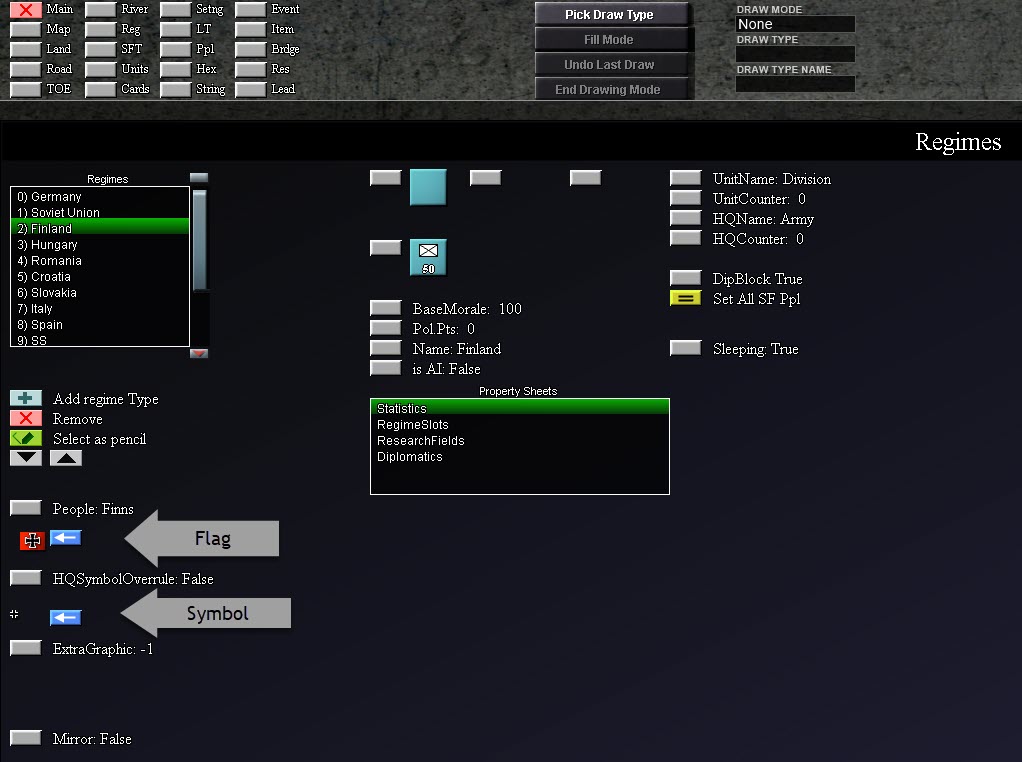
In the Reg menu (chosen by pressing the Reg button above). You can see these settings under the heading of Statistics.
(See picture below)
- Flags n Symbols.jpg (94.54 KiB) Viewed 1506 times
You simply choose the Regime, then statistics, and you can edit these options, chosen by buttons. The Squares allow for renaming the regime (probably no need here, with the Finns), and then the Flag (which is a graphics file we will come to later) and the HQ symbol overule which is false in this case, not sure exactly what it does, to be honest. And then the Symbol (the cross). Both graphics are shown by me via the grey arrow
Re: How to make Flags/Symbols for HQs
Posted: Sat Jan 03, 2026 1:20 am
by ernieschwitz
Oops, I see I made this in the AAR Section... (I'll ask for an Admin to move it, maybe that'll happen).
Re: How to make Flags/Symbols for HQs
Posted: Sat Jan 03, 2026 1:23 am
by ernieschwitz
The Flags, and Symbols that Khanti has provided are located in Ostfront/National. You can take a look at those, see if you want to use them. Probably not, by glancing at them.
You can use them as templates for how to make the flags, and symbols. Again the dimensions of the graphic must be kept, and the graphic file type has to be png, so to allow see-through.
If you really really need to, I could do this for you... That is make the flags, and symbols, from graphics you provide.
Re: How to make Flags/Symbols for HQs
Posted: Sat Jan 03, 2026 1:27 am
by ernieschwitz
You can extend the game, I guess, by editing event 8, in the Event menu.
However, note, this is done in a computer language unique to ATG/AT ww2, but it does resemble other languages, like basic. It looks from a cursory glance to be hard to extend... labor intensive... not hard programming.