Page 1 of 1
Imported map image for overlay not showing
Posted: Mon Jan 26, 2026 7:28 pm
by Cpl GAC
I want a 75x62 map; I keep trying to upload a 4800x3968 pixel bmp image, 24-bit, 54.4MB from C:\Users\mynamehere\Documents\My Games\Stalingrad\maps, and nothing shows.
I even created a 4800x3968 BMP image in GIMP with just the color pink, and it wouldn't show either. I was testing to see if there was anything in the original that prevented importing.
What am I doing wrong?
Re: Imported map image for overlay not showing
Posted: Wed Jan 28, 2026 6:23 pm
by StuccoFresco
Cpl GAC wrote: Mon Jan 26, 2026 7:28 pm
I want a 75x62 map; I keep trying to upload a 4800x3968 pixel bmp image, 24-bit, 54.4MB from C:\Users\mynamehere\Documents\My Games\Stalingrad\maps, and nothing shows.
I even created a 4800x3968 BMP image in GIMP with just the color pink, and it wouldn't show either. I was testing to see if there was anything in the original that prevented importing.
What am I doing wrong?
I think the game only accepts PNG images. So far I had some issues with JPEG images when I tried to use them for ingame units, and solved the issue by converting them to PNG format.
I'm currently using imported PNG maps with no issues, even bigger than those.
Re: Imported map image for overlay not showing
Posted: Wed Jan 28, 2026 6:36 pm
by Cpl GAC
thank you - I'll go back at it.
Re: Imported map image for overlay not showing
Posted: Fri Jan 30, 2026 10:20 pm
by Cpl GAC
I'm still struggling with it as a png as well- I even made the map a 2400x1984.
Here's a dropbox link if someone wants to upload it and tell me what I'm doing wrong.
https://www.dropbox.com/scl/fo/a9rwsq0j ... qm3nh&dl=0
Re: Imported map image for overlay not showing
Posted: Tue Feb 03, 2026 10:01 pm
by StuccoFresco
I've downloaded the map, put it into the "Documents/mygames/stalingrad/maps" folder, opened the editor, made a 75x62 map and set the "VSfrompng.png" file as the imported map.
... it works perfectly? Once set the image as the imported map I saved the scenario and re-opened it to make the map actually show up in the editor.

- test.png (1.67 MiB) Viewed 2546 times
Re: Imported map image for overlay not showing
Posted: Wed Feb 04, 2026 1:14 pm
by Cpl GAC
Thank you - it was a me issue.
I followed your steps and got it.
Re: Imported map image for overlay not showing
Posted: Wed Feb 04, 2026 5:23 pm
by StuccoFresco
Cpl GAC wrote: Wed Feb 04, 2026 1:14 pm
Thank you - it was a me issue.
I followed your steps and got it.
Glad to help a fellow modder

Are you porting a TOAW4 scenario in Stalingrad?
Re: Imported map image for overlay not showing
Posted: Wed Feb 04, 2026 6:58 pm
by Cpl GAC
I've gathered enough information to get into detailed battles in Army Group Center versus the Western Front in Summer 1941. I'm working on both games, TOAW and WEGO, concurrently.
That TOAW being hard work getting the OOBs entered is frustrating, and, that Governato and I have talked about the flexibility of the WEGO platform, so, I thought I'd take a break and try creating a scenario about the 3Pz Group taking Vitebsk in early July and the not well-known tank battle where the Soviets had their two best Mechanized Corps slammed.
The overarching theme will be the race between the Wehrmacht's mounting logistical challenges and the Soviets' growing cohesion.
I'm tapping into the almost complete turnaround of the telling of the history of the Eastern Front in my lifetime. Through the 1980s, we accepted things like Guderian's and Manstein's books as unadulterated facts - basically "We won, we won, Look how smart we were, Tiger tanks! And then they were in Berlin. Not my fault." Then, the work starting in the 1990s as Russia opened up shows the Russians were giving as good as they were getting starting in July 1941. The author David Glantz basically makes the case that this war was lost by September 10th because of July and August around Smolensk.
Re: Imported map image for overlay not showing
Posted: Thu Feb 05, 2026 3:05 pm
by StuccoFresco
Cpl GAC wrote: Wed Feb 04, 2026 6:58 pm
I've gathered enough information to get into detailed battles in Army Group Center versus the Western Front in Summer 1941. I'm working on both games, TOAW and WEGO, concurrently.
That TOAW being hard work getting the OOBs entered is frustrating, and, that Governato and I have talked about the flexibility of the WEGO platform, so, I thought I'd take a break and try creating a scenario about the 3Pz Group taking Vitebsk in early July and the not well-known tank battle where the Soviets had their two best Mechanized Corps slammed.
The overarching theme will be the race between the Wehrmacht's mounting logistical challenges and the Soviets' growing cohesion.
I'm tapping into the almost complete turnaround of the telling of the history of the Eastern Front in my lifetime. Through the 1980s, we accepted things like Guderian's and Manstein's books as unadulterated facts - basically "We won, we won, Look how smart we were, Tiger tanks! And then they were in Berlin. Not my fault." Then, the work starting in the 1990s as Russia opened up shows the Russians were giving as good as they were getting starting in July 1941. The author David Glantz basically makes the case that this war was lost by September 10th because of July and August around Smolensk.
Yeah I played TOAW extensively and even created two scenarios, and the editor is HELL to use. Its UI is downright hostile, I have immense respect for TOAW4 modders but I gave up after two scenarios despite loving the in-depth game mechanics of the game proper.
WEGO is comparatively a walk in the park when it comes to making scenarios (aside from map graphics: TOAW4's base graphics are serviceable, WEGO's are IMHO downright bad).
However, the WEGO editor doesn't have "events" like TOAW, and there are no complex victory conditions, so it's definitely much less flexible. TOAW4's editor has a much higher ceiling, but it's just way too grating to use for my taste so I switched to Order of Battle first (best scenario-campaign editor I've ever seen) and then WEGO for the simultaneous turn system and the general depth of the mechanics.
Re: Imported map image for overlay not showing
Posted: Thu Feb 05, 2026 3:07 pm
by StuccoFresco
Cpl GAC wrote: Wed Feb 04, 2026 6:58 pm
I'm tapping into the almost complete turnaround of the telling of the history of the Eastern Front in my lifetime. Through the 1980s, we accepted things like Guderian's and Manstein's books as unadulterated facts - basically "We won, we won, Look how smart we were, Tiger tanks! And then they were in Berlin. Not my fault." Then, the work starting in the 1990s as Russia opened up shows the Russians were giving as good as they were getting starting in July 1941. The author David Glantz basically makes the case that this war was lost by September 10th because of July and August around Smolensk.
Yup, it's incredible how acritically the West accepted what were essentially all the nazi's talking points regarding the Eastern Front. I suppose there was a lot of push toward painting the Soviets as brutal savages in light of the Cold War. Unfortuinately Hollywood swallowed it up and further cemented all that "bad history" for the masses, to the point you can't tell the truth without being labeled as some pro-soviet agiographer.
Re: Imported map image for overlay not showing
Posted: Tue Feb 24, 2026 1:46 pm
by Cpl GAC
So, am I missing something;
1st - get a map image uploaded to use as a guide,
2nd - make a map on top of the uploaded image that the programming reads and delete that image,
3rd - make a new image that sits on top of the actual map that is attractive - readable place names, river names, rail
line visuals.
Here's my completed step 2 - I changed open terrain, tracks, marsh and sea PNGs to make the map look more map-like.
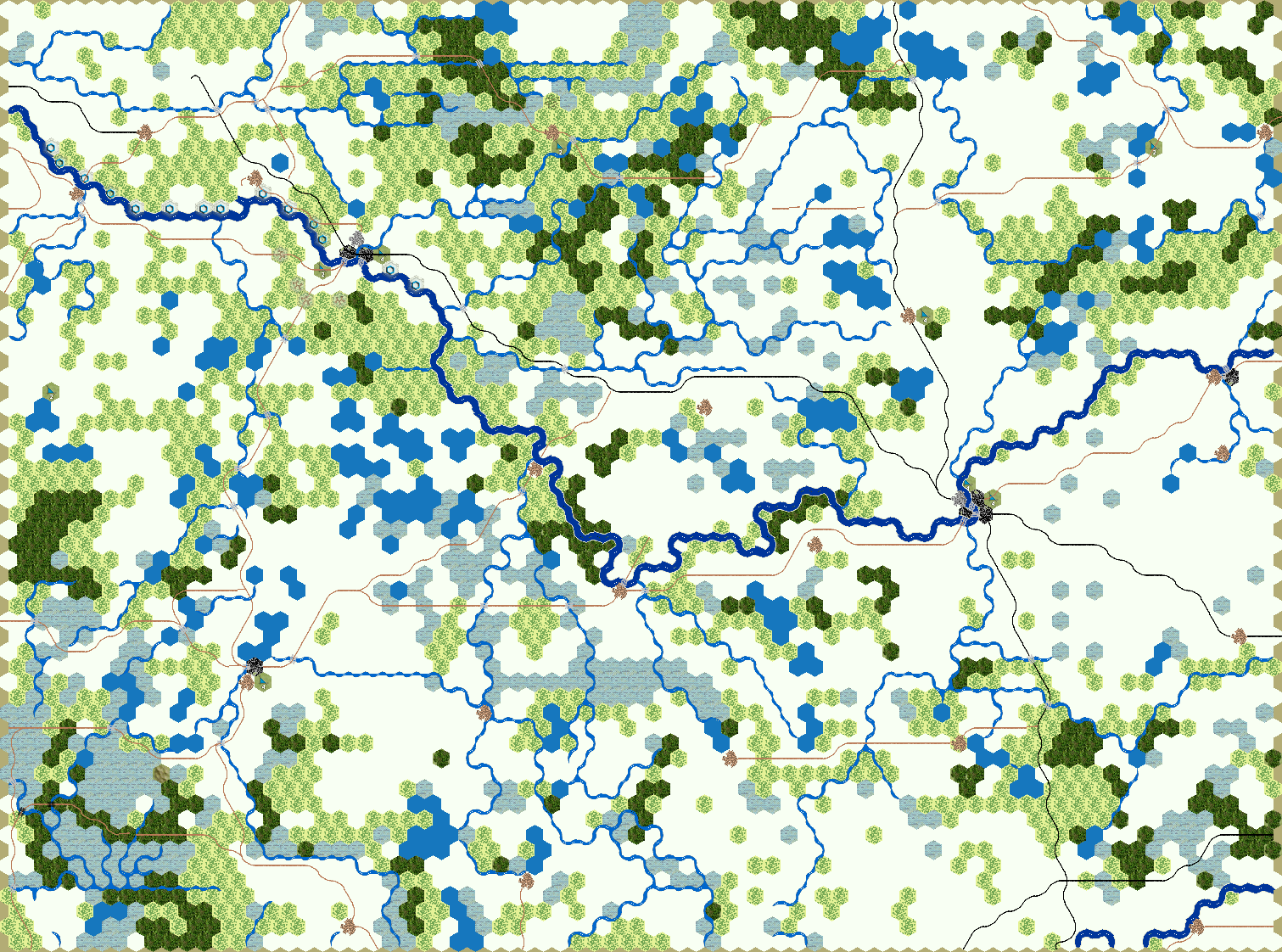
- Vitebsk map.png (553.22 KiB) Viewed 2425 times
Are there other fonts to use?
Re: Imported map image for overlay not showing
Posted: Wed Feb 25, 2026 9:55 pm
by StuccoFresco
Fonts?
Re: Imported map image for overlay not showing
Posted: Thu Feb 26, 2026 1:15 pm
by Cpl GAC
One size serif gold with a black outline is not attractive. My overarching question is; why do we have to make an aesthetically better map image to sit over the game's map?

- not a good look.png (444.4 KiB) Viewed 2381 times
I was trying to avoid three steps because I'm not good with software like GIMP or Photoshop;
1st - get a map image uploaded to use as a guide,
2nd - make a map on top of the uploaded image that the programming reads and delete that image,
3rd - make a new image that sits on top of the actual map that is attractive - readable place names, river names, rail
line visuals.
Re: Imported map image for overlay not showing
Posted: Fri Feb 27, 2026 11:37 am
by StuccoFresco
Cpl GAC wrote: Thu Feb 26, 2026 1:15 pm
One size serif gold with a black outline is not attractive. My overarching question is; why do we have to make an aesthetically better map image to sit over the game's map?
not a good look.png
I was trying to avoid three steps because I'm not good with software like GIMP or Photoshop;
1st - get a map image uploaded to use as a guide,
2nd - make a map on top of the uploaded image that the programming reads and delete that image,
3rd - make a new image that sits on top of the actual map that is attractive - readable place names, river names, rail
line visuals.
Yes unfortunately there is no way to not having to draw a map on your own. Just as with everything else, you'll be required to imput all the labels yourself on the same map you use for background in the game. In your case it's even harder because there are preexistent labels already "printed" on the map so you would need to erase them somehow, recreate the underlying terrain graphics, and add a better label again.
If the map was generate in TOAW4, maybe it would be faster and better to load the map in the TOAW editor, erase the labels, export the map and then add the labels in Paint.
Re: Imported map image for overlay not showing
Posted: Mon Mar 02, 2026 1:09 pm
by Cpl GAC
The challenge with TOAW maps versus other games is that the TOAW terrain spills over into other hexes - on purpose.
The biggest challenge is rivers - they do not follow hexsides. So, you'd have to erase the rivers. Then it becomes a whole thing - which is where I'm at.
Re: Imported map image for overlay not showing
Posted: Mon Mar 02, 2026 3:23 pm
by StuccoFresco
Cpl GAC wrote: Mon Mar 02, 2026 1:09 pm
The challenge with TOAW maps versus other games is that the TOAW terrain spills over into other hexes - on purpose.
The biggest challenge is rivers - they do not follow hexsides. So, you'd have to erase the rivers. Then it becomes a whole thing - which is where I'm at.
Ah right, the rivers work differently in TOAW, I remember. You'll definitely need Photoshop or some other editing software. There's people making wonders with basic Paint, but I resorted to a mapmaking program (wonderdraft).