Page 1 of 1
Map creation - exporting PNG for import into FC
Posted: Sun Mar 01, 2026 8:13 pm
by Zumwalt_446
I am creating a test map in qGIS and attempting to import it into the FC map editor. My terrain import into qGIS is done using a GeoTIFF file for the area of interest; I then change the style for that layer to use a singleband pseudocolor style with several elevation bins. I can see from the layer display in qGIS that the elevation is being correctly processed and has the correct color applied based on the style specification.
However, when I export this as a PNG and then import the PNG into the Map Editor, portions of the map show as "Elevation Unknown" in the map scan. Are there additional steps required beyond what I have described above?
The PNG I am using is attached for reference.
Re: Map creation - exporting PNG for import into FC
Posted: Mon Mar 02, 2026 1:37 am
by CapnDarwin
How big is the map? I'll see if I can get William to get back to you as our map guru.
Re: Map creation - exporting PNG for import into FC
Posted: Mon Mar 02, 2026 8:33 pm
by WildCatNL
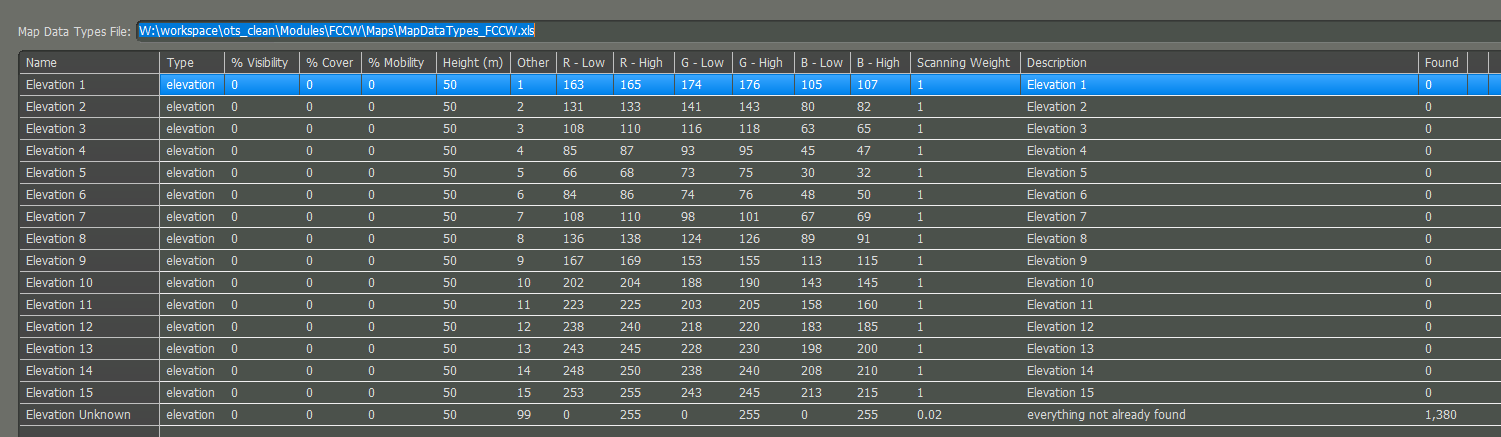
The colors used for elevation do not match the (narrow) bands defined for the elevations in the MapDataTypes_FCCW.xls spreadsheet:
How did you pick the colors? Which style did you apply to the elevation data?
The most frequent green color on the map is RGB 141, 151, 90 which falls outside all the 15 elevation colors.
- map_values_scanner_rgb_palette.png (53.78 KiB) Viewed 1530 times
Re: Map creation - exporting PNG for import into FC
Posted: Wed Mar 04, 2026 1:51 am
by Zumwalt_446
Interesting - my qGIS color selections match the ones in the spreadsheet. I've attached screenshots of my style tab and the individual color definitions; does anything here seem off to you?
Re: Map creation - exporting PNG for import into FC
Posted: Wed Mar 04, 2026 1:52 pm
by Argyll
If the QGIS settings match the expected input, there might be an issue with the color space of the exported image, perhaps? That could potentially shift the hue.
Re: Map creation - exporting PNG for import into FC
Posted: Wed Mar 04, 2026 6:18 pm
by WildCatNL
Zumwalt_446 wrote: Wed Mar 04, 2026 1:51 am
Interesting - my qGIS color selections match the ones in the spreadsheet. I've attached screenshots of my style tab and the individual color definitions; does anything here seem off to you?
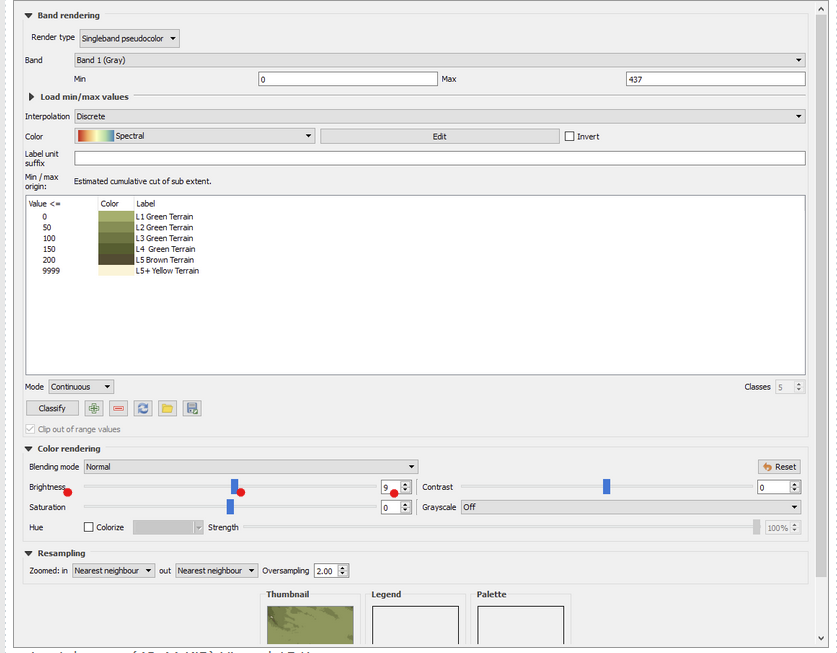
It looks like in 'post-processing' the colors are being changed due to the +9 brightness setting.
- qgis3_bumping_up_brightness.png (116.7 KiB) Viewed 1487 times
Re: Map creation - exporting PNG for import into FC
Posted: Wed Mar 04, 2026 8:19 pm
by Argyll
WildCatNL wrote: Wed Mar 04, 2026 6:18 pm
Zumwalt_446 wrote: Wed Mar 04, 2026 1:51 am
Interesting - my qGIS color selections match the ones in the spreadsheet. I've attached screenshots of my style tab and the individual color definitions; does anything here seem off to you?
It looks like in 'post-processing' the colors are being changed due to the +9 brightness setting.
qgis3_bumping_up_brightness.png
Good spot!
Re: Map creation - exporting PNG for import into FC
Posted: Thu Mar 05, 2026 1:41 am
by Zumwalt_446
Perfect - setting the brightness to 0 makes the color mapping correct and it can be read into FC. Thanks for the help.